1. Introdución
The Leviton Series 2000 480V 3P4W 200A Demand Indoor Kit (Model 2K480-2D) is a revenue-grade meter designed for accurate measurement of power consumption. This kit is suitable for various applications, including load management and achieving LEED ratings. It provides reliable performance for both new construction and retrofit installations, ensuring precise data capture of electrical usage.
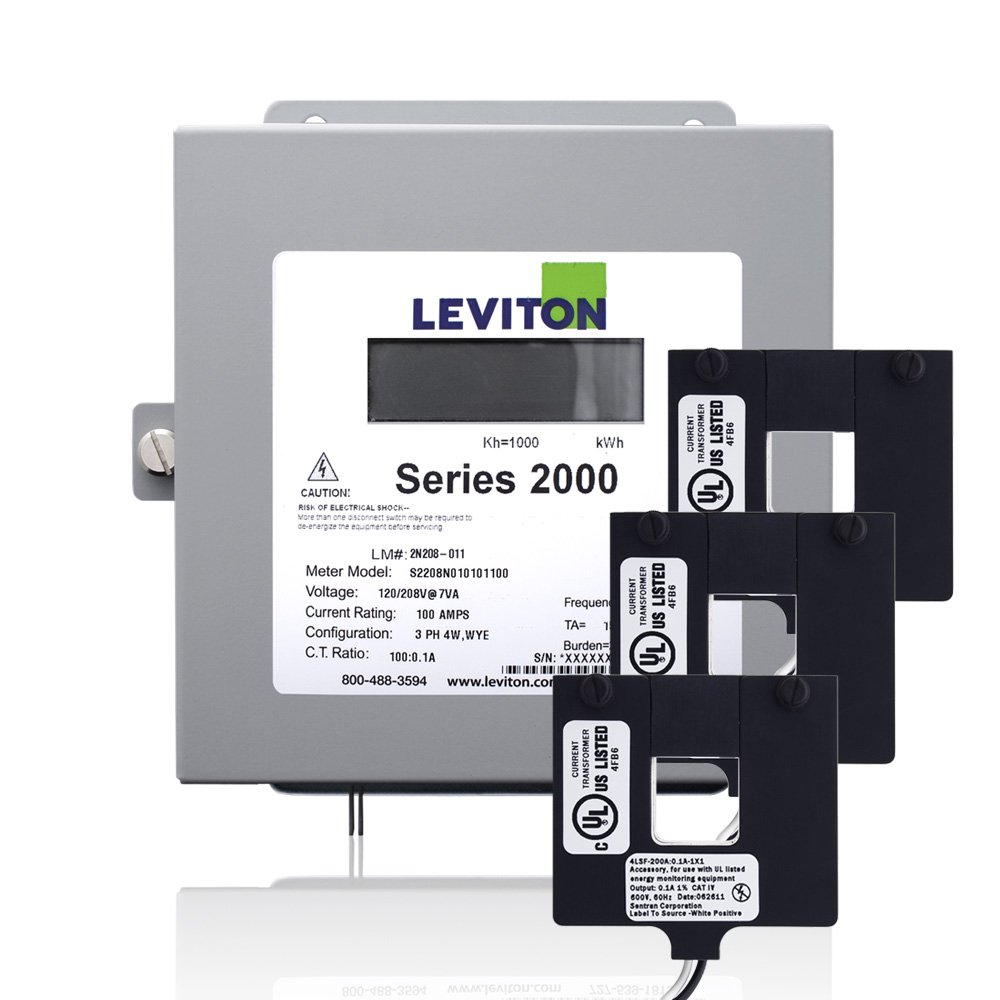
Image 1.1: Leviton Series 2000 480V 3P4W 200A Demand Indoor Kit with 3 Split Core CTs. This image displays the main components of the metering kit, including the meter unit and the current transformers.
2. Información de seguridade
AVISO: Installation and servicing of this equipment should only be performed by qualified, licensed electrical personnel. Failure to follow these instructions may result in serious injury or death.
- Always disconnect power at the main circuit breaker or fuse panel before installing or servicing the meter or current transformers.
- Verifica que a alimentación estea desconectada usando un voltage probador antes de continuar.
- Cumpre todos os códigos eléctricos nacionais e locais.
- Non instale este dispositivo en lugares húmidos ou secos.amp localizacións.
- Asegúrese de que todas as conexións estean seguras e debidamente illadas.
3. Contido do paquete
Comprobe que todos os compoñentes estean presentes antes de comezar a instalación:
- Leviton Series 2000 Meter (Model 2K480-2D)
- 3 Split Core Current Transformers (CTs)
- Guía de instalación (este documento)
4. Configuración e instalación
This section outlines the general steps for installing the Leviton Series 2000 meter. Refer to the detailed wiring diagrams provided with the product packaging for specific connection instructions.
- Desconexión de alimentación: Ensure all power to the installation area is completely disconnected at the source. Confirm with a voltagprobador.
- Montaxe do medidor: Mount the Leviton Series 2000 meter in a suitable indoor location, ensuring it is secure and accessible for wiring and observation.
- Current Transformer (CT) Installation:
- The included split core CTs are designed for easy installation without requiring disconnection of existing wire terminations, making them ideal for retrofitting.
- Open each split core CT and carefully place it around the appropriate phase conductor. Ensure the CT closes securely.
- Observe the correct line/load orientation as indicated on the CTs. For 100 and 200 Amp solid core CTs (if used), color-coded labels assist in identifying the correct orientation.
- Connect the CT leads to the designated terminals on the Leviton Series 2000 meter according to the wiring diagram.
- VoltagConexión e: Conecta o voltage leads from the electrical system to the appropriate terminals on the meter. Ensure correct phase sequencing and voltage levels (480V 3P4W).
- Conexións de comunicación: If integrating with AMR or BAS systems, connect the Isolated Pulse Output and/or RS-485 Serial Port (Modbus Native) to the respective communication devices.
- Initial Power-Up and Diagnostics: Restore power to the system. Observe the meter's diagnostic indicators:
- A red reverse phase indicator will illuminate if the meter is improperly installed (e.g., incorrect CT orientation or wiring). Correct any issues before proceeding.
- A green duty cycle light should illuminate, indicating that the meter is collecting electrical consumption data at the appropriate rate.
5. Funcionamento do contador
The Leviton Series 2000 meter operates automatically once properly installed and powered. It continuously measures and records electrical consumption data.
- Data Measurement: The meter measures kilowatt-hours (kWh) and can also measure demand, if configured.
- Indicadores de estado:
- O green duty cycle light confirms active data collection. A steady or flashing green light (depending on model and status) indicates normal operation.
- O red reverse phase indicator should be off during normal operation. If it illuminates, it signifies an installation error that needs immediate attention.
- Acceso a datos: Data can be accessed via the Isolated Pulse Output or the RS-485 Serial Port (Modbus Native) by connecting to compatible AMR (Automatic Meter Reading) or BAS (Building Automation System) systems. Refer to your system's documentation for integration details.
6. Mantemento
The Leviton Series 2000 meter is designed for long-term, reliable operation with minimal maintenance.
- Limpeza: Keep the meter's exterior clean and free from dust and debris. Use a soft, dry cloth for cleaning. Do not use abrasive cleaners or solvents.
- Inspeccións: Periodically inspect the wiring connections to ensure they remain secure. Check for any signs of wear or damage to the meter or CTs.
- Non hai pezas reparables polo usuario: There are no user-serviceable parts inside the meter. Do not attempt to open or repair the unit. Refer all servicing to qualified personnel.
7 Solución de problemas
If you encounter issues with your Leviton Series 2000 meter, refer to the following table:
| Problema | Causa posible | Solución |
|---|---|---|
| Red reverse phase indicator is illuminated. | Improper installation, incorrect CT orientation, or wiring error. | Immediately disconnect power. Re-check all wiring connections and CT orientations against the installation diagram. Ensure CTs are securely closed. |
| Green duty cycle light is not illuminated. | Meter is not receiving power or not collecting data. | Verify that power is supplied to the meter. Check all power and CT connections. If issues persist, contact technical support. |
| No readings or incorrect data. | Wiring error, CT malfunction, communication issue, or meter fault. | Ensure all wiring is correct and secure. Check CTs for proper installation and function. Verify communication settings if connected to an external system. If problem persists, contact technical support. |
8. Especificacións
Key technical specifications for the Leviton Series 2000 2K480-2D meter:
- Número de modelo: 2K480-2D
- Voltage: 480 V
- Phase/Wire: 3-Phase, 4-Wire (3P4W)
- Valoración actual: 200-Amp
- CT Type: Split Core Current Transformers (3 included)
- Precisión: Revenue grade, 0.3 accuracy class (with 0.1A secondary solid core CTs) or 1% accuracy (with split-core CTs)
- Medidas: kWh, Demand (optional)
- Saídas: Isolated Pulse Output, RS-485 Serial Port (Modbus Native)
- Certificacións: Certified to all applicable standards of ANSI C12.1
- Dimensións: Aproximadamente 19.25 x 6.5 x 12.5 polgadas
- Peso do artigo: Aproximadamente 7.39 libras
- Instalación: Uso en interiores
9. Garantía e soporte
This Leviton product is covered by a manufacturer's warranty. For specific warranty terms, duration, and conditions, please refer to the warranty information included with your product packaging or visit the official Leviton websitio.
For technical assistance, troubleshooting beyond this manual, or to inquire about replacement parts, please contact Leviton customer support:
- Oficial de Leviton Websitio: www.leviton.com
- Consulte o websitio para obter números de contacto e recursos de asistencia específicos para a súa rexión.


