1. Información importante de seguridade
Always observe basic safety precautions when installing, operating, and maintaining electrical equipment. Failure to do so may result in electric shock, fire, or serious injury.
- Asegúrese de desconectar a alimentación eléctrica antes de realizar calquera traballo de instalación ou mantemento.
- This device operates on 230 V AC 50/60 Hz. Verify your electrical system's compatibility.
- Non expoña o lamp á auga ou á humidade excesiva.
- Non intente abrir nin modificar o lamp or its components. Refer all servicing to qualified personnel.
- Manter fóra do alcance dos nenos.
2. Produto rematadoview e Compoñentes
The Gewiss GW30501 is a removable anti-blackout lamp designed to provide emergency lighting during power outages. It features a white LED lamp and an internal Ni-Mh battery for autonomous operation.
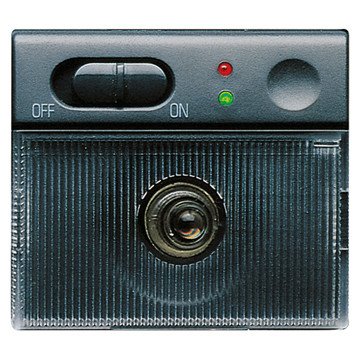
An image showing the compact design of the Gewiss GW30501 removable anti-blackout lamp, suitable for wall mounting.
Contido do paquete:
- 1 x Gewiss GW30501 Removable Anti-Blackout Lamp
- Integrated Ni-Mh Power Batteries
3. Configuración e instalación
The GW30501 lamp is designed for wall mounting and integrates into a 2-module Playbus system.
Pasos de instalación:
- Desconectar a enerxía: Before beginning installation, ensure the main power supply to the installation area is completely disconnected at the circuit breaker.
- Preparar a localización de montaxe: Identify a suitable wall location within your electrical system's 2-module Playbus slot.
- Conectar cableado: Conecte coidadosamente o lamp's electrical wiring to the 230 V AC, 50/60 Hz power supply terminals within the Playbus module. Ensure correct polarity and secure connections.
- Monta o Lamp: Securely insert the lamp into the 2-module Playbus slot on the wall. Ensure it is firmly seated.
- Carga inicial: Once installed, restore power. The lamp's internal Ni-Mh battery will begin charging. Allow at least 12-24 hours for the initial full charge to ensure optimal autonomy.
4. Instrucións de funcionamento
The Gewiss GW30501 lamp offers both automatic emergency lighting and a removable portable light function.
Automatic Anti-Blackout Function:
- When installed and connected to the main power supply, the lamp's battery remains charged.
- In the event of a power failure (blackout), the lamp will automatically illuminate using its internal battery, providing emergency lighting for up to 2 hours.
- Once main power is restored, the lamp will turn off (if not manually activated) and begin recharging its battery.
L extraíbleamp Función:
- O lamp can be easily removed from its wall-mounted base.
- Para activar o lamp when removed, gently touch the designated activation area (Touch-activated style). The white LED will illuminate.
- Para apagar o lamp, touch the activation area again.
- Cando o lamp is reinserted into its wall base, it will resume its automatic anti-blackout function and recharge its battery.
5. Mantemento
Regular maintenance ensures the longevity and optimal performance of your anti-blackout lamp.
Coidado da batería:
- The integrated Ni-Mh battery is designed for long life. To maintain its capacity, ensure the lamp is regularly connected to power to allow for charging cycles.
- Se o lamp is stored for an extended period, fully charge it before storage and recharge every 3-6 months to prevent deep discharge.
Limpeza:
- Limpar o lamp's exterior with a soft, dry cloth.
- Non empregues produtos de limpeza abrasivos, solventes ou produtos químicos agresivos, xa que poden danar o acabado.
Verificación de funcionalidade:
- Periodically test the anti-blackout function by temporarily cutting power to the circuit the lamp is connected to. The lamp debería iluminar.
- Test the removable lamp function by removing it from the base and activating it via touch.
6 Solución de problemas
If you encounter issues with your Gewiss GW30501 lamp, consulte os seguintes problemas e solucións comúns:
| Problema | Causa posible | Solución |
|---|---|---|
| Lamp does not light up during a power outage. | Battery not charged or faulty. No power to the base. | Asegurar o lamp has been connected to power for at least 24 hours. Check the circuit breaker for the lamp's power supply. If issues persist, contact support. |
| Desmontable lamp does not turn on when touched. | Battery low or discharged. Faulty touch sensor. | Devolve o lamp to its base for charging. Ensure the touch area is clean and dry. |
| Short autonomy (less than 2 hours). | Batería non completamente cargada ou batería vella. | Allow for a full 24-hour charge. If the lamp is old, battery capacity may naturally decrease over time. |
| Lamp parpadea ou se atenúa. | Low battery. Loose connection. | Asegurar o lamp is fully charged. Check the electrical connections at the wall base (with power disconnected). |
If these solutions do not resolve the issue, please contact Gewiss customer support or a qualified electrician.
7. Especificacións técnicas
Detailed specifications for the Gewiss GW30501 Removable Anti-Blackout Lamp:
| Característica | Especificación |
|---|---|
| Número de modelo | GW30501 |
| Marca | Gewiss |
| Alimentación Voltage | 230 V CA, 50/60 Hz |
| Autonomía | 2 horas |
| Lamp Tipo | LED branco |
| Tipo de batería | Ni-Mh (included) |
| Number of Modules (Playbus) | 2 |
| Dimensións (L x W x H) | 6.5 x 5 x 5 cm |
| Peso | 9.07 gramos |
| Material | Metal |
| Cor | Gris |
| Tipo de instalación | Montaxe en parede |
| Cambiar de estilo | Activado ao tacto |
| Usos específicos | For use during power outages or emergencies |
8. Garantía e soporte
For warranty information, technical support, or service inquiries, please refer to the documentation provided with your purchase or contact your retailer or the manufacturer directly.
Fabricante: Gewiss
Please have your model number (GW30501) and purchase details available when contacting support.