1. Introdución
The Olympus E-PL5 is a compact mirrorless digital camera designed for both photography enthusiasts and casual users. It features a 16MP Live MOS sensor, a TruePic VI image processor, and a versatile 14-42mm lens, offering high-quality imaging in a portable form factor. This manual provides essential information for setting up, operating, and maintaining your camera.
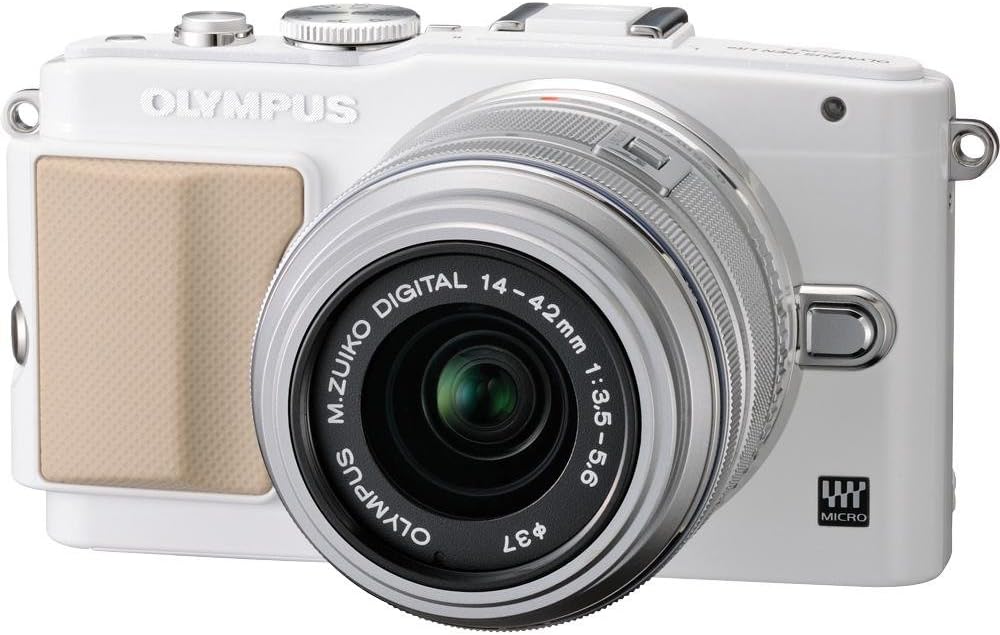
Figura 1: Fronte view of the Olympus E-PL5 Mirrorless Digital Camera with the 14-42mm lens attached.
2. Configuración
2.1 Instalación da batería e da tarxeta de memoria
- Abra a tapa da batería/tarxeta de memoria situada na parte inferior da cámara.
- Insira a batería coa orientación correcta ata que encaixe no seu lugar.
- Insert an SD/SDHC/SDXC memory card into the slot until it clicks. Ensure the card is facing the correct direction.
- Pecha a tapa de forma segura.
2.2 Colocación da lente
- Retire a tapa do corpo da cámara e a tapa traseira da lente.
- Aliña o punto branco da lente co punto branco do corpo da cámara.
- Monte a lente xirándoa no sentido das agullas do reloxo ata que encaixe no seu lugar.
- Retire a tapa da lente frontal.

Figura 2: Fronte view of the camera, illustrating the lens attachment point.
3. Funcionamento
3.1 Modos básicos de disparo
Turn the mode dial to select your desired shooting mode:
- i-Auto: Intelligent Auto mode for automatic scene detection.
- P (Programa automático): A cámara axusta a apertura e a velocidade do obturador para unha exposición óptima.
- A (Prioridade de apertura): You control the aperture, camera sets shutter speed.
- S (Prioridade de obturación): You control the shutter speed, camera sets aperture.
- M (Manual): Full manual control over aperture and shutter speed.
- SCN (modos de escena): Pre-set modes for specific situations (e.g., Portrait, Landscape).
- ART (Art Filters): Apply creative effects to your photos.
3.2 Using the Touch LCD Screen
The 3.0-inch flip self-portrait touch LCD screen allows for intuitive control:
- Touch Shutter: Tap the screen to focus and take a picture.
- Touch AF: Tap to set the autofocus point.
- Live Guide System: Adjust settings like brightness, color, and background blur by touching on-screen sliders and previewefectos ing.
- The screen can be tilted for various shooting angles, including self-portraits.

Figura 3: Traseira view of the Olympus E-PL5, showing the LCD screen in use.

Figura 4: Lateral view of the Olympus E-PL5 with its tilting LCD screen extended.
3.3 Gravación de vídeo
The E-PL5 supports Full 1080i HD video recording with Art Filter Movie and Effects. To record a video:
- Set the mode dial to the movie recording mode (usually indicated by a film camera icon).
- Press the dedicated movie record button to start and stop recording.
- Utilize the Art Filters for creative video effects.
Video 1: This video showcases the Olympus E-PL5 camera being used in a 72-hour filmmaking challenge, demonstrating its capabilities for video production in various environments.
4. Mantemento
4.1 Limpeza da cámara
- Corpo da cámara: Limpe o corpo da cámara cun pano suave e seco. Para a sucidade persistente, use un pano lixeiramente húmido.amprematado con auga. Evite produtos químicos agresivos.
- Lente: Usa un cepillo para lentes ou un soprador para eliminar o po. Para as manchas, usa unha solución especializada para a limpeza de lentes e un pano de microfibra. Nunca toques a superficie da lente cos dedos.
- Pantalla LCD: Gently wipe the screen with a soft, lint-free cloth. Avoid pressing too hard.
4.2 Almacenamento
When not in use, store the camera in a cool, dry place away from direct sunlight and extreme temperatures. Remove the battery if storing for extended periods to prevent leakage.
5 Solución de problemas
5.1 Problemas comúns e solucións
- A cámara non se acende: Asegúrate de que a batería estea completamente cargada e inserida correctamente. Comproba se os contactos da batería están limpos.
- As imaxes están borrosas: Check if the lens is clean and properly attached. Ensure the autofocus is working correctly or try manual focus. Verify that the shutter speed is appropriate for the lighting conditions to prevent camera shake.
- LCD screen is blank or unresponsive: Press the DISPLAY button to cycle through display modes. If the screen is unresponsive to touch, try restarting the camera. Ensure the screen is not physically damaged.
- Erro da tarxeta de memoria: Ensure the memory card is inserted correctly and is not full. Try formatting the card (this will erase all data, so back up first). If the issue persists, try a different memory card.
- O flash non se dispara: Check if the flash is enabled in the camera settings and if the shooting mode allows flash. Ensure the external flash (if used) is properly mounted and powered.
6. Especificacións
| Característica | Detalle |
|---|---|
| Nome do modelo | Olympus E-PL5 |
| Resolución de sensor fotográfico | 16 MP |
| Tipo de sensor | MOS |
| Montaxes compatibles | Micro Catro Tercios |
| Estabilización da imaxe | Sensor de cambio |
| Tipo de lente | Zoom (14-42 mm) |
| Apertura máxima | 3.5 f |
| Tamaño da pantalla | 3 polgadas |
| Tipo de visualización | LCD, inclinable, pantalla táctil |
| Resolución de vídeo | FHD 1080i |
| Soportado File Formato | RAW, JPEG, RAW+JPEG, MPO(3D still) |
| Tipo de memoria flash | SD/SDHC/SDXC |
| Tecnoloxía de conectividade | HDMI, USB, Sen fíos |
| Peso do elemento | 0.72 libras |
7. Garantía e soporte
For detailed warranty information and customer support, please refer to the official Olympus websitio web ou póñase en contacto directamente co servizo de atención ao cliente. Garde o comprobante de compra para calquera reclamación de garantía.
Online resources, FAQs, and software updates may also be available on the Olympus support pages.


