Introdución
This manual provides comprehensive instructions for the safe and efficient use of your Marmitek BoomBoom 560 Bluetooth Over-Ear Headphones. These headphones offer excellent digital sound quality with clear mid-tones and deep bass, along with passive noise reduction for an immersive audio experience. Please read this manual thoroughly before operating the device.

Image: Marmitek BoomBoom 560 Bluetooth Over-Ear Headphones, black, shown from a slight angle.
Contido do paquete
Comprobe que todos os elementos que se indican a continuación estean presentes no seu paquete:
- 1x Marmitek BoomBoom 560 Bluetooth Over-Ear Headphones
- 1x Micro USB to USB charging cable
- 1x 3.5mm Mini-jack audio cable (160 cm)
- 1x Manual de usuario (este documento)

Image: Visual representation of the Marmitek BoomBoom 560 package contents, including the headphones, charging cable, audio cable, and user manual.
Produto rematadoview: Controis e portos
Familiarize yourself with the controls and ports on your BoomBoom 560 headphones:
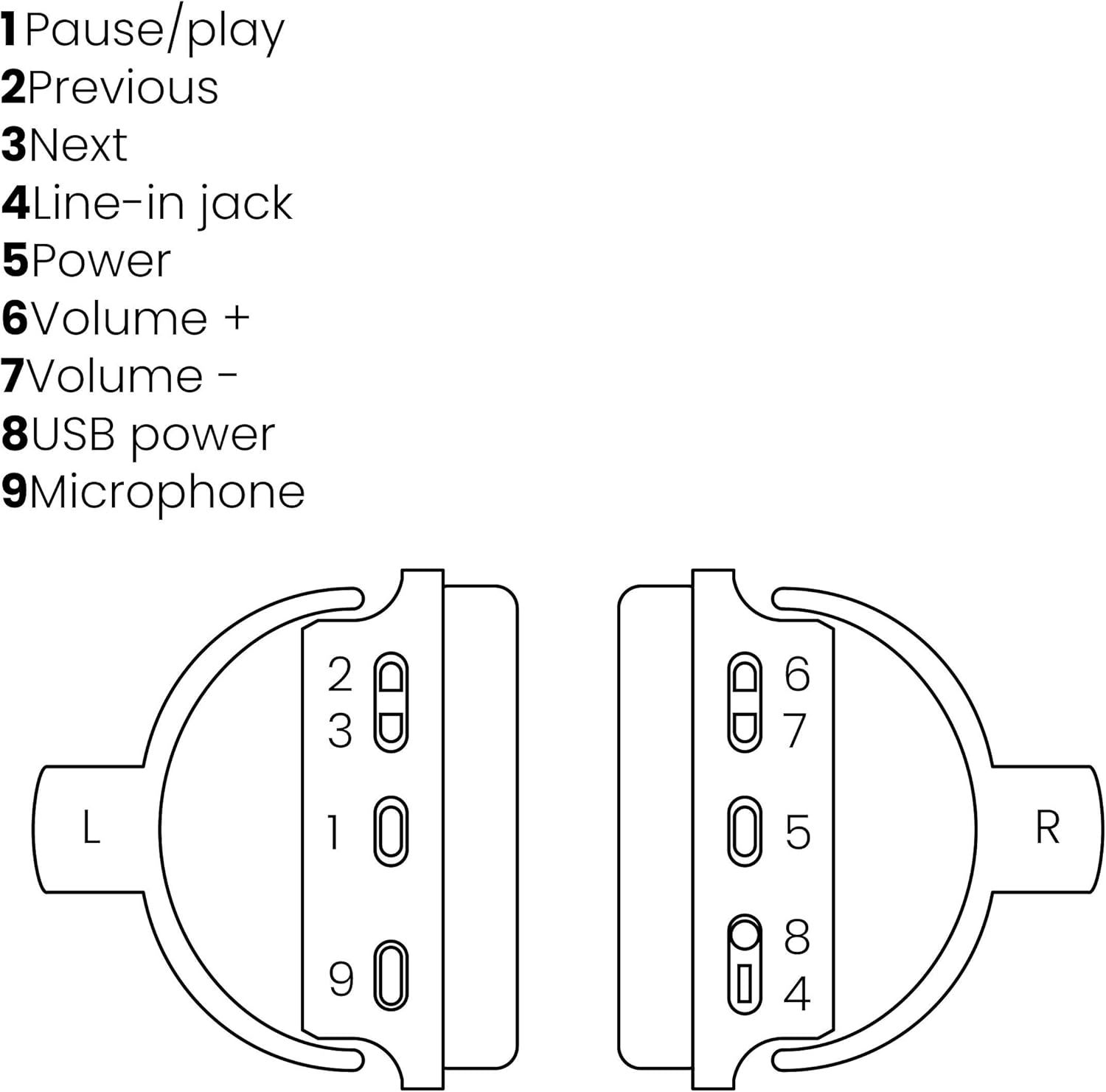
Image: A line drawing illustrating the left and right ear cup controls and ports, numbered for identification.
- Botón de pausa/reprodución: Controla a reprodución de música.
- Botón de pista anterior: Salta á canción anterior.
- Botón Seguimento seguinte: Salta á seguinte canción.
- Jack de entrada de liña: For wired audio connection using the 3.5mm cable.
- Botón de encendido: Turns the headphones on/off and initiates Bluetooth pairing.
- Botón Volume +: Aumenta o volume.
- Botón de volume: Diminúe o volume.
- Porto de alimentación USB: For charging the headphones using the Micro USB cable.
- Micrófono: Micrófono incorporado para chamadas mans libres.
Configuración
1. Carga dos auriculares
Before first use, fully charge your headphones. Connect the Micro USB end of the charging cable to the USB Power Port (8) on the headphones and the standard USB end to a USB power adapter (not included) or a computer's USB port. The LED indicator will show charging status. A full charge provides over 8 hours of playback time.
2. Emparellamento Bluetooth
To connect your headphones wirelessly to a Bluetooth-enabled device:
- Asegúrese de que os auriculares estean apagados.
- Manteña premido o Botón de encendido (5) until the LED indicator flashes blue and red, indicating pairing mode.
- No teu teléfono intelixente, tableta ou outro dispositivo Bluetooth, activa Bluetooth e busca os dispositivos dispoñibles.
- Select "BoomBoom 560" from the list of found devices.
- Unha vez conectado, o indicador LED parpadeará azul lentamente.

Image: Illustration depicting various Bluetooth-enabled devices (laptop, smartphone, tablet) wirelessly transmitting audio to the headphones.
3. Conexión por cable
If Bluetooth is not available or the battery is depleted, you can use the included 3.5mm audio cable. Connect one end of the cable to the Line-in Jack (4) on the headphones and the other end to the audio output of your device.
Instrucións de funcionamento
Encendido/apagado
- Para acender: Manteña premido o Botón de encendido (5) for approximately 3 seconds until the LED indicator flashes blue.
- Para apagar: Manteña premido o Botón de encendido (5) for approximately 3 seconds until the LED indicator turns off.
Reprodución de música
- Reproducir/Pausa: Preme o Pause/Play Button (1) unha vez.
- Próxima pista: Preme o Next Track Button (3) unha vez.
- Pista anterior: Preme o Previous Track Button (2) unha vez.
Xestión de chamadas
When connected via Bluetooth, you can manage phone calls using the built-in microphone (9):
- Responder/Finalizar chamada: Preme o Pause/Play Button (1) unha vez.
- Rexeitar a chamada: Manteña premido o Pause/Play Button (1) durante aproximadamente 2 segundos.
Control de volume
- Aumentar o volume: Preme o Volume + Button (6).
- Diminuír o volume: Preme o Volume - Button (7).

Image: A user enjoying music or media with the Marmitek BoomBoom 560 headphones while relaxing at home.
Mantemento
Para garantir a lonxevidade e o rendemento óptimo dos seus auriculares:
- Limpa os auriculares cun pano suave e seco. Non empregues produtos de limpeza abrasivos nin disolventes.
- Evite expoñer os auriculares a temperaturas extremas, humidade ou luz solar directa.
- Garda os auriculares nun lugar fresco e seco cando non estes en uso.
- Non intentes desmontar nin reparar os auriculares ti mesmo, xa que isto anulará a garantía.
Resolución de problemas
If you encounter issues with your BoomBoom 560 headphones, refer to the following common solutions:
- Sen enerxía: Asegúrate de que os auriculares estean completamente cargados. Conéctaos a unha fonte de alimentación mediante o cable de carga USB.
- Non se pode emparellar por Bluetooth:
- Asegúrate de que os auriculares estean en modo de emparellamento (o LED parpadea en azul e vermello).
- Ensure your Bluetooth device's Bluetooth function is enabled and within range (typically 10 meters).
- Try turning off and on both the headphones and your Bluetooth device.
- Delete "BoomBoom 560" from your device's Bluetooth list and attempt to pair again.
- Sen son:
- Comprobe os niveis de volume tanto nos auriculares como no dispositivo conectado.
- Ensure the headphones are properly paired or the 3.5mm audio cable is securely connected.
- If using Bluetooth, try disconnecting and reconnecting.
- Mala calidade de son:
- Acércate máis ao teu dispositivo Bluetooth para reducir as interferencias.
- Ensure there are no obstacles between the headphones and the device.
- Comprobe se hai problemas de calidade na fonte de son.
- Loose Earcup Bracket: If the earcup bracket feels loose, handle the headphones with care. Avoid excessive force when adjusting or folding. If the issue persists and affects functionality, contact customer support.
Especificacións
| Nome do modelo | BoomBoom 560 |
| Número de modelo | 8122 |
| Marca | Marmitek |
| Tecnoloxía de conectividade | Wireless (Bluetooth), Wired (3.5mm jack) |
| Compatibilidade Bluetooth | Si |
| Factor de forma | Sobre orella |
| Material | Coiro (auriculares) |
| Características especiais | Redución de ruído |
| Tecnoloxía de micrófono | Omni (Built-in) |
| Descrición da batería | Litio-Ion (Li-Ion) |
| Duración da batería | Over 8 hours (approx.) |
| Relación sinal-ruído (SNR) | 82 dB |
| Dimensións do produto | 23 x 5 x 18 cm; 100 g |
Garantía e Soporte
Marmitek products are designed and manufactured to high quality standards. For information regarding warranty terms and conditions, please refer to the documentation provided with your purchase or visit the official Marmitek websitio.
Para obter máis axuda ou soporte técnico, visite o Marmitek Store on Amazon or the official Marmitek support channels.

Image: Logo indicating "Dutch Quality" and compliance with "EU European Standards".


