Introdución
The Tivoli Audio Model One Bluetooth AM/FM Radio is designed to provide high-quality audio reception and reproduction. Featuring a classic design with a handmade wood cabinet, this radio integrates both traditional AM/FM tuning and modern Bluetooth connectivity. Its simple controls offer an intuitive user experience, delivering clear sound and reliable performance.
O que hai na caixa
- (1) Model One BT Radio
- (1) Owner's Manual
- (1) Alimentación
- (1) External FM Antenna
Configuración
- Desembalaxe: Retire coidadosamente todos os compoñentes da embalaxe.
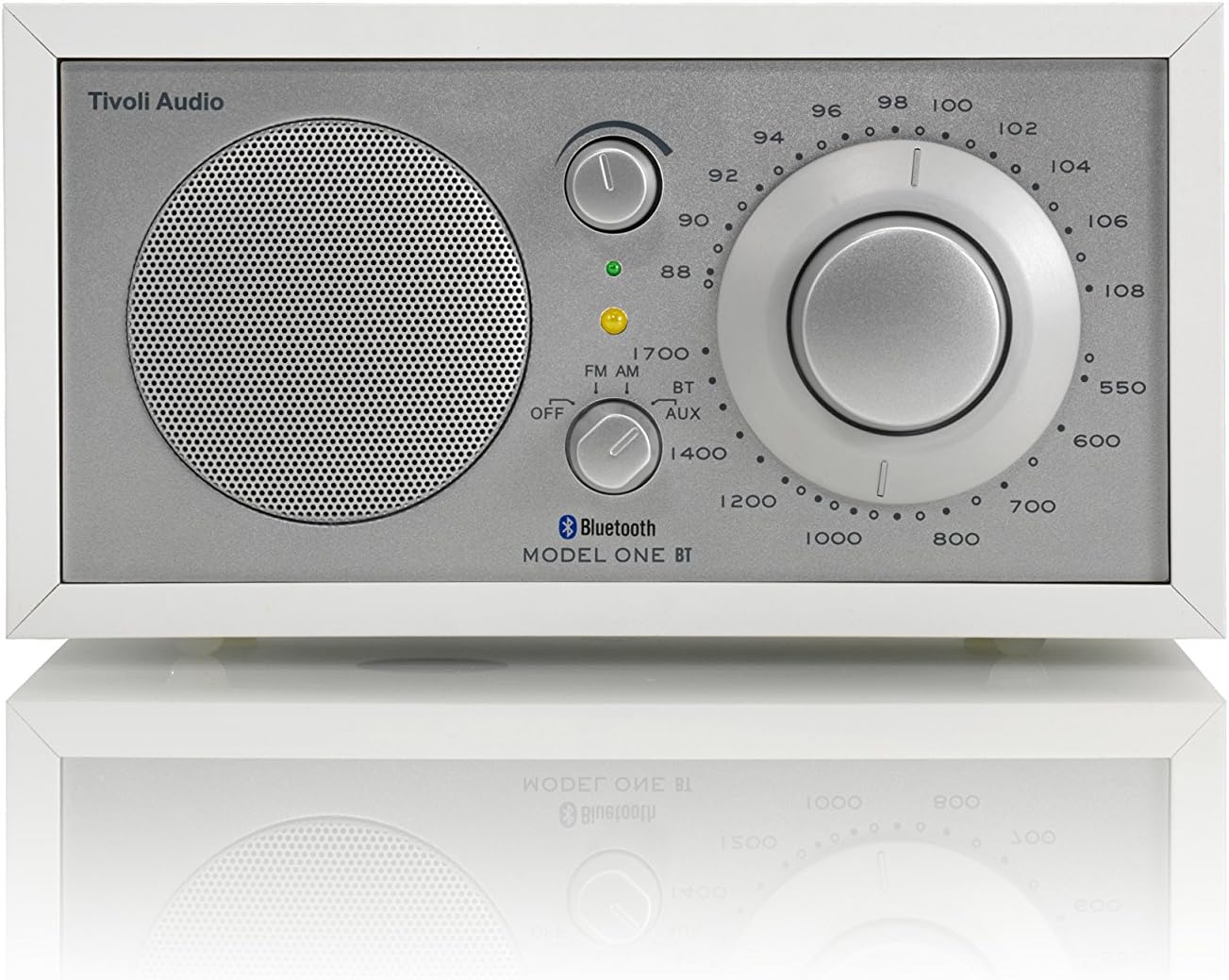
Figura 1: Fronte view of the Tivoli Audio Model One BT radio. - Conexión de alimentación: Connect the power supply to the DC input on the rear of the radio and then plug it into a wall outlet.

Figure 2: Rear panel connections, including power input and external antenna port. - Conexión antena: For optimal FM reception, connect the included external FM antenna to the "FM-EXT" jack on the rear panel. For AM reception, the internal AM antenna is usually sufficient, but an external AM antenna can be connected if needed.
- Colocación: Position the radio on a stable, flat surface away from direct sunlight, heat sources, or excessive moisture. Experiment with different locations to find the best reception for both AM and FM bands.
Instrucións de funcionamento
1. Acendido/apagado e selección da fonte
- Locate the three-position switch on the front panel.
- To turn the radio on, slide the switch from "OFF" to either "FM", "AM", "BT" (Bluetooth), or "AUX" (Auxiliary Input) depending on your desired source.
- To turn the radio off, slide the switch to "OFF".
2. Sintonización de radio AM/FM
- Set the source switch to "FM" or "AM".
- Use the large tuning dial to scan for stations. The tuning indicator light will illuminate when a strong signal is received, indicating optimal tuning.
- Axuste o volume empregando a perilla de volume.

3. Conectividade Bluetooth
- Set the source switch to "BT". The Bluetooth indicator light will begin to flash, indicating it is in pairing mode.
- On your Bluetooth-enabled device (e.g., smartphone, tablet), navigate to the Bluetooth settings and select "Tivoli Audio Model One BT" from the list of available devices.
- Once paired, the Bluetooth indicator light on the radio will glow solid, and you can stream audio from your device.
4. Entrada auxiliar
- Connect an external audio device (e.g., MP3 player, CD player) to the "AUX IN" port on the rear panel using a 3.5mm audio cable (not included).
- Set the source switch to "AUX".
- Controla a reprodución e o volume desde o teu dispositivo conectado.
5. Vídeo oficial do produto
Mantemento
- Limpeza: Use a soft, dry cloth to clean the radio's cabinet and controls. Avoid abrasive cleaners or solvents, which can damage the finish.
- Coidado da madeira: The wood cabinet can be polished with a non-abrasive wood furniture polish as needed.
- Coidado da antena: Ensure the external FM antenna is not bent or damaged.
Resolución de problemas
- Sen enerxía: Ensure the power supply is securely connected to both the radio and a working electrical outlet.
- Mala recepción de radio:
- Verify the external FM antenna is properly connected and fully extended.
- Reposition the radio or antenna to improve signal strength.
- Check for local interference from other electronic devices.
- Problemas de sincronización Bluetooth:
- Ensure the radio is set to "BT" mode and the indicator light is flashing.
- Asegúrate de que o Bluetooth do teu dispositivo estea activado e dentro do alcance.
- Se xa o emparellaches, tenta "esquecer" o dispositivo no teléfono e volvelo emparellar.
- No Sound from Auxiliary Input:
- Confirma que a radio está configurada no modo "AUX".
- Check the audio cable connection at both the radio and the external device.
- Ensure the volume on both the radio and the external device is turned up.
Especificacións
| Marca | Tivoli Audio |
| Número de modelo | M1BTWHT |
| Dimensións do produto | 8.3" de longo x 5.2" de ancho x 4.4" de alto (21.1 x 13.2 x 11.2 cm) |
| Peso do elemento | 4.1 libras (1.86 kg) |
| Tecnoloxía de conectividade | Bluetooth |
| Tecnoloxía de sintonizador | AM/FM Analog |
| Bandas de radio admitidas | AM/FM |
| Fonte de enerxía | AC (120V~60Hz) |
| Características especiais | Auxiliary input, Stereo headphone output, Sensitive AM/FM analog tuner with large 5:1 ratio tuning dial |

Garantía e Soporte
For warranty information, product support, or service inquiries, please refer to the included Owner's Manual or visit the official Tivoli Audio websitio. Garda o comprobante de compra para reclamacións de garantía.


