1. Produto rematadoview
The IEI 232SE is a robust, weather-resistant keypad designed for indoor and outdoor access control applications. It features a durable brushed metal housing treated for corrosion resistance and an all-metal Braille, alpha-numeric keypad. The unit provides audible feedback for key presses via an internal sounder and visual operational status through a bi-color LED. Its design allows for direct mounting on standard single-gang electrical boxes or most flat surfaces.
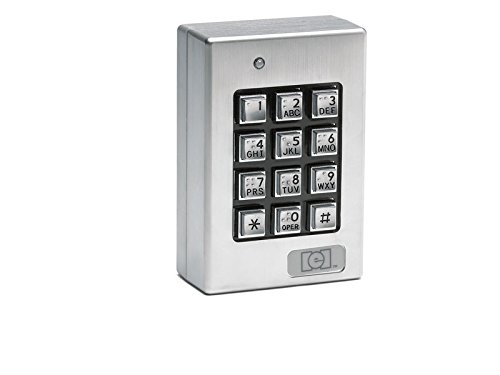
Esta imaxe mostra a parte dianteira view of the IEI 232SE keypad. It features a robust brushed metal casing, a numeric keypad with Braille markings, and an integrated LED indicator above the keys. The keys are arranged in a standard telephone-style layout with numbers 0-9, an asterisk (*), and a pound (#) symbol. Below the keypad, there is a small rectangular area that likely houses a sensor or additional indicator.
Características:
- Sealed environment design with brushed metal housing.
- Corrosion-resistant treatment for extended durability.
- All-metal Braille, alpha-numeric keypad.
- Internal sounder for key press feedback.
- Bi-color LED for operational status indication.
- Designed for surface mounting on standard single-gang electrical boxes or flat surfaces.
- Vandal-resistant design.
Contido do paquete:
- IEI 232SE Keypad Unit
2. Información de seguridade
Please read all instructions carefully before installing and operating the IEI 232SE keypad. Failure to follow these instructions may result in damage to the unit, property, or personal injury.
- Seguridade eléctrica: Ensure power is disconnected before installation or maintenance to prevent electric shock. All wiring should comply with local electrical codes.
- Montaxe: Mount the keypad securely to a stable surface to prevent it from falling.
- Ambiente: Although weather-resistant, avoid submerging the unit in water or exposing it to extreme temperatures beyond its specified operating range.
- Persoal Autorizado: Installation and complex maintenance should only be performed by qualified technicians.
- Limpeza: Use só un suave, damp pano para limpeza. Evite produtos de limpeza abrasivos ou solventes.
3. Instalación e configuración
The 232SE keypad is designed for surface mounting. Follow these general steps for installation:
- Escolla localización: Select a suitable indoor or outdoor location that is secure and provides easy access for users. Ensure the surface is flat and can support the keypad's weight.
- Preparar o cableado: Disconnect all power to the area where the keypad will be installed. Route necessary wiring (e.g., power, data, lock control) to the mounting location.
- Montaxe:
- If mounting to a standard single-gang electrical box, align the keypad's mounting holes with the box.
- If surface mounting to a flat wall, mark the drilling points using the keypad as a template. Drill pilot holes if necessary.
- Conectar cableado: Connect the keypad's wires to your access control system or power supply according to the specific wiring diagram provided with your system components. Pay close attention to polarity and voltage requisitos.
- Vivenda segura: Once wiring is complete and verified, securely attach the keypad's housing.
- Aplicar potencia: Reconnect power to the system. The keypad's LED should illuminate, indicating it is powered on.
Nota: Specific wiring instructions and programming details for user codes are dependent on the access control system the keypad is integrated with. Refer to your system's main controller manual for detailed programming procedures.
4. Funcionamento
The IEI 232SE keypad serves as an input device for an access control system. Its primary function is to allow users to enter numerical codes for authentication.
- Entering Codes: To gain access, simply press the numeric keys corresponding to your assigned access code.
- Key Press Feedback: Each key press will be accompanied by an audible beep from the internal sounder, confirming the input.
- Indicador LED: The bi-color LED provides visual feedback on the keypad's status. Its behavior (e.g., green for access granted, red for access denied, blinking for programming mode) is typically controlled by the connected access control system. Refer to your system's manual for specific LED indications.
- Teclas especiais: The '*' (asterisk) and '#' (pound) keys may have special functions depending on the access control system's programming, such as entering programming mode or confirming entries.
5. Mantemento
Regular maintenance helps ensure the longevity and reliable operation of your IEI 232SE keypad.
- Limpeza: Periodically clean the keypad's surface with a soft, slightly damp cloth. Do not use harsh chemicals, abrasive cleaners, or solvents, as these can damage the finish or internal components.
- Inspección: Regularly inspect the keypad for any signs of physical damage, loose mounting, or wear on the keys. Address any issues promptly.
- Comprobacións ambientais: Ensure that the area around the keypad remains free from excessive moisture, dust, or debris that could impede its function.
6 Solución de problemas
If you encounter issues with your IEI 232SE keypad, try the following troubleshooting steps:
- Keypad Not Responding / No Power:
- Check the power supply to the keypad and the access control system.
- Verify all wiring connections are secure and correct, especially power and data lines.
- Ensure the circuit breaker or fuse for the system is not tripped.
- No Audible Feedback (Sounder):
- Confirm the keypad is receiving power.
- Check if the sounder function is enabled in your access control system's programming.
- LED Not Illuminating or Incorrectly:
- Verify power to the keypad.
- Consult your access control system's manual to understand the expected LED behavior for different states.
- Ensure data communication between the keypad and the controller is functioning correctly.
- Codes Not Granting Access:
- Verify that the correct access code is being entered.
- Check the access control system's programming to ensure the code is active and valid.
- Ensure the keypad is properly communicating with the access control panel.
If these steps do not resolve the issue, contact technical support for further assistance.
7. Especificacións
| Atributo | Detalle |
|---|---|
| Número de modelo | 232 SE |
| Marca | Lineal |
| Fabricante | iEi Electronics / Linear |
| Material | Metal |
| Descrición do teclado | Accessible, Durable |
| Peso do elemento | 1.5 libras |
| Dimensións do paquete | 4.69 x 3.27 x 3.11 polgadas |
| Primeiro dispoñible | 20 de decembro de 2010 |
| Compoñentes incluídos | Teclado |
8. Garantía e soporte
Specific warranty terms for the IEI 232SE keypad are typically provided by the manufacturer or the distributor at the time of purchase. Please refer to your purchase documentation or the manufacturer's official websitio para obter información detallada sobre a garantía.
For technical support, service, or inquiries regarding your IEI 232SE keypad, please contact the manufacturer or your authorized dealer. Ensure you have your product model number (232SE) and any relevant purchase details ready when contacting support.
Manufacturer: iEi Electronics / Linear


