Introdución
The JENSEN CD-490 is a portable stereo CD player equipped with an AM/FM stereo radio and an auxiliary line-in. It features a top-loading CD player with an LED track display, skip/search/repeat functions, and programmable memory. The unit includes a telescopic antenna for radio reception, a foldable carrying handle for portability, and a stereo headphone jack. An auxiliary input allows connection of external audio devices such as MP3 players.
Información importante de seguridade
AVISO: Este produto contén produtos químicos coñecidos polo estado de California por causar cancro e defectos de nacemento ou outros danos á reprodución.
Siga sempre as precaucións básicas de seguridade ao usar electrodomésticos para reducir o risco de incendio, descarga eléctrica e lesións persoais. Garde este manual para futuras consultas.
Que está incluído
- JENSEN CD-490 Portable Stereo CD Player with AM/FM Radio
- Cable de alimentación de CA
- Manual do propietario
Produto rematadoview
Familiarize yourself with the controls and features of your JENSEN CD-490 unit.
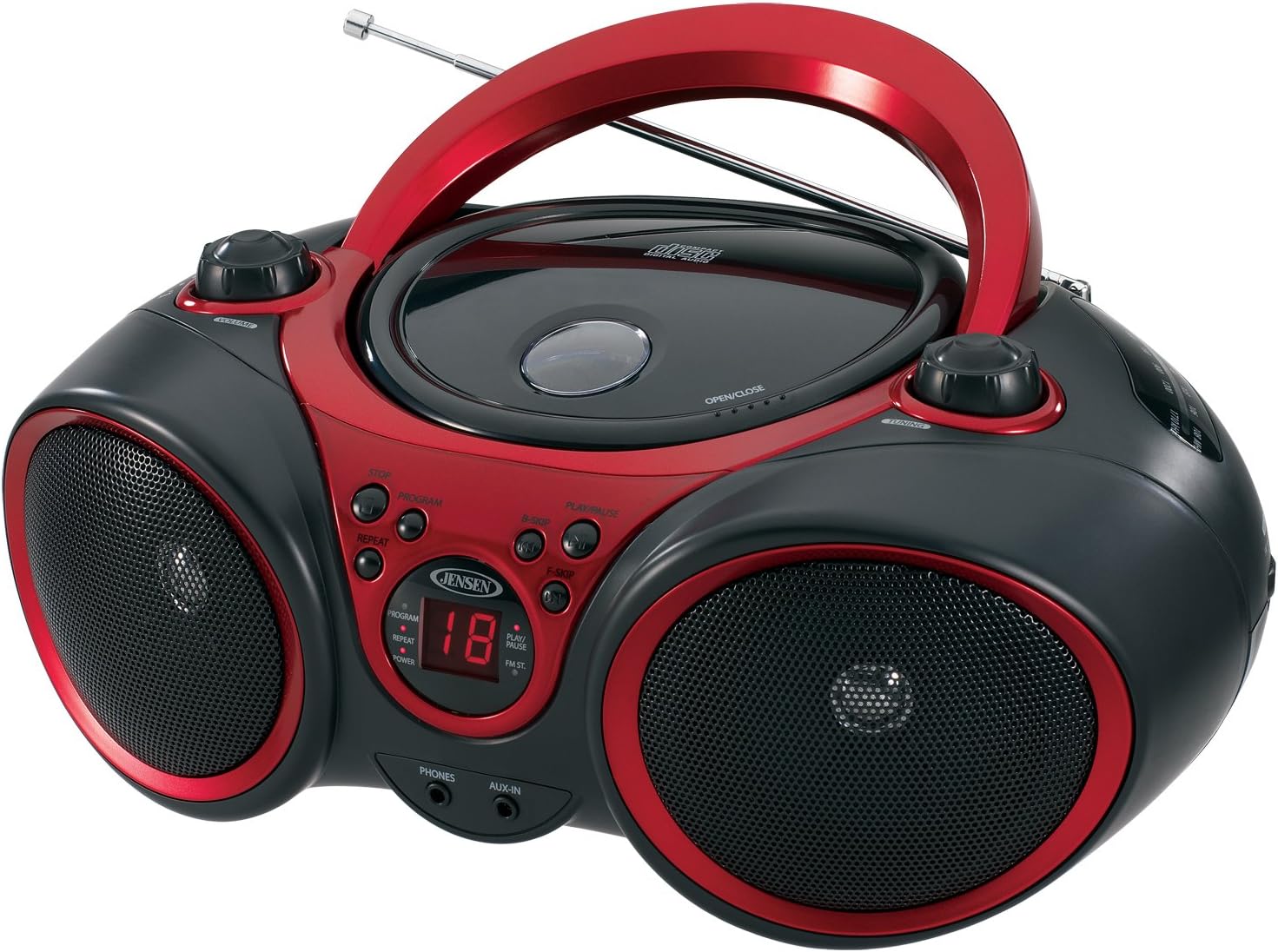
Imaxe: Fronte view of the JENSEN CD-490 unit, showing the CD compartment, speakers, control buttons, and display.
Controis do panel frontal:
- Botón VOLUME: Axusta o nivel de saída de audio.
- Botón STOP: Detén a reprodución de CD.
- Botón PROGRAMA: Usado para programar pistas de CD.
- Botón REPEAT: Repite a pista actual ou todas as pistas.
- B-SKIP Button: Skips backward through CD tracks.
- Botón REPRODUCIR/PAUSA: Inicia ou detén a reprodución de CD.
- F-SKIP Button: Skips forward through CD tracks.
- Pantalla LED: Shows CD track number and function indicators (PROGRAM, REPEAT, POWER, PLAY/PAUSE, FM ST).
- TELÉFONOS Jack: Para conectar auriculares estéreo.
- Conector AUX-IN: Para conectar dispositivos de audio externos.
Controis do panel superior:
- Compartimento de CD: Top-loading area for compact discs.
- OPEN/CLOSE Latch: Abre a tapa do compartimento do CD.
- Botón de afinación: Adjusts AM/FM radio frequency.
Controis do panel lateral:
- Interruptor de función: Selects between RADIO, CD/AUX IN, and OFF modes.
- Selector de banda AM/FM: Selects between AM and FM radio bands.
Características do panel traseiro:
- Entrada de enerxía CA: Para conectar o cable de alimentación CA.
- Compartimento de batería: Holds 8 'C' (UM-2) batteries for portable operation.
- Antena telescópica: Extendable antenna for FM radio reception.
Configuración
Alimentación da unidade:
The CD-490 can be powered by either AC power or batteries.
Potencia CA:
- Ensure the unit is in the OFF position using the FUNCTION switch.
- Connect the AC power cord to the AC power input on the rear of the unit.
- Plug the other end of the AC power cord into a standard AC 120V/60Hz wall outlet.
Potencia da batería:
- Ensure the unit is in the OFF position.
- Abra a tapa do compartimento da batería situada na parte inferior da unidade.
- Insert 8 'C' (UM-2) size batteries (not included), ensuring correct polarity (+/-).
- Pecha a tapa do compartimento da batería de forma segura.
Configuración da antena:
For optimal FM radio reception, fully extend the telescopic antenna. For AM reception, the unit has a built-in antenna, so no adjustment is typically needed.
Operating the CD Player
The CD-490 supports standard audio CDs and CD-R/RW discs.
- Set the FUNCTION switch to the 'CD/AUX IN' position.
- Press the 'OPEN/CLOSE' latch to open the CD compartment lid.
- Place an audio CD into the compartment with the label side facing up.
- Close the CD compartment lid firmly until it clicks. The LED display will show the total number of tracks on the CD.
- Press the 'PLAY/PAUSE' button to begin playback. The current track number will appear on the LED display.
- Adjust the 'VOLUME' knob to your desired listening level.
- To pause playback, press the 'PLAY/PAUSE' button. Press it again to resume.
- To skip to the next track, press the 'F-SKIP' button. To go back to the beginning of the current track or the previous track, press the 'B-SKIP' button.
- To stop playback, press the 'STOP' button.
Función de repetición:
- During playback, press the 'REPEAT' button once to repeat the current track. The 'REPEAT' indicator will light up.
- Press the 'REPEAT' button a second time to repeat all tracks on the CD. The 'REPEAT' indicator will flash.
- Press the 'REPEAT' button a third time to cancel the repeat function.
Reproducción programada:
- In STOP mode, press the 'PROGRAM' button. The 'PROGRAM' indicator will light up and '00' will flash on the display.
- Use the 'F-SKIP' or 'B-SKIP' buttons to select your desired track.
- Press the 'PROGRAM' button again to confirm the track. The display will show the next program number.
- Repita os pasos 2 e 3 para programar ata 20 pistas.
- After programming, press the 'PLAY/PAUSE' button to start programmed playback.
- To cancel programmed playback, press the 'STOP' button twice.
Operating the AM/FM Radio
- Set the FUNCTION switch to the 'RADIO' position.
- Select either 'AM' or 'FM' using the AM/FM band selector switch.
- Extend the telescopic antenna for FM reception. Adjust its position for best reception.
- Rotate the 'TUNING' knob to select your desired radio station.
- Adjust the 'VOLUME' knob to your desired listening level.
Usando a entrada auxiliar
The AUX-IN jack allows you to connect an external audio device (e.g., MP3 player, smartphone) to play through the CD-490's speakers.
- Set the FUNCTION switch to the 'CD/AUX IN' position.
- Connect one end of a 3.5mm audio cable (not included) to the AUX-IN jack on the front of the CD-490.
- Connect the other end of the audio cable to the headphone jack or line-out jack of your external audio device.
- Turn on your external audio device and start playback.
- Adjust the volume on both your external device and the CD-490's 'VOLUME' knob for optimal sound.
Mantemento e coidados
- Manteña a unidade lonxe da luz solar directa, de fontes de calor e de exceso de po ou humidade.
- Limpa a unidade cun pano suave e seco. Non empregues produtos de limpeza abrasivos nin solventes.
- To clean the CD lens, use a commercially available CD lens cleaner.
- Se usa pilas, retíreas se non vai usar a unidade durante un período prolongado para evitar fugas.
Resolución de problemas
| Problema | Causa posible | Solución |
|---|---|---|
| Sen poder | Cable de CA non conectado; Pilas esgotadas ou inseridas incorrectamente. | Comprobe a conexión do cable de CA; substitúa as pilas ou asegúrese de que a polaridade sexa correcta. |
| CD does not play / 'NO DISC' error | CD inserted incorrectly; CD is dirty or scratched; Unit in wrong function mode. | Re-insert CD with label side up; Clean or replace CD; Set FUNCTION switch to 'CD/AUX IN'. |
| Mala recepción de radio | Antena non estendida/axustada; sinal débil. | Extend and adjust FM telescopic antenna; Reposition the unit for better signal. |
| No sound from AUX-IN | Audio cable not connected; Volume too low on external device or unit. | Ensure audio cable is securely connected; Increase volume on both devices. |
Especificacións
- Modelo: CD-490
- Fonte de enerxía: AC 120V/60Hz or 8 x 'C' (UM-2) batteries (not included)
- Potencia de saída: 2 x 1.5 W RMS
- Compatibilidade con CD: CD, CD-R / RW
- Bandas de radio: Estéreo AM/FM
- Conectividade: Auxiliary Input Jack, Stereo Headphone Jack
- Dimensións (L x W x H): 12.7 x 9.1 x 5.8 polgadas
- Peso: 3.4 libras
- Fabricante: Spectra Merchandising International, Inc.
- Primeiro dispoñible: 14 de maio de 2003
Garantía e Soporte
Specific warranty information and customer support contact details are typically provided with your product packaging or on the manufacturer's official website. Please refer to those resources for the most accurate and up-to-date information.
Vídeo do produto
Mira este vídeo oficial do produto para obter unha visión xeralview of the JENSEN CD-490 Stereo.
Vídeo: Un overview of the JENSEN CD-490 Portable Stereo CD Player, highlighting its features and design.


