1. Introdución
This manual provides essential information for the safe and effective use of your new X-Rite NiMH Battery Pack. This rechargeable battery pack is designed specifically for use with various X-Rite spectrophotometer models, including the 530, 528, 520, 518, 508, 504, and 500 series. Please read this manual thoroughly before initial use to ensure optimal performance and longevity of your battery pack.
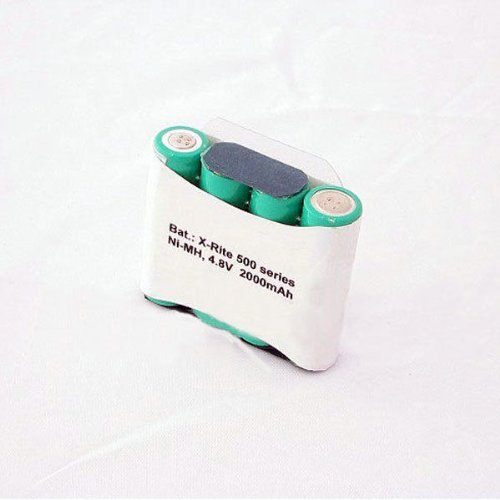
Figura 1: X-Rite NiMH Battery Pack. This image shows the compact, rectangular battery pack, typically black or dark gray, with connection terminals visible on one side, designed for specific X-Rite spectrophotometer models.
2. Configuración e carga
Before using the battery pack for the first time, it is recommended to fully charge it. Refer to your X-Rite spectrophotometer's user manual for specific instructions on battery installation and charging procedures, as these may vary slightly between models.
2.1 Cargo inicial
- Insert the Battery Pack: Carefully insert the NiMH battery pack into the designated battery compartment of your X-Rite spectrophotometer. Ensure proper alignment of the terminals.
- Conectar o cargador: Connect the appropriate X-Rite charger (sold separately or included with your spectrophotometer) to the device.
- Carga totalmente: Allow the battery to charge until the device's charging indicator shows a full charge. This typically takes several hours for a new battery.
2.2 Instalación
The battery pack is designed for easy installation. Always ensure the spectrophotometer is powered off before installing or removing the battery. Consult your spectrophotometer's manual for detailed steps on accessing the battery compartment and securing the battery pack.
3. Instrucións de funcionamento
Once installed and charged, the NiMH battery pack powers your X-Rite spectrophotometer, allowing for portable operation. The battery life will vary depending on the specific spectrophotometer model and usage patterns.
3.1 Acendido/Apagado
- To power on your spectrophotometer, press and hold the power button as instructed in your device's manual.
- To power off, follow the shutdown procedure outlined in your spectrophotometer's manual to prevent data loss and ensure proper device shutdown.
3.2 Battery Level Monitoring
Your X-Rite spectrophotometer will typically display a battery level indicator on its screen. Monitor this indicator to determine when recharging is necessary. Avoid completely draining the battery to prolong its lifespan.
4. Mantemento e coidados
Proper maintenance ensures the longevity and optimal performance of your NiMH battery pack.
- Carga regular: Recharge the battery pack regularly, even if not fully depleted. NiMH batteries benefit from regular use and charging cycles.
- Almacenamento: If storing the battery pack for an extended period, ensure it is partially charged (around 50%) and stored in a cool, dry place away from direct sunlight and extreme temperatures.
- Limpeza: Keep the battery terminals clean and free from dust or corrosion. Use a dry, soft cloth to wipe them if necessary.
- Evitar a descarga excesiva: Do not allow the battery to completely discharge for prolonged periods, as this can reduce its capacity and lifespan.
- Eliminación: Dispose of old or damaged battery packs according to local regulations for NiMH batteries. Do not dispose of them in general waste.
5 Solución de problemas
If you encounter issues with your X-Rite NiMH Battery Pack, consider the following troubleshooting steps:
- A batería non se carga:
- Ensure the charger is properly connected to both the spectrophotometer and a working power outlet.
- Verify that the battery pack is correctly seated in the device.
- Check the charger and device for any visible damage.
- Duración da batería curta:
- The battery may not be fully charged. Ensure a complete charging cycle.
- NiMH batteries have a finite number of charge cycles. If the battery is old, its capacity may have diminished, requiring replacement.
- Operating the spectrophotometer in extreme temperatures can affect battery performance.
- O dispositivo non se acende:
- Confirm the battery pack is charged and correctly installed.
- Try connecting the spectrophotometer directly to its charger to see if it powers on. If it does, the battery may be completely depleted or faulty.
If these steps do not resolve the issue, please contact X-Rite customer support or an authorized service center for further assistance.
6. Especificacións
| Característica | Detalle |
|---|---|
| Marca | X-Rite |
| Modelos compatibles | X-Rite 530, 528, 520, 518, 508, 504, 500 Spectrophotometers |
| Composición da pila da batería | NiMH (Hidruro de Níquel-Metal) |
| Reutilizabilidade | Recargable |
| Número de unidades | 1 Conta |
| Número de modelo do artigo | XRite 530 528 520 518 508 504 500 |
| Data de primeira dispoñibilidade | 23 de outubro de 2013 |
7. Garantía e soporte
Specific warranty information for this X-Rite NiMH Battery Pack is typically provided with the original product packaging or can be found on the official X-Rite website. For technical support, service, or warranty claims, please contact X-Rite customer service directly.
You can visit the official X-Rite store for more information: X-Rite Store on Amazon.


