Introdución
This manual provides essential information for the safe and efficient operation of your InFocus IN124a XGA Wireless-Ready Projector. Please read this manual thoroughly before using the projector and retain it for future reference. This projector is designed for displaying content with XGA (1024 x 768) native resolution, offering 3500 lumens of brightness and a 15000:1 contrast ratio.
Información de seguridade
- Seguridade eléctrica: Always connect the projector to a grounded power outlet. Do not use damaged power cords. Disconnect power before cleaning or servicing.
- Ventilación e calor: Ensure adequate ventilation around the projector. Do not block ventilation openings. Avoid placing the projector near heat sources.
- Lamp Seguridade: O proxector lamp operates at high temperatures and pressures. Allow the projector to cool down before moving or replacing the lamp. Do not look directly into the lens when the lamp está activado.
- Manexo: Manexa o proxector con coidado. Evita deixalo caer ou sometelo a impactos fortes.
- Humidade: Non expoña o proxector á choiva, á humidade ou a un exceso de humidade.
Contido do paquete
Verifica que todos os elementos estean presentes no paquete:
- InFocus IN124a Projector
- Cable HDMI
- Cable VGA
- Cable de alimentación
- Control remoto (non aparece explicitamente na lista pero é estándar)
- Optional USB adapter for wireless connectivity (if purchased separately)
Produto rematadoview
Familiarize yourself with the physical components and connections of your InFocus IN124a projector.

This image displays the rear panel of the InFocus IN124a projector, highlighting various connectivity options including HDMI, VGA (Computer 1 and 2), Monitor Out, S-Video, Video, Audio In (1 and 2), Audio Out, RS-232, USB-B, USB Mini-B, and USB-A ports. The power input is located on the lower left.

The top panel of the InFocus IN124a projector is shown, featuring the control buttons for power, menu navigation (up, down, left, right, enter), source selection, blank screen function, and indicators for temperature and lamp status. The focus and zoom adjustment rings are also visible.

Unha fronte view of the InFocus IN124a projector, showing the main projection lens and the power indicator light. The focus and zoom rings are visible near the lens.

Esta imaxe presenta un lado view of the InFocus IN124a projector, emphasizing the ventilation grilles designed for heat dissipation, crucial for maintaining optimal operating temperature.
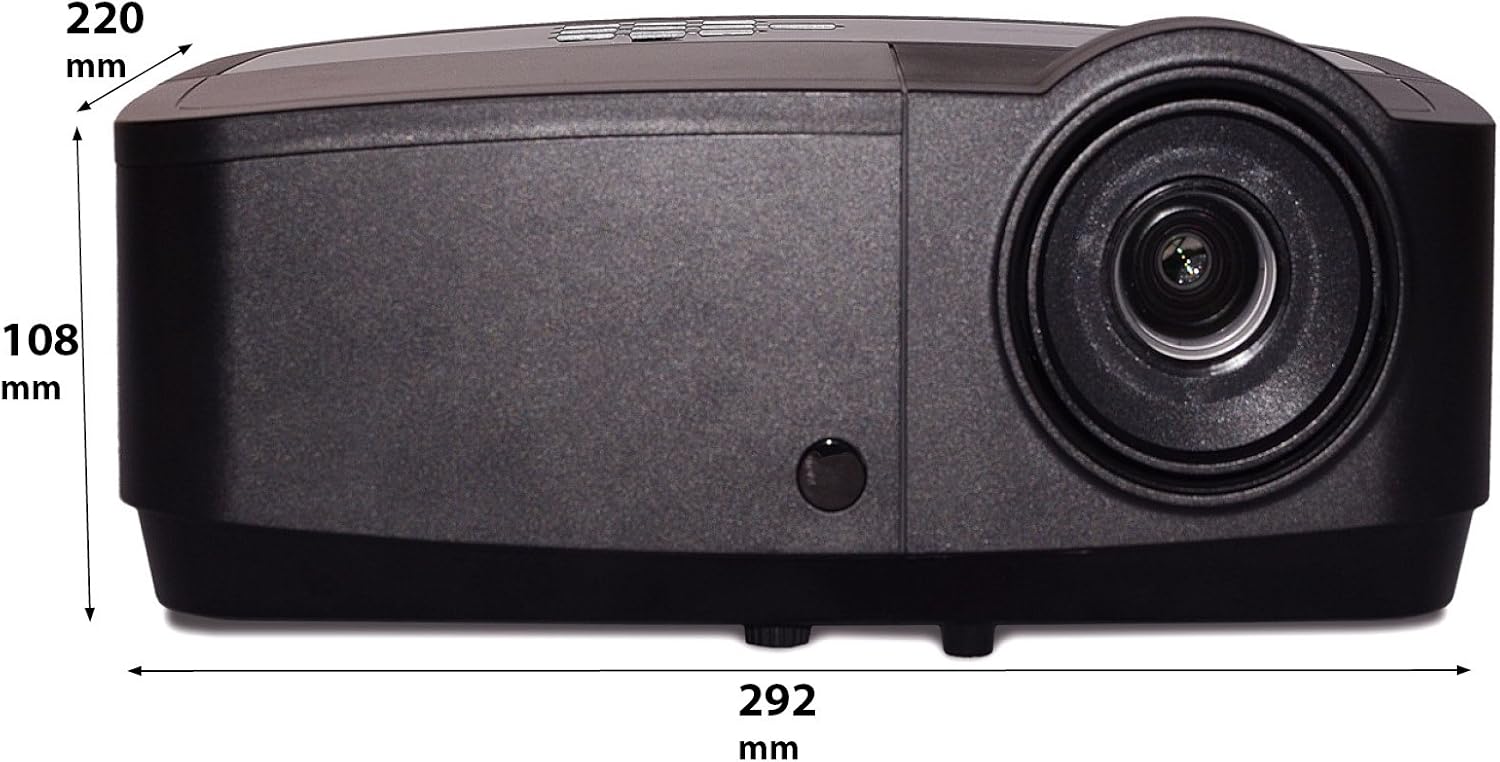
Esta imaxe mostra un profesional lateralfile of the InFocus IN124a projector, illustrating its physical dimensions: approximately 292 mm in length, 108 mm in height, and 220 mm in width.
Configuración
1 Colocación
Position the projector on a stable, flat surface or mount it securely. Ensure the projector is at an appropriate distance from the screen to achieve the desired image size. Avoid direct sunlight or strong ambient light on the screen for optimal viewing.
2. Potencia de conexión
- Conecte o cable de alimentación á entrada de corrente do proxector.
- Conecte o outro extremo do cable de alimentación a unha toma eléctrica conectada a terra.
3. Conexión de fontes de vídeo
The IN124a offers multiple connectivity options:
- HDMI: Conecta un cable HDMI do teu dispositivo fonte (por exemplo, un portátil, un reprodutor de Blu-ray) ao porto HDMI do proxector.
- VGA (Ordenador 1/2): Use a VGA cable to connect your computer to either the 'COMPUTER 1' or 'COMPUTER 2' port.
- S-Vídeo/Vídeo: For older devices, connect S-Video or composite video cables to the respective ports.
- USB: The USB-A port can be used for displaying content directly from a USB drive. The USB-B port supports USB display functionality.
- Audio: Connect external audio sources to 'AUDIO 1' or 'AUDIO 2' inputs, and use 'AUDIO OUT' for external speakers if needed.
4. Wireless Setup (Optional)
For wireless connectivity, an optional USB adapter is required. Insert the wireless USB adapter into the designated USB port on the projector. Refer to the adapter's specific instructions for software installation and connection procedures on your source device.
En funcionamento
1. Acendido/apagado
- Encendido: Press the 'Power' button on the projector's control panel or remote control. The power indicator light will turn steady blue.
- Apagado: Press the 'Power' button again. A confirmation message may appear. Press 'Power' a second time to confirm shutdown. The fan will continue to run briefly to cool the lamp before shutting down completely.
2. Axustar a imaxe
- Foco: Rotate the focus ring around the lens until the image appears sharp and clear.
- Zoom: Rotate the zoom ring around the lens to adjust the image size without moving the projector.
- Corrección Keystone: Se a imaxe ten forma trapezoidal, use a función de corrección trapezoidal do menú do proxector para cadrala.
3. Selección da fonte
Press the 'Source' button on the control panel or remote control repeatedly to cycle through available input sources (HDMI, Computer 1, Computer 2, S-Video, Video, USB). The projector will automatically detect an active signal.
4. Navegación por menús
Press the 'Menu' button to access the On-Screen Display (OSD) menu. Use the arrow buttons to navigate through options and 'Enter' to select. Press 'Menu' or 'Exit' to close the OSD.
5. Modo 3D
The InFocus IN124a is 3D-Ready. To utilize 3D functionality, you will need compatible 3D content, a 3D-capable source device, and active 3D glasses. Refer to your 3D source device's manual for specific setup instructions. The projector will automatically detect a 3D signal when available.
Mantemento
1. Lamp Substitución
O proxector lamp has a lifespan of up to 7,000 hours. When the lamp a vida está a piques de rematar, pode aparecer unha mensaxe de aviso ou a lamp indicator light will illuminate. Only replace the lamp with an authorized InFocus replacement lamp. Always allow the projector to cool completely before attempting lamp substitución.
2. Limpeza
- Proxector Casing: Use un pano suave e sen pelusa damplimpador suave e non abrasivo. Non empregue produtos químicos agresivos.
- Lente: Gently wipe the lens with a lens cleaning cloth or lens tissue. Avoid touching the lens surface with your fingers.
- Ventos de aire: Periodically check and clean the air vents to prevent dust buildup, which can lead to overheating. Use a soft brush or compressed air to clear obstructions.
Resolución de problemas
Se tes problemas co teu proxector, consulta os seguintes problemas e solucións comúns:
| Problema | Causa posible | Solución |
|---|---|---|
| Non se mostra ningunha imaxe | Power not connected; Incorrect input source; Source device not active. | Check power connection; Select correct input source; Ensure source device is on and outputting signal. |
| A imaxe está borrosa ou desenfocada | Lens focus not adjusted; Projector too close/far from screen. | Adjust the focus ring on the lens; Adjust projector distance or use zoom ring. |
| O control remoto non funciona | Batteries depleted; Obstruction between remote and projector; Remote sensor blocked. | Replace batteries; Remove obstructions; Ensure remote sensor on projector is clear. |
| O proxector sobrequéntase e apágase | Blocked ventilation; Dusty air filter. | Ensure vents are clear; Clean air filter (if applicable) and vents. |
Especificacións
| Característica | Especificación |
|---|---|
| Resolución nativa | XGA (1024 x 768) |
| Brillo | 3500 lúmenes |
| Relación de contraste | 15000:1 |
| Lamp A vida | Ata 7,000 horas (modo ecolóxico) |
| Tecnoloxía de conectividade | Wireless (with optional adapter), HDMI, USB video |
| Característica especial | Listo para 3D |
| Dimensións do produto | 14.25 x 12 x 7.75 polgadas (36.2 x 30.5 x 19.7 cm) |
| Peso do elemento | 5.4 libras (2.45 kg) |
| Usos recomendados | Interior/Exterior |
Garantía e Soporte
For warranty information and technical support, please refer to the warranty card included with your product or visit the official InFocus websitio. Garde o recibo da compra como xustificante de compra para reclamacións de garantía.


