1. Introdución
The Nikon D4S is a high-performance 16.2 MP FX-format CMOS Digital SLR camera designed for professional use. It offers advanced speed, precision, and versatility for various shooting conditions. This manual provides essential information for setting up, operating, maintaining, and troubleshooting your camera to ensure optimal performance.
The D4S features rapid image processing with the EXPEED 4 engine, an extended ISO range for diverse lighting, and comprehensive video capabilities. It is built for durability and reliability, making it suitable for demanding assignments.
2. Configuración
2.1. Desembalaxe e inspección inicial
Carefully unpack all components and verify that all items listed in the 'What's in the Box' section are present. Inspect the camera body and accessories for any signs of damage.
2.2. Attaching the Camera Strap
Attach the supplied AN-DC11 strap to the camera's strap lugs. Ensure it is securely fastened to prevent accidental drops.
2.3. Carga e instalación da batería
The camera uses an EN-EL18a Rechargeable Li-ion Battery. Before first use, fully charge the battery using the MH-26a Battery Charger. Insert the charged battery into the camera's battery chamber, ensuring it clicks into place.
Video: Nikon Smart Tip: Spare Battery. This video provides a helpful tip on always having a fully charged spare battery for your DSLR to avoid interruptions during shooting sessions.
2.4. Inserción de tarxetas de memoria
The D4S supports both XQD and CF cards. Open the memory card slot cover and insert the cards into their respective slots until they click. Ensure the cards are correctly oriented.
2.5. Colocación dunha lente
Remove the body cap from the camera and the rear cap from the lens. Align the mounting marks on the lens with those on the camera body, then rotate the lens counter-clockwise until it locks into place.

Imaxe: Ángulo frontal view of the Nikon D4S DSLR camera with a lens attached, showcasing its robust build and ergonomic design.
3. Funcionamento da cámara
3.1. Acendido/apagado
To power on the camera, rotate the power switch located around the shutter-release button. To power off, rotate it back to the OFF position.
3.2. Basic Shooting Controls
Familiarízate cos controis principais:
- Botón disparador: Prema ata a metade para enfocar, totalmente para sacar unha foto.
- Disco de modo: Selects exposure mode (P, S, A, M).
- ISO button: Adjusts ISO sensitivity.
- QUAL button: Sets image quality and size.
- WB button: Adjusts white balance.

Imaxe: Fronte view of the Nikon D4S DSLR camera body, highlighting the lens mount and grip.

Imaxe: Traseira view of the Nikon D4S DSLR camera, showing the LCD screen and various control buttons for navigation and settings adjustment.
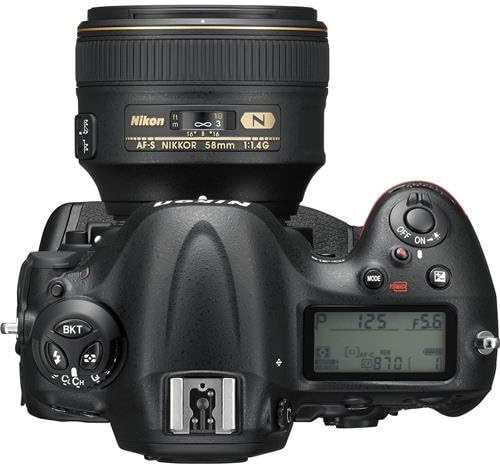
Imaxe: Arriba view of the Nikon D4S DSLR camera, displaying the top control panel, hot shoe, and mode dial.
3.3. Sistema de enfoque automático
The D4S features a 51-point AF system and 3D Color Matrix metering III with a 91,000-pixel RGB sensor for fast and accurate autofocus. Utilize the new Group Area AF setting for faster initial subject capture by using five AF sensors as a single focus point. For viewfinder shooting, a custom setting allows toggling Face Detection on and off.
3.4. ISO Performance
Achieve noise-free shooting from ISO 100 to 25,600. The ISO range can be expanded to an equivalent of ISO 409,600 (Hi 4) for challenging low-light conditions.
3.5. Gravación de vídeo
Record stunning 1080/60p Full HD videos with high-fidelity stereo audio. The 2.7x Crop Mode extends the reach of lenses while maintaining video quality. Adjust audio settings in real-time during recording, including selectable sound ranges (Wide Range, Voice Range) and improved wind noise reduction. You can also capture 2MP stills simultaneously while recording video.
Video: Nikon Photo Tips: Shooting Videos. This video offers guidance on effectively using your Nikon camera for video recording.
3.6. Funcións avanzadas
- Image Area Modes: Select from FX, DX, 1.5x, 5:4, and 1.2x while shooting stills in Live View.
- RAW SIZE S: A new setting for shooting smaller, more manageable 12-bit uncompressed Nikon NEF files, speeding up workflow.
- Picture Control: Enhanced tone curves deliver more depth and clearer color rendition in "Standard" mode.
- Lapso de tempo: Create smoother Time Lapse sequences with reduced flicker and improved interval control (up to 9,999 shots).
- LAN con cable: Transferencia files up to 10x faster with new 1000 Base-T (Gigabit) wired LAN.
Video: Nikon Smart Tip: Additional Lenses. This video provides advice on selecting and utilizing additional lenses for your Nikon camera.
Video: Nikon Smart Tip: Pumpkin Patch Trip. This video offers creative photography tips for capturing moments during a pumpkin patch visit.
Video: Nikon Photo Tips: Holiday Lights. This video provides tips for photographing holiday lights effectively.
Video: Nikon Photo Tips: Family Holiday Portraits. This video offers advice on capturing memorable family portraits during the holiday season.
Video: Nikon Photo Tip: Shooting in Winter Weather. This video provides essential tips for using your camera in cold and snowy conditions.
Video: Nikon Smart Tip: Fall Photo Shoots. This video offers creative ideas and techniques for capturing beautiful autumn photographs.
Video: Nikon Smart Tip: Family Dinners. This video provides tips for capturing candid and appealing photos during family dinner gatherings.
4. Mantemento
4.1. Limpeza da cámara
Regularly clean the camera body with a soft, dry cloth. For the lens and sensor, use specialized cleaning tools and solutions to avoid damage. Never use harsh chemicals or abrasive materials.
4.2. Almacenamento
When not in use, store the camera in a dry, cool place away from direct sunlight and extreme temperatures. Remove the battery if storing for extended periods.
5 Solución de problemas
5.1. Problemas comúns e solucións
- A cámara non se acende: Asegúrate de que a batería estea completamente cargada e inserida correctamente.
- As imaxes están borrosas: Check focus settings, lens cleanliness, and shutter speed. Use a tripod in low light.
- Erro da tarxeta de memoria: Ensure the card is inserted correctly and is not full or damaged. Try reformatting the card (this will erase all data).
- Non se dispara o flash: Check flash settings and ensure it is properly attached and charged.
For more complex issues, refer to the detailed troubleshooting section in the full user manual or contact Nikon support.
6. Especificacións
| Característica | Detalle |
|---|---|
| Dimensións do produto | 6.3 x 3.58 x 6.18 polgadas |
| Peso do elemento | 2.98 libras |
| Número de modelo do artigo | 1541 |
| Baterías | 1 pilas de iones de litio necesarias (incluídas) |
| Montaxes compatibles | Nikon F (FX) |
| Relación de aspecto | 3:2 |
| Tecnoloxía do sensor fotográfico | CMOS |
| Soportado File Formato | NEF (12-bit or 14-bit, compressed or lossless compressed RAW), NEF + JPEG, TIFF, JPEG |
| Estabilización da imaxe | Non |
| Zoom óptico | 1 x |
| ISO mínimo ampliado | 50 |
| Descrición da medición | Múltiple, con ponderación central, puntual |
| Marca | Nikon |
| Nome do modelo | Nikon D4S |
7. Que hai na caixa
- D4S FX-format Digital SLR Camera Body
- Batería recargable de iones de litio EN-EL18a
- MH-26a Battery Charger
- USB Cable Clip
- HDMI Cable Clip
- UF-2 Connector Cover for stereo mini plug cable
- C-E15 USB Cable
- Correa AN-DC11
- BF-1B Tapón para o corpo
- BS-2 Accessory Shoe Cover
- BL-6 Battery Chamber Cover
- DK-17 Eyepiece
- ViewNX 2 CD-ROM
8. Garantía e soporte
8.1. Exención de responsabilidade legal
SERIAL #2038819 FULL 14 DAY NO HASSLE SATISFACTION GUARANTEE AND A 90 DAY PARTS AND LABOR WARRANTY.
8.2. Atención ao cliente
For further assistance, technical support, or warranty claims, please visit the official Nikon website or contact their customer service department. Keep your purchase receipt and product serial number handy for faster service.
Podes visitar o Nikon Store on Amazon para obter máis información sobre o produto e accesorios.


