Introdución
The Delta Dore RF 4890 is a 10 A receiver designed to control electric underfloor heating mats and/or panel heaters up to 2.3 kW. It is suitable for installation in a standard 55 mm back box. This receiver operates in conjunction with the Delta Dore Tybox 5101 thermostat, allowing up to 16 RF 4890 units to be connected to a single Tybox 5101. When integrated with a floor sensor and the Tybox 5101, it enables advanced functionalities such as floor temperature limitation or direct temperature control via the Tydom application (requires Tydom 1.0 gateway, sold separately). The RF 4890 also supports programming, local/remote control, and voice command services when connected to Tydom 1.0.
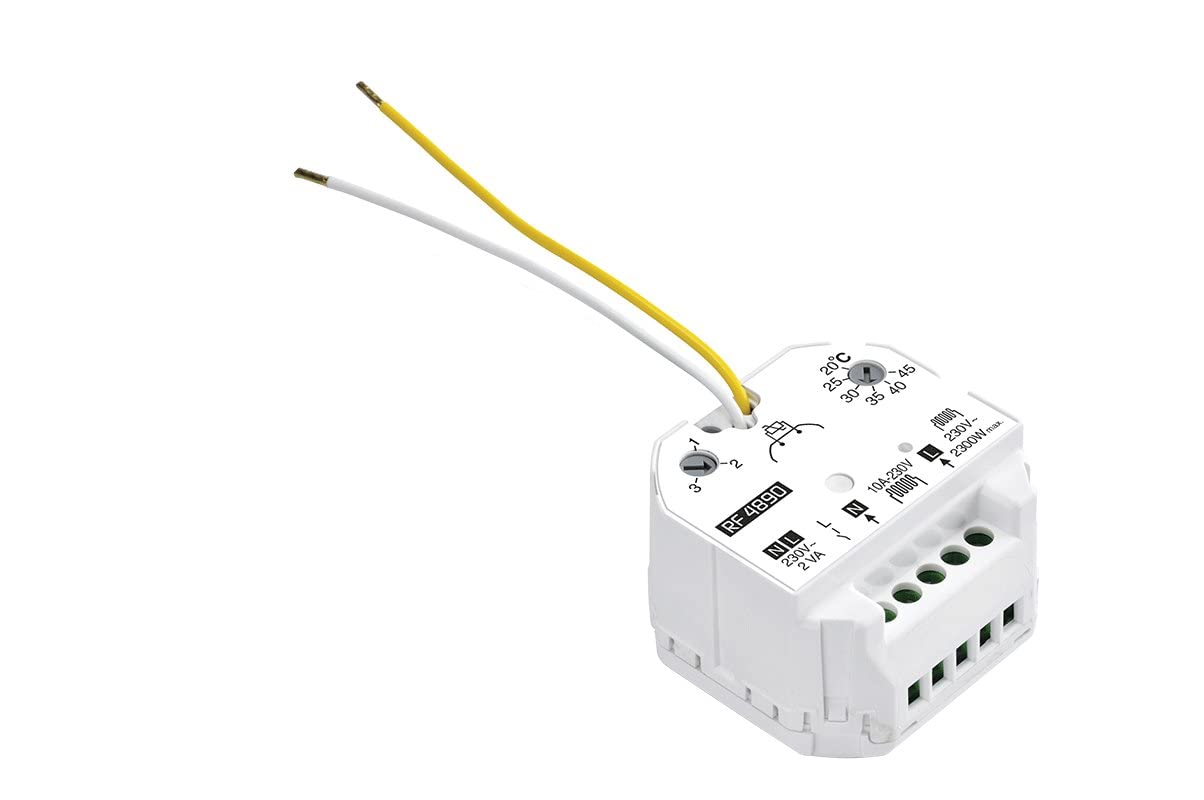
Image: Delta Dore RF 4890 Receiver Thermostat. This image shows the compact design of the receiver unit.
Configuración e instalación
Importante: Installation should only be performed by a qualified electrician and in accordance with local wiring regulations. Ensure power is disconnected before beginning installation.
- Montaxe: The RF 4890 receiver is designed to fit into a standard 55 mm electrical back box. Secure the unit within the back box.
- Cableado: Connect the electrical heating device (underfloor mat or panel heater) to the receiver's output terminals. Connect the main power supply (230V) to the receiver's input terminals. Ensure all connections are secure and correctly polarized. The receiver can handle loads up to 2.3 kW (10 A).
- Pairing with Tybox 5101 Thermostat:
- Power on the RF 4890 receiver and the Tybox 5101 thermostat.
- Follow the pairing instructions provided with your Tybox 5101 thermostat to link it with the RF 4890 receiver. Up to 16 RF 4890 units can be paired with a single Tybox 5101.
- Verify successful pairing by testing the heating control from the thermostat.
- Optional: Floor Sensor Connection: If using a floor sensor, connect it to the designated terminals on the Tybox 5101 thermostat. This enables floor temperature limitation or direct floor temperature control.
- Optional: Tydom 1.0 Integration: For smart home integration, remote control, and voice commands, connect the Tybox 5101 (and thus the RF 4890) to a Tydom 1.0 gateway (sold separately). Refer to the Tydom 1.0 manual for integration steps.

Imaxe: Interna view of the RF 4890 receiver, showing wiring terminals. This illustrates where electrical connections are made.
Instrucións de funcionamento
The RF 4890 receiver is controlled by the paired Tybox 5101 thermostat. All temperature adjustments and mode selections are made via the thermostat or the Tydom application.
Tybox 5101 Thermostat Control:
- Axuste de temperatura: Use the Up and Down buttons on the Tybox 5101 to set the desired temperature.
- Selección de modo: The Tybox 5101 typically offers modes such as Comfort, Eco, and Frost Protection. Use the mode button on the thermostat to cycle through these options.
- Modo confort: Maintains the set comfort temperature.
- Modo Eco: Maintains a reduced temperature for energy saving.
- Modo de protección contra xeadas: Maintains a minimum temperature (e.g., 7°C) to prevent freezing.
- Floor Temperature Limitation: If a floor sensor is connected, the Tybox 5101 can be configured to limit the floor temperature, preventing overheating.
Tydom Application and Voice Control (with Tydom 1.0 Gateway):
- Control remoto: Use the Tydom application on your smartphone or tablet to adjust temperatures, change modes, and program heating schedules from anywhere.
- Comandos de voz: Integrate with Amazon Alexa or Google Assistant (via Tydom 1.0) to control your heating using voice commands.

Image: Delta Dore Tybox 5101 Thermostat. This is the primary control unit for the RF 4890 receiver.

Image: Screenshot of the Tydom application interface. This shows how users can control their smart home devices, including heating, remotely.
Mantemento
The Delta Dore RF 4890 receiver is designed for maintenance-free operation. No user-serviceable parts are inside.
- Limpeza: If necessary, gently wipe the exterior of the unit with a dry, soft cloth. Do not use liquid cleaners or abrasive materials.
- Inspección: Periodically check for any visible damage to the unit or its wiring. If damage is observed, disconnect power and contact a qualified technician.
- Actualizacións de firmware: If connected to a Tydom 1.0 gateway, ensure the Tydom application and gateway firmware are kept up to date for optimal performance and security.
Resolución de problemas
| Problema | Causa posible | Solución |
|---|---|---|
| Heating device not responding. |
|
|
| Lecturas de temperatura incorrectas. |
|
|
| Tydom app or voice control not working. |
|
|
Especificacións técnicas
| Característica | Especificación |
|---|---|
| Marca | Delta Dore |
| Número de modelo | 6050615 |
| Nome do produto | Receptor RF 4890 |
| Cor | Branco |
| Dimensións (L x W x H) | 5 x 4.7 x 3.3 cm |
| Peso | 60 gramos |
| Carga de potencia máxima | 2300 vatios (10 A) |
| Voltage | 230 voltios |
| Material | Plástico |
| Clase Enerxética | A a G |
| Características especiais | Smart Home Integration, Voice Control Compatibility |
| Tecnoloxía de conectividade | Wi-Fi (via Tydom 1.0 gateway) |
| Compoñentes incluídos | Receptor RF 4890 |
| Fonte de enerxía | Cable eléctrico |
| Usos específicos | Indoor residential heating control |
Información da garantía
Specific warranty details for the Delta Dore RF 4890 receiver are typically provided with the product packaging or can be found on the official Delta Dore website. Please retain your proof of purchase for warranty claims. Warranty coverage generally includes defects in materials and workmanship under normal use.
Para consultar os termos e condicións detallados da garantía, visite o Delta Dore official websitio ou póñase en contacto co seu servizo de atención ao cliente.
Atención ao cliente
If you encounter any issues or have questions regarding your Delta Dore RF 4890 receiver, please refer to the following resources:
- Soporte en liña: Visit the official Delta Dore website for FAQs, product documentation, and support contact information: Soporte Delta Dore
- Asistencia Técnica: For technical queries or installation assistance, it is recommended to contact a qualified electrician or Delta Dore's technical support team directly.


