1. Introdución
This manual provides comprehensive instructions for the proper setup, operation, and maintenance of your Sony RM-DX300 remote control. This remote is specifically designed for use with Sony CD Changer models CDP-CX300, CDP-CX335, CDP-CX355, and CDP-X300. Please read this manual thoroughly before using the remote control to ensure optimal performance and longevity.
2. Información de seguridade
- Manexo da batería: Always insert batteries with the correct polarity (+/-). Do not mix old and new batteries, or different types of batteries (e.g., alkaline and rechargeable). Remove batteries if the remote will not be used for an extended period to prevent leakage.
- Eliminación: Desfágase das baterías usadas segundo a normativa local. Non tire as baterías ao lume.
- Exposición ao líquido: Avoid exposing the remote control to liquids or excessive moisture.
- Temperatura: Non expoña o control remoto a temperaturas extremas nin á luz solar directa.
- Limpeza: Use un pano suave e seco para a limpeza. Non use produtos de limpeza ou disolventes abrasivos.
3. Contido do paquete
Comprobe que o seu paquete contén os seguintes elementos:
- Sony RM-DX300 Remote Control
- Manual de instrucións (este documento)
Note: Batteries are typically not included and must be purchased separately.
4. Configuración
4.1 Instalación da batería
To power your RM-DX300 remote control, you will need to install two (2) AA batteries (not included).
- Localice a tapa do compartimento da batería na parte traseira do control remoto.
- Prema a pestana e deslice a tapa cara abaixo na dirección indicada pola frecha.
- Insira dúas pilas AA, asegurándose de que os terminais positivo (+) e negativo (-) estean aliñados correctamente coas marcas do interior do compartimento.
- Deslice a tapa do compartimento da batería de volta ao seu lugar ata que faga clic de forma segura.
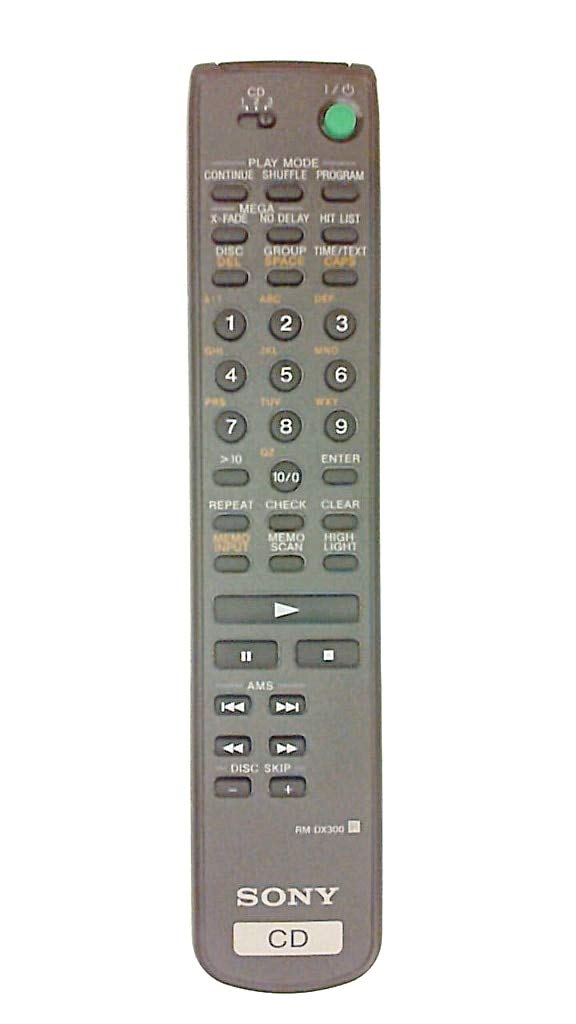
Image 4.1: The Sony RM-DX300 remote control. The battery compartment is located on the back.
5. Instrucións de funcionamento
The RM-DX300 remote control allows you to operate your compatible Sony CD Changer from a distance. Ensure there is a clear line of sight between the remote's infrared emitter and the CD changer's IR receiver.
5.1 Funcións básicas
- POTENCIA: Turns the CD changer on or off.
- REPRODUCIR (►): Starts CD playback.
- PAUSE (−): Pauses CD playback. Press again to resume.
- PARAR (■): Detén a reprodución de CD.
- SKIP (►►| / |◄◄): Skips to the next track or returns to the beginning of the current/previous track.
- SEARCH (►► / ◄◄): Avance ou retroceso rápido nunha pista.
- DISC SELECT (Numeric Keypad): Directly select a disc by entering its number.
- TRACK SELECT (Numeric Keypad): Directly select a track by entering its number.
- PROGRAMA: Allows programming of tracks for custom playback sequences. Refer to your CD changer's manual for detailed programming instructions.
- REPETIR: Repeats the current track, disc, or programmed sequence.
- SHUFFLE/RANDOM: Plays tracks or discs in a random order.
Note: Specific button labels and advanced functions may vary slightly depending on your CD changer model. Consult your CD changer's original instruction manual for detailed information on all features.
6. Mantemento
6.1 Limpeza do mando a distancia
To clean the remote control, gently wipe its surface with a soft, dry cloth. Do not use liquid cleaners, sprays, or abrasive materials, as these can damage the remote's finish or internal components.
6.2 Substitución da batería
Replace the batteries when the remote control's range decreases or if it stops responding. Follow the battery installation steps outlined in Section 4.1. Always replace both batteries at the same time with new ones of the same type.
7 Solución de problemas
| Problema | Causa posible | Solución |
|---|---|---|
| Remote control does not operate the CD changer. |
|
|
| Remote control operates intermittently. |
|
|
8. Especificacións
| Modelo: | RM-DX300 |
| Dispositivos compatibles: | Sony CD Changer models CDP-CX300, CDP-CX335, CDP-CX355, CDP-X300 |
| Tecnoloxía de conectividade: | Infravermello (IR) |
| Fonte de enerxía: | 2 pilas AA (non incluídas) |
| Dimensións do produto: | 8.1 x 1.5 x 1 polgadas |
| Peso do artigo: | 3.2 onzas |
| Fabricante: | Sony |
9. Garantía e soporte
This remote control is manufactured by Sony. For information regarding warranty coverage, technical support, or service, please refer to the documentation provided with your original Sony CD Changer or visit the official Sony support websitio. Garde o recibo da compra como xustificante de compra para reclamacións de garantía.
Soporte de Sony Websitio: https://www.sony.com/electronics/support