1. Introdución
This manual provides comprehensive instructions for the setup, operation, maintenance, and troubleshooting of your Genius Traveler 9005BT 4-D Bluetooth Mouse. Please read this manual thoroughly before using the device to ensure proper functionality and longevity.
Características principais:
- Precision 1200 dpi BlueEye engine for versatile surface tracking.
- Bluetooth 4-button wireless optical mouse.
- Ergonomic design suitable for both left and right-handed users.
- Turbo Scroll function for rapid document and web navegación da páxina.
- BlueEye technology allows operation on various surfaces including dusted glass, marble, carpet, and sofa upholstery.
- Compatible with multiple operating systems: Android 3.0+, Windows 7/XP/Vista, and Mac OS X 10.4 or later.
2. Contido do paquete
Verifique que todos os elementos que se indican a continuación estean presentes no paquete do produto:
- Genius Traveler 9005BT Mouse
- CD driver for mouse 4-D Scroll function
- Two AA Alkaline batteries
- Manual de usuario multilingüe
3. Configuración
3.1. Instalación da batería
- Localiza a tapa do compartimento da batería na parte inferior do rato.
- Deslice ou levante a tapa con suavidade para abrir o compartimento.
- Insert the two AA Alkaline batteries, ensuring correct polarity (+ and -) as indicated inside the compartment.
- Volva colocar a tapa do compartimento da batería ata que encaixe firmemente no seu lugar.
3.2. Emparellamento Bluetooth
To connect your Traveler 9005BT mouse to your device:
- Ensure the mouse is powered on. There is typically a power switch on the underside of the mouse.
- Activate Bluetooth on your computer, laptop, or Android device.
- On your device, navigate to the Bluetooth settings and initiate a search for new devices.
- The Genius Traveler 9005BT should appear in the list of available devices. Select it to begin the pairing process.
- Follow any on-screen prompts to complete the pairing. A successful connection will be indicated by a confirmation message on your device.
The mouse supports Bluetooth EDR 2.0 technology, providing a reliable working distance of up to 10 meters. It is compatible with Android 3.0+, Windows 7/XP/Vista, and Mac OS X 10.4 or later.
3.3. Driver Installation (for 4-D Scroll Function)
For optimal use of the 4-D Scroll function, install the provided driver:
- Insert the included CD driver into your computer's optical drive.
- Siga as instrucións en pantalla para instalar o software necesario.
- Restart your computer if prompted to ensure the driver is fully installed and recognized.
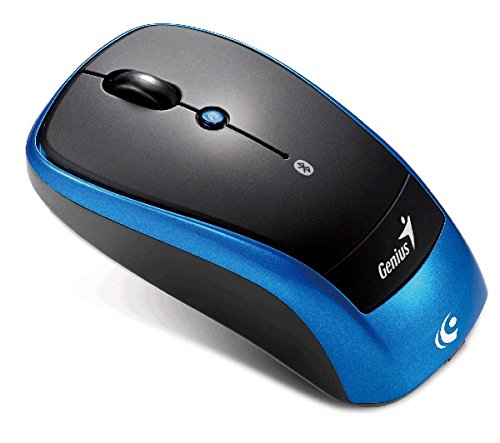
Unha sobrecarga view of the Genius Traveler 9005BT 4-D Bluetooth Mouse, showcasing its ergonomic design with a black top surface and blue sides. It features a scroll wheel, left and right click buttons, and a small button for 4-D scroll functionality.
4. Uso do rato
4.1. Funcións básicas
- Clic esquerdo: Press the left button for primary selection and activation.
- Clic dereito: Press the right button to access contextual menus.
- Roda de desprazamento: Xira a roda cara arriba ou cara abaixo para desprazarte verticalmente polos documentos e web páxinas.
4.2. 4-D Scroll Function
The Traveler 9005BT features a dedicated 4-D scroll function key. Once the driver is installed, this function allows for more natural and convenient scrolling by simply moving your mouse in the direction you wish to scroll (up, down, left, or right) while holding down the 4-D scroll button.
4.3. Turbo Scroll
Engage the Turbo Scroll feature for hyper-fast navigation through lengthy documents, spreadsheets, and web pages. This function allows you to accelerate scrolling speed, significantly improving efficiency when reviewing extensive content.
4.4. BlueEye Technology
The integrated BlueEye technology enables the mouse to operate on a wide variety of surfaces that traditional optical mice may struggle with. This includes challenging textures such as dusted glass, marble, carpet, and sofa upholstery, providing flexibility in your workspace.
5. Mantemento
5.1. Limpeza
Para manter un rendemento e unha aparencia óptimos:
- Asegúrate de que o rato estea apagado antes de limpalo.
- Use un pano suave, seco e sen fiapos para limpar as superficies exteriores.
- Para a sucidade persistente, d lixeiramenteampEnxágüe o pano con auga ou un limpador suave e non abrasivo. Evite a humidade excesiva.
- Do not use harsh chemicals, solvents, or abrasive materials, as these can damage the mouse's finish or internal components.
- Periodically clean the optical sensor area on the underside of the mouse with a cotton swab to prevent tracking issues.
5.2. Substitución da batería
When the mouse's performance degrades or it stops responding, it may be time to replace the batteries. Follow the battery installation steps outlined in Section 3.1.
6 Solución de problemas
If you encounter issues with your Genius Traveler 9005BT mouse, refer to the following common solutions:
- O rato non responde:
- Asegúrese de que o rato estea acendido.
- Comprobe e substitúa as pilas se é necesario.
- Verify that Bluetooth is enabled on your device and the mouse is paired correctly. Try re-pairing if needed.
- Move the mouse closer to your device to rule out range issues.
- Movemento errático do cursor:
- Limpa o sensor óptico da parte inferior do rato.
- Ensure you are using the mouse on a suitable surface. While BlueEye technology is versatile, extreme surfaces or highly reflective ones can still cause issues.
- Check for any obstructions around the optical sensor.
- 4-D Scroll Function Not Working:
- Confirm that the 4-D scroll driver has been installed correctly from the provided CD.
- Restart your computer after driver installation.
- Desconexións por Bluetooth:
- Asegúrate de que ningún outro dispositivo estea a causar interferencias de Bluetooth.
- Actualiza os controladores Bluetooth do teu dispositivo.
- Re-pair the mouse with your device.
If these steps do not resolve the issue, consult the multi-language user manual included in your package or contact Genius customer support.
7. Especificacións
| Característica | Detalle |
|---|---|
| Marca | Xenio |
| Número de modelo | Traveler 9005BT |
| Tecnoloxía de detección de movemento | Optical (BlueEye) |
| DPI | 1200 ppp |
| Conectividade | Bluetooth EDR 2.0 |
| Número de botóns | 4 |
| Orientación das mans | Ambidiestro |
| Fonte de enerxía | 2 pilas alcalinas AA (non incluídas) |
| Sistemas operativos compatibles | Windows® 7, Vista, XP / Android 3.0+ / Mac OS X 10.4+ |
| Plataforma de hardware | Ordenador portátil, ordenador persoal |
8. Garantía e soporte
For warranty information, please refer to the documentation provided with your purchase or contact your retailer. Genius products typically come with a limited warranty. For technical support or further assistance, please consult the multi-language user manual included in your package or visit the official Genius websitio para información de contacto.


