1. Introdución
This manual provides detailed instructions for the proper use, setup, and maintenance of your Genius HS-920BT Bluetooth Headset. Please read this manual thoroughly before using the device to ensure optimal performance and longevity.
The Genius HS-920BT is a versatile Bluetooth headset designed for wireless audio streaming and hands-free communication with compatible devices such as smartphones, tablets, and PCs.
2. Contido do paquete
Verifica que todos os elementos estean presentes no teu paquete:
- Genius HS-920BT Bluetooth Headset
- Cable de carga USB
- Multi-language User Manual (this document)
3. Produto rematadoview
The HS-920BT headset features an adjustable headband and comfortable earcups, integrating controls for audio playback and call management.
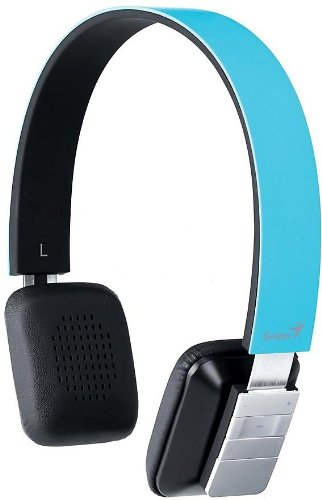
Figure 1: Genius HS-920BT Bluetooth Headset (Blue)
This image displays the Genius HS-920BT Bluetooth Headset in blue, viewed from an angle, highlighting its adjustable headband and earcup design.
Características principais:
- Wireless Bluetooth connectivity for audio and calls (A2DP support)
- Integrated rechargeable Lithium-Ion battery
- Micrófono incorporado para comunicación mans libres
- On-ear controls for volume adjustment, track skipping (AVRCP support)
- Diadema axustable para un axuste cómodo
- 40 mm driver units for clear sound
4. Configuración
4.1 Carga dos auriculares
Before initial use, fully charge the headset. Use the provided USB charging cable.
- Conecta o extremo pequeno do cable de carga USB ao porto de carga dos auriculares.
- Conecta o extremo máis grande do cable USB a un porto USB con alimentación (por exemplo, un ordenador ou un adaptador de parede USB).
- The LED indicator on the headset will illuminate during charging and change color or turn off when fully charged. Refer to the headset's LED behavior for specific indications.
Unha carga completa adoita tardar aproximadamente de 2 a 3 horas.
4.2 Emparellamento cun dispositivo Bluetooth
To use the HS-920BT wirelessly, you must pair it with your Bluetooth-enabled device.
- Encendido: Press and hold the Power button on the headset until the LED indicator flashes, usually alternating blue and red, indicating pairing mode.
- Activar Bluetooth: On your smartphone, tablet, or PC, enable Bluetooth functionality.
- Busca Dispositivos: In your device's Bluetooth settings, search for available devices. The headset should appear as "HS-920BT".
- Seleccionar e emparellar: Select "HS-920BT" from the list. If prompted for a passcode, enter "0000" (four zeros).
- Confirmación: Once paired, the headset's LED indicator will typically flash blue slowly, and your device will confirm the connection.
The headset will automatically attempt to reconnect to the last paired device when powered on, if that device's Bluetooth is active and within range.
5. Instrucións de funcionamento
The HS-920BT features intuitive controls located on the earcup.

Figure 2: Earcup Controls of HS-920BT
This image shows a close-up of the right earcup of the Genius HS-920BT Bluetooth Headset, detailing the control buttons for power, volume, and track navigation.
5.1 Encendido/apagado
- Encendido: Manteña premido o botón de acendido/apagado durante aproximadamente 3 segundos ata que o indicador LED parpadee en azul.
- Apagado: Manteña premido o botón de acendido durante aproximadamente 3 segundos ata que o indicador LED se apague.
5.2 Reprodución de música
- Reproducir/Pausa: Preme o botón Reproducir/Pausa unha vez.
- Próxima pista: Press the "Next Track" button (usually marked with a forward arrow).
- Pista anterior: Press the "Previous Track" button (usually marked with a backward arrow).
5.3 Xestión de chamadas
- Responder/Finalizar chamada: Press the Multi-function button (often the same as Play/Pause) once during an incoming call to answer, or once during a call to end it.
- Rexeitar a chamada: Manteña premido o botón multifunción durante aproximadamente 2 segundos durante unha chamada entrante.
- Volver a marcar o último número: Prema dúas veces o botón multifunción cando non estea nunha chamada.
5.4 Control de volume
- Aumentar o volume: Preme o botón para subir o volume (+).
- Diminuír o volume: Prema o botón para baixar o volume (-).
6. Mantemento
Proper care ensures the longevity of your headset.
- Limpeza: Usa un pano suave e seco para limpar os auriculares. Non empregues produtos de limpeza abrasivos nin disolventes.
- Almacenamento: Garde os auriculares nun lugar fresco e seco, lonxe da luz solar directa e de temperaturas extremas.
- Coidado da batería: Para prolongar a duración da batería, evite descargala completamente con frecuencia. Cargue os auriculares con regularidade, mesmo se non os usa durante períodos prolongados.
- Exposición á auga: Os auriculares non son impermeables. Evite a exposición á auga ou á humidade excesiva.
7 Solución de problemas
If you encounter issues with your HS-920BT headset, refer to the following common solutions:
| Problema | Posible Solución |
|---|---|
| Os auriculares non se acende. | Ensure the battery is charged. Connect the headset to a power source using the USB cable. |
| Non se poden emparellar os auriculares cun dispositivo. |
|
| Sen son ou volume baixo. |
|
| A calidade da chamada é mala. |
|
8. Especificacións
| Nome do modelo: | HS-920BT |
| Tecnoloxía sen fíos: | Bluetooth |
| Unidades controladoras: | 40 mm |
| Batería: | Ión de litio recargable integrada |
| Tipo de control: | Volume Control, Track Navigation, Call Management |
| Micrófono: | Integrado |
| Pro compatiblefiles: | A2DP, AVRCP |
| Plataforma de hardware: | PC, Smartphone, Tablet |
| Peso do artigo: | 110 gramos |
| Dimensións (LxWxH): | 13.6 x 17.3 x 2.9 cm |
9. Garantía e soporte
For warranty information and technical support, please refer to the warranty card included with your product or visit the official Genius websitio. Garde o recibo da compra como xustificante da mesma.
For further assistance, you may contact Genius customer service through their official channels.


