Introdución
This manual provides essential information for setting up, operating, maintaining, and troubleshooting your Apple iPad Air 2. Please read this guide thoroughly to ensure optimal use of your device.
1. Configuración e configuración inicial
1.1 Unboxing Your iPad Air 2
Carefully remove your iPad Air 2 and its accessories from the packaging. The box typically contains the iPad Air 2 device, a Lightning to USB cable, and a USB power adapter.
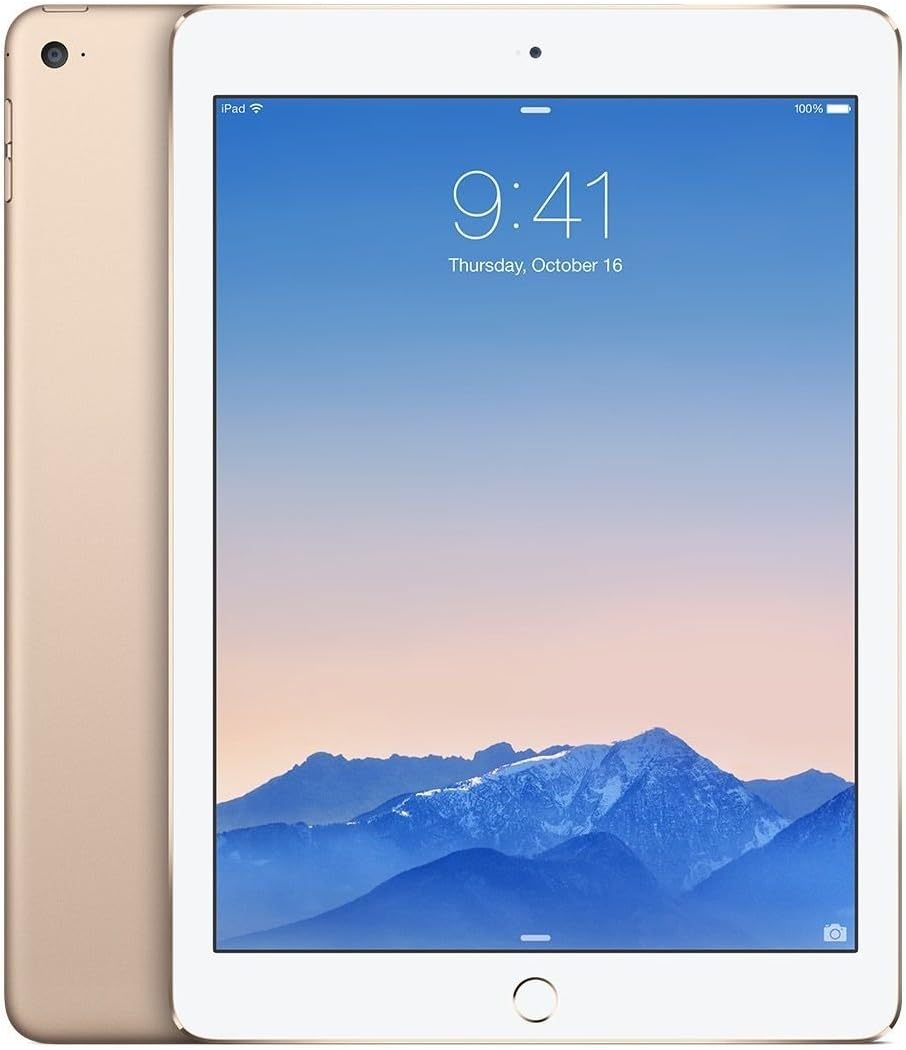
Imaxe: Anverso e reverso view of the gold Apple iPad Air 2, showcasing its thin profile and gold finish.
1.2 Carga do dispositivo
Before first use, it is recommended to fully charge your iPad Air 2. Connect the Lightning to USB cable to the iPad's charging port and the USB power adapter. Plug the adapter into a power outlet. The battery icon on the screen will indicate charging status.
1.3 Initial Setup Process
Upon powering on your iPad Air 2 for the first time, you will be guided through the initial setup steps:
- Select Language and Region: Choose your preferred language and country/region.
- Conectar a wifi: Select a Wi-Fi network and enter the password if required.
- Activar os servizos de localización: Decide whether to enable or disable location services.
- Set Up Touch ID: Follow the on-screen instructions to register your fingerprint for secure unlocking and purchases.
- Create a Passcode: Set a 4-digit or custom alphanumeric passcode.
- Restore or Set Up as New iPad: You can restore from an iCloud or iTunes backup, or set up the device as new.
- Sign in with Apple ID: Enter your Apple ID and password. If you don't have one, you can create one.
- Agree to Terms and Conditions: Read and accept Apple's terms and conditions.
- Set Up Siri: Configure Siri, Apple's voice assistant.
- Send Diagnostics: Choose whether to send diagnostic and usage data to Apple.
2. Operating Your iPad Air 2
2.1 Navegación básica
- Botón de inicio: Press once to return to the Home screen. Double-press to open the multitasking switcher. Press and hold to activate Siri.
- Touch ID: Use your registered fingerprint on the Home button to unlock the device or authorize purchases.
- Xestos: Swipe from the bottom for Control Center, swipe from the top for Notification Center, pinch to zoom, and swipe between apps.

Imaxe: Lateral view of the gold Apple iPad Air 2, emphasizing its remarkably thin design.
2.2 Uso da cámara
Your iPad Air 2 features an 8MP iSight camera on the rear and a 1.2MP FaceTime HD camera on the front.
- Facendo fotos: Open the Camera app, select Photo mode, and tap the shutter button.
- Gravación de vídeos: Select Video mode and tap the record button to start/stop.
- FaceTime Calls: Use the FaceTime app with the front camera for video calls over Wi-Fi.
2.3 Conectividade Wi-Fi
Para conectarse a unha rede wifi:
- Ir a Configuración > Wi-Fi.
- Activa a wifi.
- Seleccione a rede desexada da lista.
- Introduza o contrasinal se se lle solicita.
3. Mantemento e coidados
3.1 Cleaning Your iPad Air 2
To clean your iPad Air 2, use a soft, lint-free cloth. Avoid using abrasive materials, aerosols, solvents, or ammonia-based cleaners. For the screen, a slightly damp cloth is sufficient. Do not spray cleaners directly onto the device.
3.2 Actualizacións de software
Keep your iPad's software up to date for the best performance and security. Go to Configuración > Xeral > Actualización de software para comprobar e instalar as actualizacións dispoñibles.
3.3 Coidado coa batería
Para maximizar a duración da batería:
- Evita temperaturas extremas.
- Keep the software updated.
- Axusta o brillo da pantalla.
- Desactiva o Wi-Fi ou o Bluetooth cando non esteas en uso.
4. Solución de problemas comúns
4.1 O dispositivo non responde
If your iPad Air 2 is unresponsive, try a force restart: Press and hold both the Home button and the Top (Sleep/Wake) button for at least ten seconds, until you see the Apple logo.
4.2 Problemas de conexión Wi-Fi
If you're experiencing Wi-Fi issues:
- Asegúrate de que o wifi estea activado en Configuración.
- Reinicia o teu enrutador Wi-Fi.
- Ir a Settings > General > Reset > Reset Network Settings.
4.3 As aplicacións fallan ou conxélanse
If an app is misbehaving, try closing it: Double-press the Home button, then swipe the app's preview upward to close it. If the issue persists, delete and reinstall the app.
5. Especificacións do produto
| Característica | Especificación |
|---|---|
| Nome do modelo | iPad Air 2 |
| Número de modelo do artigo | MH182LL/A |
| Mostrar | 9.7-inch Retina Display, 2048x1536 resolution at 264 ppi |
| Procesador | A8X chip with 64-bit architecture, M8 motion coprocessor |
| RAM | 2 GB DDR2 |
| Almacenamento | 64 GB |
| Sistema Operativo | iOS 8 (upgradable) |
| Cámara traseira | 8 MP iSight Camera |
| Cámara frontal | 1.2 MP FaceTime HD Camera |
| Conectividade sen fíos | Wi-Fi (802.11a/b/g/n/ac), Bluetooth 4.0 |
| Duración da batería | Ata 10 horas |
| Dimensións do produto | 30 x 30 x 6 polgadas (dimensións da embalaxe) |
| Peso do elemento | 15.4 onzas |
| Cor | Ouro |

Imaxe: En ángulo view of the gold Apple iPad Air 2, highlighting its sleek design and display.
6. Vídeos de produtos
Neste momento non hai vídeos oficiais de produtos do vendedor dispoñibles para a súa inserción.
7. Información da garantía
Your Apple iPad Air 2 comes with a one-year limited warranty from Apple, covering manufacturing defects. For detailed warranty terms and conditions, please refer to the documentation included with your device or visit the official Apple websitio.
8. Atención ao cliente
For further assistance, technical support, or service, please visit the official Apple Support website or contact Apple Customer Service directly. You can find contact information and extensive support resources at support.apple.com.


