1. Introdución
This manual provides essential information for the safe and efficient operation of your COTEC SP2000-224 Pure Sine Wave Inverter. This advanced inverter offers high efficiency and power density, featuring selectable output voltage and frequency, all housed within a robust aluminum casing. Please read this manual thoroughly before installation and use to ensure proper function and longevity of the device.
2. Información de seguridade
Observe sempre as seguintes precaucións de seguridade para evitar lesións e danos no inversor ou no equipo conectado:
- Ventilación: Asegúrese de que haxa unha ventilación axeitada arredor do inversor. Non bloquee as aberturas de ventilación.
- Ambiente: Install the inverter in a dry, cool, and well-ventilated area, away from direct sunlight, heat sources, and flammable materials.
- Conexión a terra: Properly ground the inverter chassis to prevent electrical shock.
- Entrada CC: Connect the inverter only to a 24V DC battery bank. Ensure correct polarity (positive to positive, negative to negative). Reverse polarity will damage the unit.
- Saída CA: Do not overload the inverter. Ensure the total wattage of connected AC devices does not exceed the inverter's rated output.
- Servizo: Do not attempt to open or service the inverter yourself. Refer all servicing to qualified personnel.
- Exposición á auga: Keep the inverter away from water, rain, or excessive moisture.
3. Características do produto
The COTEC SP2000-224 Inverter incorporates several advanced features for reliable power conversion:
- Saída de onda sinusoidal pura para electrónica sensible.
- Power ON / OFF remote control capability via a dedicated green terminal.
- Full input and output isolation for enhanced safety.
- Temperature and load-controlled cooling fan for efficient heat dissipation.
- User-friendly interface with 3-color LED status indicators.
- Output frequency selectable between 50 Hz and 60 Hz via DIP switch.
- Vol. De saídatage selectable via DIP switch.
- Power saving mode adjustable via a variable resistor.
- Comprehensive input protection: Reverse Polarity (via fuse), Under Voltage, Over Voltage.
- Comprehensive output protection: Short Circuit, Overload, Over Temperature.
- Certifications: E13, UL, CE, FCC approved.
4. Configuración e instalación
Unha instalación axeitada é crucial para o rendemento e a seguridade do inversor.
4.1 Instalación física
Mount the inverter securely in a location that meets the safety requirements mentioned in Section 2. Ensure sufficient space around the unit for airflow.
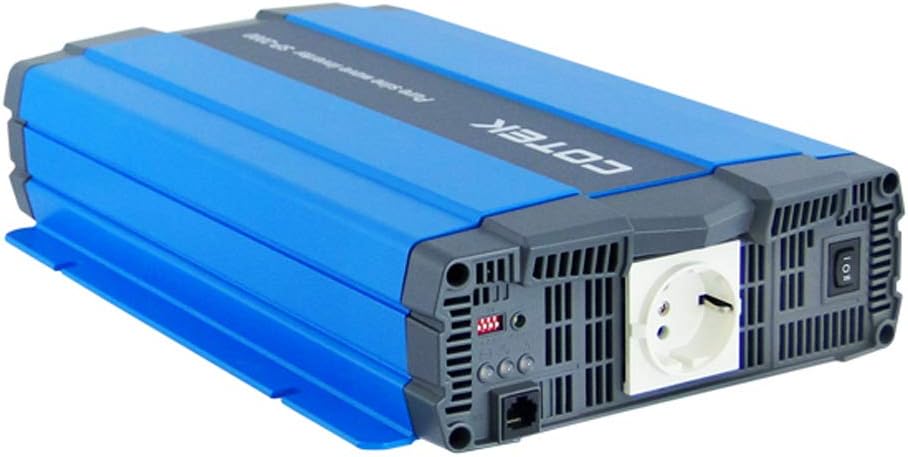
Figura 4.1: En ángulo view of the COTEC SP2000-224 Pure Sine Wave Inverter, showcasing its robust blue and gray casing.
4.2 Conexión de entrada de CC
Connect the inverter to a 24V DC battery bank using appropriate gauge cables. Ensure the positive (+) terminal of the inverter connects to the positive terminal of the battery, and the negative (-) terminal of the inverter connects to the negative terminal of the battery. Install an appropriate fuse or circuit breaker in the positive DC line close to the battery.

Figura 4.2: Traseira view of the inverter, highlighting the DC input terminals (red for positive, black for negative), the chassis ground screw, and the remote control terminal.
4.3 Chassis Ground Connection
Connect the chassis ground terminal (labeled 'CHASSIS GROUND') to a reliable earth ground point. This is a critical safety step.
4.4 AC Output and Controls
The inverter features a standard AC outlet and control switches on its front panel.

Figura 4.3: Fronte view of the inverter, displaying the AC output socket, the main power switch, LED indicators, and DIP switches for configuration.
4.5 Configuración do interruptor DIP
The inverter features DIP switches for configuring output frequency and voltage. Refer to the specifications table (Section 7) or the product label for specific settings. Ensure the inverter is powered off before adjusting DIP switches.
- Frecuencia de saída: Select 50 Hz or 60 Hz based on your regional requirements.
- Vol. De saídatage: Seleccione o volume de saída de CA desexadotage (e.g., 230VAC for this model).
5. Instrucións de funcionamento
5.1 Acendido/Apagado
After all connections are secure and verified, switch the main power button on the inverter to the 'ON' position. The LED indicators will illuminate to show the inverter's status. To power off, switch the button to 'OFF'. A remote control terminal is also available for external ON/OFF control.
5.2 Indicadores LED
The 3-color LED indicators provide visual feedback on the inverter's operational status and any potential faults. Consult the product documentation or the specifications table for a detailed explanation of each LED state.
5.3 Modo de aforro de enerxía
The power saving mode can be adjusted via a variable resistor. This feature helps reduce quiescent current draw when no load or a very light load is connected, conserving battery power.
5.4 Conexión de cargas de CA
Plug your AC appliances into the inverter's AC output socket. Ensure the total power consumption does not exceed the inverter's continuous power rating (2000W for this model). For inductive loads (e.g., motors, refrigerators), consider their surge power requirements, which can be significantly higher than their running power.
6. Mantemento
Regular maintenance ensures optimal performance and extends the lifespan of your inverter.
- Limpeza: Manteña o inversor limpo e libre de po. Use un pano seco para limpar o exterior. Non empregue produtos de limpeza líquidos.
- Ventilación: Periodically check that the cooling fan and ventilation openings are clear of obstructions.
- Conexións: Inspect all DC and AC connections regularly to ensure they are tight and free from corrosion. Loose connections can cause overheating and poor performance.
- Mantemento da batería: Follow the manufacturer's recommendations for your battery bank's maintenance.
7 Solución de problemas
If the inverter is not functioning correctly, refer to the following common issues and solutions:
- Sen potencia de saída:
- Check DC input connections and battery voltage.
- Verify the inverter's power switch is ON.
- Check for blown DC input fuses (if applicable).
- Indicación de sobrecarga:
- Reducir a carga total conectada ao inversor.
- Disconnect and reconnect the load to reset the inverter.
- Over Temperature Indication:
- Asegúrese de que haxa unha ventilación axeitada arredor do inversor.
- Comprobe se o ventilador de refrixeración está funcionando.
- Reduce the load if operating in a hot environment.
- Vol. De batería baixatage Alarm/Shutdown:
- Recharge the battery bank.
- Check battery connections for looseness or corrosion.
For persistent issues, contact COTEC customer support.
8. Especificacións
The following table details the technical specifications for the COTEC SP2000 series, with specific values for the SP2000-224 model highlighted where applicable.

Figura 8.1: Detailed technical specifications for the COTEC SP-2000 series, including the SP2000-224 model.
| Característica | Especificación |
|---|---|
| Marca | COTEK |
| Nome do modelo | SP2000 (SP2000-224 variant) |
| Potencia nominal | 2000 W |
| Surge Power (1 Sec) | 4000 W |
| Vol. De entrada CCtage | 24VDC (Operating Range: 21.0-33.0VDC) |
| Saída CA Voltage | 230VAC (selectable) |
| Frecuencia de saída | 50/60 Hz (seleccionable) |
| Forma de onda de saída | Pure Sine Wave (THD<3% at nominal load) |
| Eficiencia (máx.) | 93 % |
| Refrixeración | Temperature & load controlled fan |
| Temperatura de funcionamento | -20 °C a +40 °C |
| Temperatura de almacenamento | -30 °C a +70 °C |
| Dimensións (W x H x D) | 17.44 x 9.76 x 3.27 polgadas (443 x 248 x 83 mm) |
| Peso do elemento | 1 pounds (approximate, actual unit weight may vary) |
| Dimensións do paquete | 19 x 12 x 6 polgadas |
| Certificacións | E13, UL, CE, FCC approved |
8.1 Debuxos mecánicos
For detailed physical dimensions and mounting information, refer to the mechanical drawings below.
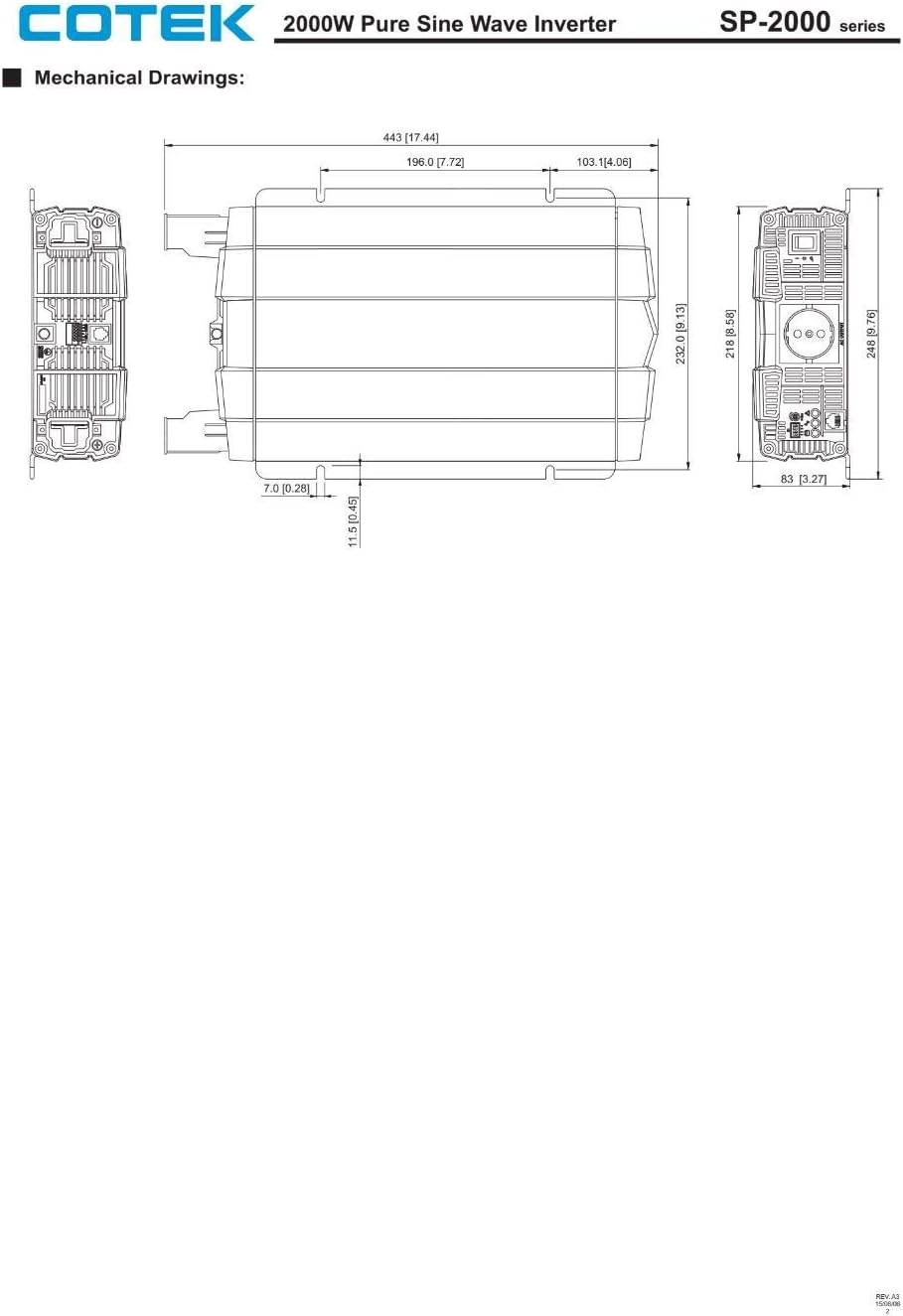
Figura 8.2: Mechanical drawings providing precise dimensions for installation planning.
9. Garantía e soporte
COTEC products are designed for reliability and performance. For warranty information, technical support, or service inquiries, please refer to the warranty card included with your product or visit the official COTEC websitio. Garde o recibo da compra como xustificante de compra para reclamacións de garantía.


