1. Produto rematadoview
The ABB IRC5 M2004 is a robust control module designed for industrial applications, specifically within robotics systems. This module is critical for managing and controlling various robotic functions, ensuring precise operation and integration. It operates at a rated current of 1A and a voltage of 230V, with a frequency range of 50/60Hz.
This manual provides essential information for the proper installation, operation, and maintenance of your IRC5 M2004 control module.
2. Configuración e conexións
Proper connection of the IRC5 M2004 control module is crucial for its functionality and safety. Refer to the diagram below for key connection points.
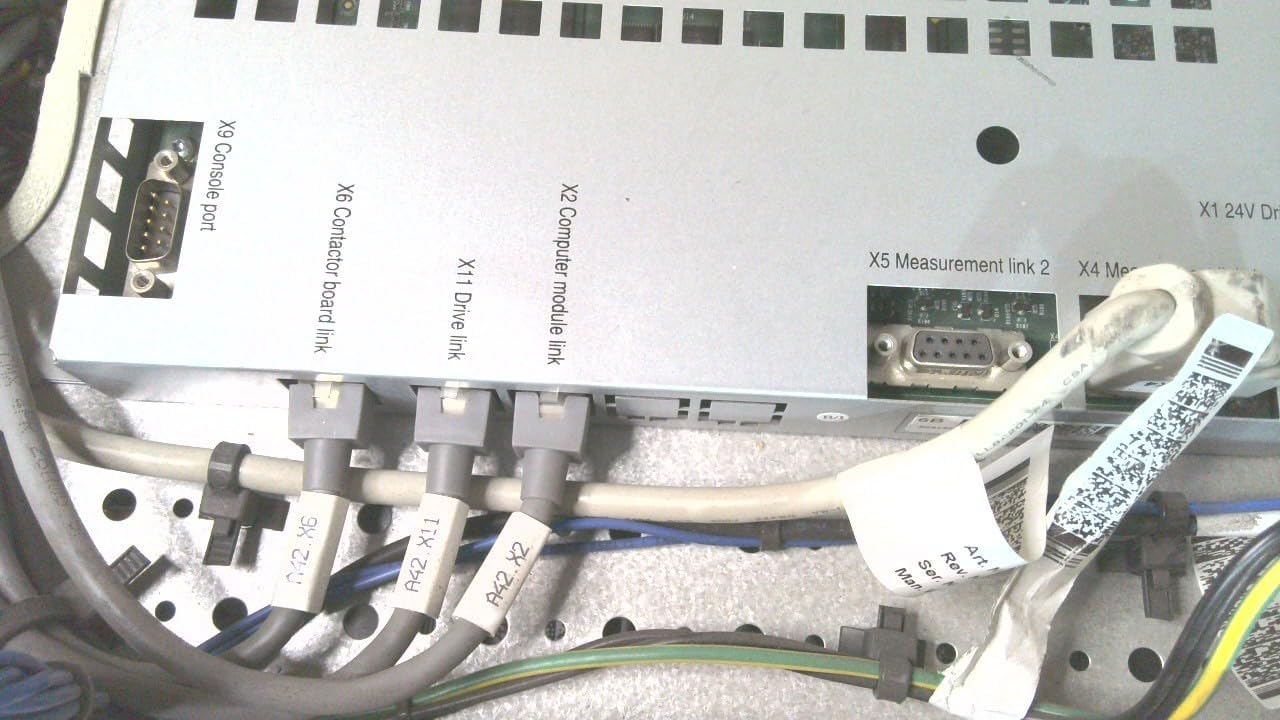
Figure 2.1: Module Connection Ports
This image displays the top panel of the ABB IRC5 M2004 control module, highlighting its various connection ports. Visible ports include the X9 Console port (a D-sub connector), X6 Contactor board link, X11 Drive link, X2 Computer module link, X5 Measurement link 2, and X4 Measurement link. Several cables are shown connected to these ports, indicating typical operational wiring. This view is essential for identifying the correct connection points during installation.
2.1. Identificación de portos
- X9 Console port: Used for direct console access and diagnostics.
- X6 Contactor board link: Connects to the contactor board for power control.
- X11 Drive link: Interface for connecting to motor drives.
- X2 Computer module link: Connects to the main computer or processing unit.
- X5 Measurement link 2: For secondary measurement data input.
- X4 Measurement link: For primary measurement data input.
2.2. Pasos da instalación
- Ensure the power supply is disconnected before making any connections.
- Mount the IRC5 M2004 module securely in its designated location, ensuring adequate ventilation.
- Connect the necessary cables to their respective ports as identified in Figure 2.1. Ensure all connections are firm and secure.
- Verify all cable routing to prevent strain or interference.
- Once all connections are made, you may proceed to power on the system.
3. Instrucións de funcionamento
The IRC5 M2004 control module operates as an integral part of the ABB robotics system. Its primary function is to process control signals and manage power distribution to connected components.
3.1. Acendido/apagado
- Encendido: After all connections are verified, apply 230V AC power to the system. The module will initiate its boot sequence.
- Apagado: To shut down the module, follow the system's standard shutdown procedure. Disconnect power only after the system has fully powered down.
3.2. Indicadores de estado
Refer to the system's main control panel or software interface for detailed status indicators. The module itself may have LED indicators for power, status, and error conditions. Consult the comprehensive system manual for specific LED patterns and their meanings.
4. Mantemento
Regular maintenance ensures the longevity and reliable operation of your IRC5 M2004 control module.
4.1. Limpeza
- Keep the module free from dust and debris. Use a soft, dry cloth for external cleaning.
- For internal cleaning (if required), ensure power is disconnected and use compressed air to remove dust from cooling vents and internal components. This should only be performed by qualified personnel.
4.2. Condicións ambientais
Ensure the module operates within its specified environmental conditions (temperature, humidity) to prevent damage. Avoid exposure to excessive moisture or extreme temperatures.
4.3. Actualizacións de firmware
Periodically check for firmware updates from ABB to ensure optimal performance and access to the latest features and bug fixes. Refer to the official ABB support portal for update procedures.
5 Solución de problemas
This section provides basic troubleshooting steps for common issues. For complex problems, contact ABB technical support.
5.1. Sen poder
- Verify the power cable is securely connected to both the module and the power source.
- Comprobe a fonte de alimentación voltage (230V AC) and frequency (50/60Hz).
- Inspect fuses or circuit breakers in the power distribution system.
5.2. Erros de comunicación
- Ensure all data cables (e.g., X2 Computer module link, X9 Console port) are properly connected and not damaged.
- Verify network settings and IP configurations if applicable.
- Restart the module and the connected control system.
5.3. Module Overheating
- Check for obstructions around the module's ventilation openings.
- Ensure the ambient temperature is within the specified operating range.
- Clean any dust accumulation from the cooling fins or fans.
6. Especificacións
Detailed technical specifications for the ABB IRC5 M2004 control module are provided below. Refer to the product label for specific unit details.

Figure 6.1: Product Rating Label
This image shows the technical specification label for the Efore SR 92E120, which is part of the ABB IRC5 M2004 module. It details the input voltage (230Vac 50-60Hz, 3.5A) and output voltages (+24V 5A, +24V 9A, +24V 5A, max 460W). The label also includes serial number, manufacturing week, and certifications (CE, cURus). This information is crucial for power supply compatibility and electrical safety.
| Atributo | Valor |
|---|---|
| Fabricante | FIG |
| Número de peza | IRC5 M2004 |
| Número de modelo do artigo | IRC5 M2004 |
| Corrente nominal | 1A |
| Voltage | 230 V |
| Frecuencia | 50/60 Hz |
| Peso do elemento | 41.7 libras (aprox. 18.9 kg) |
| Dimensións do produto | 0.75 x 0.39 x 0.59 polgadas (aprox. 1.9 x 1.0 x 1.5 cm) |
| Cantidade do paquete do artigo | 1 |
| ASIN | B00RY2E1Z2 |
| Data de primeira dispoñibilidade | 7 de novembro de 2019 |
7. Garantía e soporte
Information regarding the specific warranty terms for the ABB IRC5 M2004 control module was not provided in the available product data. Please refer to your purchase documentation or contact ABB directly for detailed warranty information.
For technical support, service, or further inquiries, please visit the official ABB website or contact their customer service department. Always provide your product model number (IRC5 M2004) and serial number when seeking support.
You can visit the ABB Store on Amazon for more products: ABB Store


