Introdución
The Logitech UE Boom is a 360-degree wireless Bluetooth speaker designed for portable audio. It features a durable, go-anywhere shape and is equipped with a water and stain resistant acoustic skin. This speaker allows for wireless music playback, phone calls, and can be paired with another UE Boom for stereo sound.

Imaxe: Fronte view of the Logitech UE Boom Wireless Bluetooth Speaker in Northern Light color.
Características clave
- Son de 360 graos: Delivers immersive audio in all directions.
- Deseño portátil: Versatile, cylindrical shape for easy transport.
- Water and Stain Resistant: Features a colorful acoustic skin with plasma coating for durability against water and stains.
- Conectividade sen fíos: Connects via Bluetooth from up to 50 feet away. Easy pairing via NFC for compatible devices.
- Double Up Feature: Wirelessly connect two UE BOOM speakers in stereo using the UE BOOM app for enhanced sound.
- Batería de longa duración: Rechargeable battery provides up to 15 hours of playback.
- Altavoz: Integrated crystal-clear speakerphone for calls.
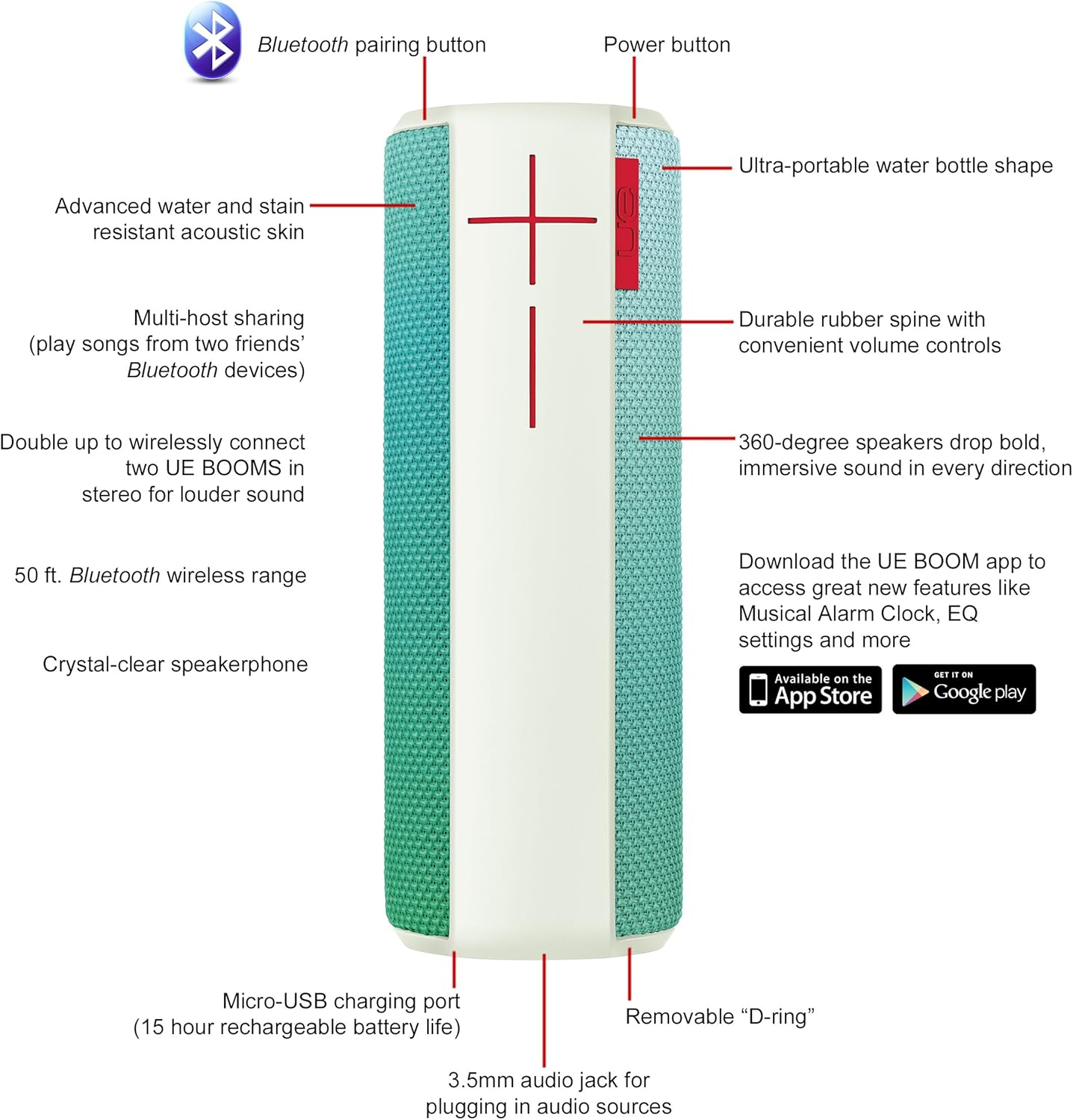
Image: Diagram highlighting key features and controls of the UE Boom speaker, including Bluetooth pairing button, power button, volume controls, micro-USB charging port, and 3.5mm audio jack.
Configuración
Cargando o altofalante
Before initial use, fully charge your UE Boom speaker. Connect the provided micro-USB cable to the charging port located at the bottom of the speaker and plug the other end into a USB power source. The speaker's battery provides approximately 15 hours of playback on a full charge.
Emparejamento Bluetooth
- Power on your UE Boom speaker by pressing the power button.
- Press and hold the Bluetooth pairing button (usually indicated by a Bluetooth icon) until you hear an audible tone and the LED indicator flashes rapidly.
- On your mobile device (smartphone or tablet), navigate to the Bluetooth settings.
- Select "UE Boom" from the list of available devices to pair.
- Once paired, you will hear a confirmation tone from the speaker.
Para dispositivos con NFC, simplemente toque o dispositivo na área NFC do altofalante para un emparellamento rápido.
Instrucións de funcionamento
Controis básicos
- Botón de encendido: Located on the top of the speaker to turn it on or off.
- Controis de volume: Large '+' and '-' buttons on the side of the speaker adjust the volume.
- Botón Bluetooth: Inicia o modo de emparellamento Bluetooth.
Using the UE BOOM App
Download the official UE BOOM app from your device's app store (available on App Store and Google Play) to unlock additional features:
- Musical Alarm Clock: Wake up to your favorite music.
- Activación remota: Turn your speaker on/off from your device.
- Configuración de ecualización: Personaliza o son profesionalfile á súa preferencia.
- Dobre: Connect two UE BOOM speakers for a stereo sound experience.
Funcionalidade do altofalante
When connected to a smartphone, the UE Boom can be used as a speakerphone. Incoming calls will be routed through the speaker, allowing for hands-free communication.
Mantemento
The UE Boom speaker features a water and stain resistant acoustic skin. To clean, gently wipe the speaker with a damp cloth. Avoid using harsh chemicals or abrasive cleaners. Ensure all ports are dry before charging or connecting other devices.
Resolución de problemas
- Sen enerxía: Ensure the speaker is charged. Connect it to a power source using the micro-USB cable.
- Non se pode emparellar por Bluetooth:
- Asegúrate de que o altofalante estea no modo de emparellamento (LED intermitente).
- Comproba que o Bluetooth estea activado no teu dispositivo.
- Achega o dispositivo ao altofalante (a menos de 50 metros).
- Tenta desvincular e volver vincular o dispositivo.
- Baixo volume ou son distorsionado:
- Axusta o volume tanto do altofalante como do dispositivo conectado.
- Asegúrate de que o altofalante estea completamente cargado.
- Check for any obstructions around the speaker.
- A aplicación non se conecta: Ensure the speaker is powered on and connected via Bluetooth to your device. Update the app to the latest version.
Especificacións do produto
| Nome do modelo | Logitech UE Boom Wireless Bluetooth Speaker |
| Número de modelo | 980-001023 |
| Marca | Logitech |
| Cor | Northern Light |
| Tipo de altofalante | Ao aire libre |
| Tecnoloxía de conectividade | Bluetooth, Sen fíos |
| distancia wireless | Ata 50 pés (15.24 metros) |
| Fonte de enerxía | Alimentado por batería (1 batería de iones de litio incluída) |
| Duración media da batería | 15 horas |
| Nivel de resistencia á auga | Impermeable |
| Peso do elemento | 2.2 libras |
| Dimensións do produto (LxWxH) | 2.6 x 2.6 x 7.1 polgadas |
| Material | Plástico |
| UPC | 097855112125 |
Vídeo oficial do produto
Vídeo: Un overview of the Logitech UE Boom speaker's features, including 360-degree sound, water resistance, wireless connectivity, and the ability to pair two speakers for louder sound. This video demonstrates the speaker's durability and portability in various environments.
Garantía e Soporte
The Logitech UE Boom Wireless Bluetooth Speaker comes with a Limited Warranty. For specific warranty details, please refer to the documentation included with your product or visit the official Logitech websitio.
For technical support or customer service, you may contact Logitech at: 646-454-3200.


