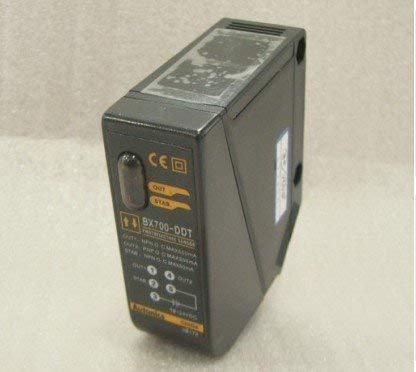
Diffuse Reflective Sensor with 700mm Sensing Distance
1. Introdución
This instruction manual provides essential information for the safe and effective use of the AUTONICS BX700-DDT Photoelectric Sensor. Please read this manual thoroughly before installation and operation to ensure proper functionality and to prevent potential hazards. Keep this manual in a safe place for future reference.
2. Precaucións de seguridade
Observe all safety warnings and instructions to prevent electric shock, fire, or product damage.
Ensure the power supply is disconnected before wiring, installation, or maintenance.
Non empregue esta unidade en ambientes con gases inflamables ou explosivos.
Comprobe a fonte de alimentación voltage está dentro do intervalo especificado (12-24 VDC).
Avoid installing the sensor in locations subject to direct sunlight, strong vibrations, or excessive dust and moisture.
Non desmonte nin modifique a unidade.
3. Produto rematadoview
The AUTONICS BX700-DDT is a diffuse reflective photoelectric sensor designed for reliable object detection. It operates by emitting light and detecting the reflected light from the target object. This model features a 700mm sensing distance and offers both NPN and PNP output types with selectable Light ON/Dark ON operation.
Figura 1: Fronte e lateral view of two AUTONICS BX700-DDT sensors. These sensors are compact, black, and feature connection terminals on one side.
Figura 2: detallada view of the AUTONICS BX700-DDT sensor's label, indicating the model number, output specifications (NPN/PNP), and power input (12-24VDC). It also shows the 'OUT' and 'STAB' indicators and adjustment buttons.
4. Especificacións
Modelo
BX700-DDT
Método de detección
Diffuse Reflective
Distancia de detección
700 mm
Fonte de alimentación
12-24 VDC
Tipo de saída
NPN & PNP Open Collector
Modo de operación
Light ON / Dark ON (Selectable)
Fabricante
AUTONICS
5. Instalación e configuración
5.1 Montaxe
Mount the sensor securely using appropriate brackets and fasteners. Ensure the sensing surface is clear of obstructions and positioned correctly relative to the target object. Avoid mounting the sensor where it may be exposed to excessive vibration or impact.
5.2 Consideracións ambientais
Temperatura: Operar dentro do rango de temperatura especificado para garantir un rendemento óptimo.
Humidade: Avoid environments with high humidity or condensation.
Light Interference: Minimize exposure to strong ambient light sources, such as direct sunlight or high-intensity lamps, which can interfere with sensing.
Po e sucidade: Keep the sensing surface clean to maintain reliable detection.
6. Cableado
Proper wiring is crucial for the sensor's functionality and safety. Refer to the wiring diagram typically found on the product label or in the full technical datasheet. The BX700-DDT supports both NPN and PNP output configurations.
General Wiring Guide:
Fío marrón: Connect to +VDC (12-24 VDC).
Fío azul: Connect to 0V / GND.
Fío negro: NPN Output.
Fío branco: PNP Output.
Importante: Asegúrese de que a polaridade e o volume sexan correctostage. Incorrect wiring can damage the sensor or connected equipment. Always disconnect power before making or changing wiring connections.
7. Funcionamento
7.1 Encendido
After completing installation and wiring, apply power to the sensor. The power indicator (if present) should illuminate.
7.2 Light ON / Dark ON Selection
The BX700-DDT allows selection between Light ON and Dark ON operation modes. This selection is typically made via a switch or button on the sensor body. Refer to Figure 2 for potential switch locations.
Light ON (NO - Normally Open): The output turns ON when light is received (object detected).
Dark ON (NC - Normally Closed): The output turns ON when light is NOT received (no object detected, or object blocks light).
7.3 Axuste da sensibilidade
For diffuse reflective sensors, sensitivity adjustment may be necessary to optimize detection for specific target objects and distances. This is often done via a potentiometer or push-button on the sensor. Adjust the sensitivity while observing the output indicator (OUT) to ensure reliable detection of the target and non-detection of background objects.
8. Mantemento
Regular maintenance ensures consistent performance and extends the lifespan of your sensor.
Limpeza: Periodically clean the sensing surface with a soft, dry cloth. Do not use abrasive cleaners or solvents.
Inspección: Check wiring connections for looseness or damage. Inspect the sensor body for any physical damage.
Verificación ambiental: Ensure the operating environment remains within specified conditions (temperature, humidity, dust).
9 Solución de problemas
Problema
Causa posible
Solución
O sensor non se acende
No power supply, incorrect wiring, faulty power supply.
Comprobe as conexións de alimentación e o volumetage. Verificar a funcionalidade da fonte de alimentación.
Incorrect Light ON/Dark ON setting, background interference, sensor misalignment.
Verify Light ON/Dark ON mode. Remove background interference. Realign sensor.
10. Garantía e soporte
This AUTONICS BX700-DDT sensor comes with a 1 ano de garantía desde a data de compra, cubrindo defectos de fabricación. Conserve o comprobante de compra para reclamacións de garantía.
For technical support, service, or warranty inquiries, please contact your authorized AUTONICS distributor or the seller. Do not attempt to repair the unit yourself, as this may void the warranty.