1. Produto rematadoview
The Delta Dore TYPHONE 2 is a modular telephone control unit designed for remote management of various home automation systems. It allows users to send commands to automatic devices such as heating systems, garden irrigation, and other household appliances using an existing telephone line. This unit supports both fixed and mobile telephony for versatile control.
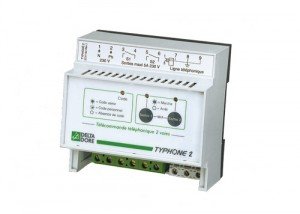
Figure 1: Delta Dore TYPHONE 2 Modular Telephone Control Unit. This image shows the compact design of the control unit, typically featuring connection ports and status indicators.
Características principais:
- Remote control via two 5A contacts for heating or automation.
- Local remote control available through the output.
- Menu accessible via voice synthesis (note: original product description mentions Spanish voice synthesis, but this manual is in English).
- Supports answering machines and faxes.
- Compatible with both fixed-line and mobile telephony.
- Display for output status.
- Designed for simple installation and high functionality.
2. Configuración e instalación
The TYPHONE 2 is designed for straightforward installation. Ensure all power is disconnected before beginning installation.
2.1. Montaxe da Unidade
Choose a suitable location for the unit, typically near your main telephone line connection and the appliances you wish to control. Ensure it is protected from moisture and extreme temperatures.
2.2. Conexións Eléctricas
- Fonte de alimentación: Connect the unit to a stable power source according to the specifications.
- Liña telefónica: Connect the existing telephone cable to the designated input port on the TYPHONE 2.
- Contactos de saída: Connect the two 5A output contacts to the devices you intend to control (e.g., heating system, irrigation pump). Refer to the wiring diagrams provided with the product packaging for specific connections.
2.3. Configuración inicial
Once all connections are secure, restore power to the unit. The TYPHONE 2 will perform an initial self-check. Follow the instructions in the voice synthesis menu (accessed via a connected telephone) to configure initial settings and assign functions to the output contacts.
3. Instrucións de funcionamento
The TYPHONE 2 offers both remote and local control capabilities.
3.1. Remote Control via Telephone
- Call the Unit: Dial the telephone number connected to your TYPHONE 2 unit from any fixed or mobile phone.
- Menú de acceso: Once the unit answers, you will hear a voice synthesis menu. Follow the audio prompts to navigate the options.
- Send Commands: Use your phone's keypad to enter commands for activating or deactivating the connected devices via the two output contacts.
- Comprobar o estado: The voice menu will also allow you to inquire about the current status of the output contacts.
Note: The specific commands and menu structure will be detailed in the full product documentation.
3.2. Control local
The unit may feature local controls (e.g., buttons or switches) to manually override or activate the output contacts directly. Refer to the physical unit and its accompanying quick start guide for details on local control options.
3.3. Answering Machine and Fax Compatibility
The TYPHONE 2 is designed to coexist with answering machines and fax machines on the same telephone line. It will typically detect incoming calls and allow the answering machine or fax to operate normally, only engaging its control functions when specific command tones are detected.
4. Mantemento
The Delta Dore TYPHONE 2 requires minimal maintenance to ensure optimal performance.
- Limpeza: Periodically wipe the unit with a soft, dry cloth. Do not use abrasive cleaners or solvents.
- Comprobación de conexión: Occasionally inspect all cable connections (power, telephone, output contacts) to ensure they are secure and free from damage.
- Condicións ambientais: Ensure the unit remains in a dry environment, away from direct sunlight and extreme temperatures, as specified in the product's environmental ratings.
5 Solución de problemas
If you encounter issues with your TYPHONE 2, try the following steps before contacting support:
- Sen enerxía:
- Check if the power adapter is securely plugged into both the unit and the wall outlet.
- Verifique que a toma de corrente funcione.
- Cannot Connect via Telephone:
- Ensure the telephone line is properly connected to the TYPHONE 2.
- Verify that the telephone line itself is active and receiving calls.
- Check if another device on the same line (e.g., answering machine) is interfering.
- Commands Not Executing:
- Confirm that the output contacts are correctly wired to the target devices.
- Ensure you are entering the correct commands as per the voice synthesis menu instructions.
- Check the output status display on the unit for any error indicators.
- Voice Menu Issues:
- Ensure your phone's volume is adequate.
- Try calling from a different phone to rule out phone-specific issues.
If the problem persists after attempting these troubleshooting steps, please refer to the Warranty & Support section for further assistance.
6. Especificacións técnicas
| Característica | Detalle |
|---|---|
| Marca | Delta Dore |
| Número de modelo | TYPHONE 2 |
| Número de peza | 3020031 |
| Fabricante | Delta Dore |
| Contactos de saída | 2 contacts, 5A rating |
| Compatibilidade | Fixed-line and mobile telephony, answering machines, fax machines |
| Pilas necesarias | Non |
| Primeira data dispoñible | 3 de abril de 2017 |
7. Garantía e soporte
7.1. Información da garantía
Specific warranty terms and conditions for the Delta Dore TYPHONE 2 are provided with the product at the time of purchase. Please refer to the documentation included in the product packaging or contact your retailer for detailed warranty information. Keep your proof of purchase for warranty claims.
7.2. Atención ao cliente
For technical assistance, troubleshooting beyond this manual, or inquiries regarding your Delta Dore TYPHONE 2, please contact Delta Dore customer support or your authorized dealer. Contact details can typically be found on the manufacturer's official websitio ou na embalaxe do produto.


