Introdución
Thank you for choosing the Altec Lansing MZX856-WHT Bluetooth Active Earbuds. These earbuds are designed to provide high-quality audio and durability for an active lifestyle. Featuring IPX67 waterproof protection and a long-lasting battery, they are suitable for various environments and activities. This manual provides detailed instructions on setup, operation, maintenance, and troubleshooting to ensure optimal performance of your earbuds.
Produto rematadoview
Contido do paquete
- Altec Lansing MZX856-WHT Bluetooth Active Earbuds
- 3 sets of Freebit ear tips (Small, Medium, Large)
- Flat tangle-free cable
- Bolsa de transporte
Características clave
- IPX67 Waterproof / Everything Proof: Designed to withstand water immersion and other elements, and they float.
- 20 Hours Battery Life: Extended playback time with spoken battery level notifications.
- 33' Wireless Range: Maintain connection from a significant distance.
- 9mm Neodymium Drivers: For clear and powerful audio.
- Freebit Ear Tips: Ensures a comfortable and secure fit for active use.
Identificación de compoñentes

Figura 1: Máisview of the Altec Lansing MZX856-WHT Bluetooth Active Earbuds, showing the earbuds, inline remote control, and the battery pack.
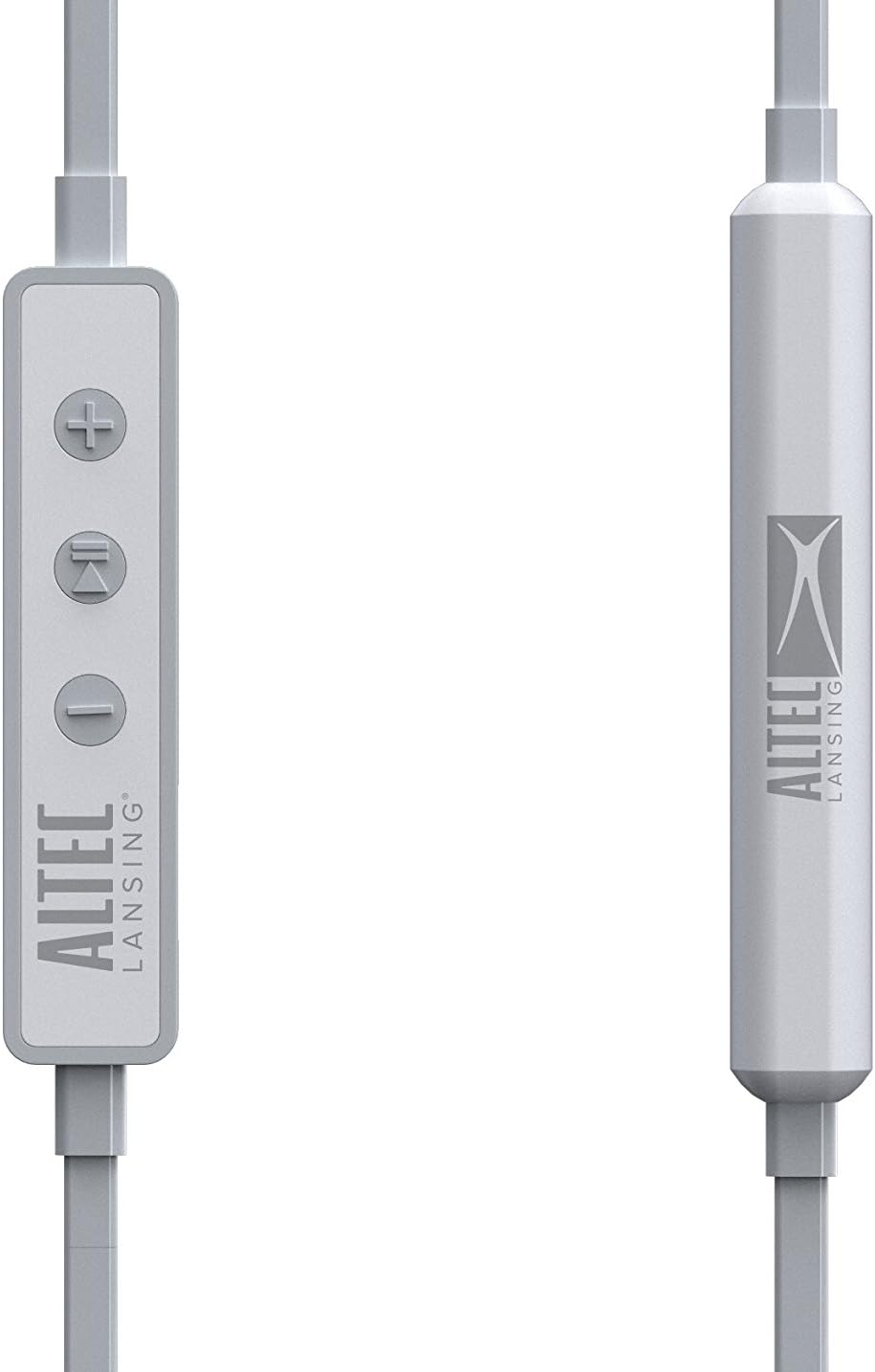
Figura 2: detallada view of the inline remote control, featuring volume up (+), multi-function (play/pause/call), and volume down (-) buttons. The battery pack is also visible.

Figure 3: The three included sizes of Freebit ear tips (Small, Medium, Large) designed for a secure and comfortable fit.

Figure 4: The earbuds with the Freebit ear tips attached, illustrating how they provide stability in the ear.
Configuración
Cargando os auriculares
Before first use, fully charge your earbuds. Connect the USB charging cable (not explicitly listed as included, but implied by 'USB' headphones jack) to the USB port on the earbuds and to a power source. The charging indicator light will show the charging status. A full charge provides approximately 20 hours of battery life.
Encendido/apagado
- Para acender: Press and hold the multi-function button (center button on the inline remote) until the indicator light illuminates and you hear an audible prompt.
- Para apagar: Press and hold the multi-function button until the indicator light turns off and you hear an audible prompt.
Emparejamento Bluetooth
Para conectar os auriculares a un dispositivo con Bluetooth:
- Asegúrate de que os auriculares estean apagados.
- Press and hold the multi-function button for approximately 5-7 seconds until the indicator light flashes rapidly (usually blue and red), indicating pairing mode.
- No teu dispositivo (teléfono intelixente, tableta, ordenador), activa o Bluetooth e busca os dispositivos dispoñibles.
- Select "MZX856-WHT" from the list of found devices.
- Once connected, the indicator light on the earbuds will typically flash slowly or turn solid blue, and you will hear a confirmation tone.
- Se se lle solicita un contrasinal, introduza "0000".
Os auriculares tentarán reconectarse automaticamente co último dispositivo emparellado ao acenderse.
Instrucións de funcionamento
Reprodución de música
- Reproducir/Pausa: Preme o botón multifunción unha vez.
- Subir volume: Prema o botón "+".
- Baixar volume: Prema o botón '-'.
- Próxima pista: Manteña premido o botón "+".
- Pista anterior: Manteña premido o botón '-'.
Xestión de chamadas
- Responder/Finalizar chamada: Prema o botón multifunción unha vez durante unha chamada entrante ou durante unha chamada activa.
- Rexeitar a chamada: Manteña premido o botón multifunción durante aproximadamente 2 segundos durante unha chamada entrante.
- Asistente de voz: Preme dúas veces o botón multifunción para activar o asistente de voz do teu dispositivo (por exemplo, Siri ou o Asistente de Google).
Usando os auriculares
Select the Freebit ear tips that provide the most comfortable and secure fit for your ears. The ear tips are designed to sit snugly within the outer ear to prevent the earbuds from falling out during movement. Experiment with the different sizes (Small, Medium, Large) to find your ideal fit.
Coidados e Mantemento
- Limpeza: Regularly clean the earbuds and ear tips with a soft, dry cloth. For the ear tips, you may use a slightly damp un pano e xabón suave, asegurándose de que estean completamente secos antes de volvelos colocar.
- Clasificación impermeable: The MZX856-WHT earbuds are IPX67 rated, meaning they are protected from dust ingress and can withstand immersion in water up to 1 meter for 30 minutes. Ensure the USB port cover is securely closed before exposing the earbuds to water.
- Almacenamento: When not in use, store the earbuds in the provided carry pouch to protect them from dust and damage. Avoid storing in extreme temperatures.
- Coidado do cable: The flat tangle-free cable is designed to resist tangling. Avoid sharp bends or excessive pulling on the cable.
Resolución de problemas
| Problema | Causa posible | Solución |
|---|---|---|
| Os auriculares non se acenderon. | Batería pouca ou nula. | Charge the earbuds fully using the USB cable. |
| Non se pode emparellar co dispositivo. | Auriculares sen modo de emparellamento; Bluetooth desactivado no dispositivo; dispositivo demasiado lonxe. | Ensure earbuds are in pairing mode (flashing red/blue). Turn Bluetooth on your device. Move device closer to earbuds (within 33 feet). Forget previous pairings on your device and try again. |
| Sen son ou volume baixo. | Volume too low on earbuds or device; earbuds not properly connected. | Increase volume on both earbuds and connected device. Re-pair the earbuds. Ensure earbuds are securely seated in your ears. |
| O son entra e sae. | Interferencia; dispositivo demasiado lonxe; batería baixa. | Move closer to the connected device. Avoid environments with strong Wi-Fi or other wireless interference. Charge the earbuds. |
| Ear tips keep coming off. | Incorrect size or improper attachment. | Ensure ear tips are securely attached to the earbuds. Try a different size of Freebit ear tips for a better fit. |
Especificacións técnicas
| Característica | Especificación |
|---|---|
| Nome do modelo | MZX856-WHT |
| Tecnoloxía de conectividade | Sen fíos (Bluetooth) |
| distancia wireless | 33 pés (aproximadamente 10 metros) |
| Duración da batería | Ata 20 horas |
| Nivel de resistencia á auga | IPX67 (Impermeable) |
| Tamaño do controlador | Neodimio de 9 mm |
| Tipo de control | Control de medios |
| Colocación do oído | En Orella |
| Factor de forma | En Orella |
| Jack para auriculares | USB (para cargar) |
| Material | Plástico |
| Peso do elemento | 8.8 onzas (aprox. 249 gramos) |
| Dimensións do produto | 4.5 x 2.3 x 5.8 polgadas |
| Fabricante | Sakar International, Inc. |
Garantía e Soporte
For warranty information and customer support, please refer to the documentation included with your product or visit the official Altec Lansing website. You may also contact Sakar International, Inc., the manufacturer, for assistance. Keep your proof of purchase for any warranty claims.
Unha versión dixital da guía do usuario pode estar dispoñible en: Altec Lansing MZX856 User Guide (PDF)


