Introdución
This manual provides instructions for the HAVIT HV-KB366L RGB Backlit Mechanical Gaming Keyboard. This keyboard features blue mechanical switches, full anti-ghosting, and customizable RGB backlighting, designed for reliable performance.
Instrucións de configuración
Conectando o teclado
- Localiza un porto USB dispoñible no teu ordenador.
- Connect the USB cable from the HAVIT HV-KB366L keyboard to the USB port on your computer.
- O teclado é plug-and-play e o teu sistema operativo debería recoñecelo automaticamente.
Compatibilidade do sistema
- Compatible with Windows 10 and other Windows operating systems.
- Mac OS supports 6-key rollover only.
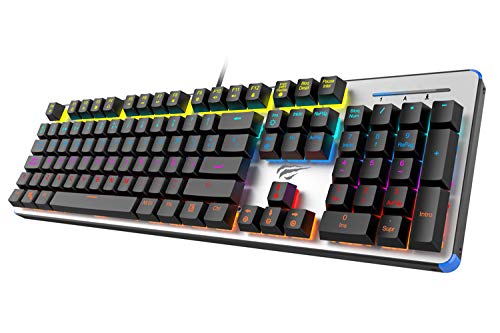
Figure 1: HAVIT HV-KB366L RGB Backlit Mechanical Gaming Keyboard. An overhead view do teclado, mostrarasing its full layout with RGB lighting on the keys and a white frame.
Instrucións de funcionamento
Interruptores de chaves mecánicos
The keyboard is equipped with blue mechanical switches, providing tactile feedback and an audible click with each keystroke. This design is intended for precise input during typing and gaming.
Anti-Ghosting Feature
The full key anti-ghosting mechanism ensures that all key presses are registered accurately, even when multiple keys are pressed simultaneously. This feature is beneficial for fast-paced gaming.
Axuste da luz de fondo
- To change the backlight color or mode, press the Fn tecla simultaneamente coa Retroiluminado key. Repeated presses will cycle through available modes and colors.
- Marquee Mode: In 7-color backlit mode (non-breathing), press the Retroiluminado key once to activate marquee mode. Press the Retroiluminado key again to deactivate marquee mode and return to 7-color backlit mode.
- Niveis de brillo: The backlight offers 4 levels of brightness adjustment.
- Breathing Rate: The breathing effect has 10 adjustable levels.
Mantemento
Limpeza do teclado
- Desconecte o teclado do ordenador antes de limpalo.
- Use un pano suave e seco para limpar a superficie do teclado.
- Para o po e os residuos entre as teclas, use aire comprimido.
- Evita o uso de produtos químicos agresivos ou materiais abrasivos, xa que poden danar o acabado ou as tapas das teclas.
Durabilidade
The keyboard features an aluminum top housing with a sanded finish and a metal base, contributing to its overall durability and stable performance.
Resolución de problemas
O teclado non responde
- Asegúrate de que o cable USB estea conectado correctamente tanto ao teclado como ao ordenador.
- Tenta conectar o teclado a un porto USB diferente do teu ordenador.
- Proba o teclado noutro ordenador para determinar se o problema é co teclado ou co porto USB do ordenador.
Backlight Not Working or Incorrect
- Comprobe que o teclado estea conectado correctamente e que reciba alimentación.
- Preme Fn + Backlit key to cycle through backlight modes and ensure it is not turned off or set to a very low brightness.
- Refer to the "Backlight Adjustment" section for detailed instructions on changing modes and brightness.
Especificacións
| Marca | HAVIT |
| Número de modelo | HV-KB366L |
| Fabricante | HAVIT |
| Dimensións do produto | 50.5 x 17.6 x 6 centímetros |
| Peso do elemento | 1.33 kg |
| Tecnoloxía de conectividade | Con cable (USB) |
| Descrición do teclado | Teclado mecánico para xogos |
| Característica especial | RGB Backlit, Anti-Ghosting |
| Plataforma de hardware | Portátil, PC |
| Sistema Operativo | Windows 10 (and compatible), Mac OS (6-key rollover) |
| Voltage | 5 voltios |
| Compoñentes incluídos | Cable USB |
Garantía e soporte
Información da garantía
Specific warranty details for the HAVIT HV-KB366L keyboard are not provided in the product data. Please refer to the product packaging or contact HAVIT directly for warranty terms and conditions.
Atención ao cliente
For technical assistance, troubleshooting, or further inquiries, please contact HAVIT customer support through their official websitio ou a información de contacto proporcionada coa súa compra.


