Introdución
The Master Lock No. X055ML large digital combination safe is designed for protecting valuable items such as laptops, jewelry, documents, money, and other electronics within a home environment. Its internal dimensions are suitable for A4-sized documents. This safe features a programmable electronic lock, allowing users to set their own combination, and includes an override key for access in case of a forgotten code. The interior is carpeted to prevent scratching of stored items. For enhanced security, the safe can be bolted down using the included hardware, preventing unauthorized removal. The robust steel construction and pry-resistant door with two live-locking bolts provide a high level of security for your belongings.
Información de seguridade
- Always keep the override keys in a secure location away from the safe. Do not store them inside the safe.
- Ensure the safe is securely bolted down to a floor or wall to prevent unauthorized removal, if applicable.
- Do not store flammable materials or open containers of liquids inside the safe.
- Keep the keypad clean and dry to ensure proper operation.
- Substitúa as pilas canto apareza o indicador de batería baixa para evitar que o dispositivo quede bloqueado.
Contido do paquete
- 1 x Master Lock Security Safe (Model X055ML)
- 2 x Override Keys
- 1 x Bolt Down Kit (for securing the safe)
- Manual de usuario (este documento)
Configuración
1. Instalación da batería
The safe requires 4 AA batteries (not included) for the electronic lock to function. The battery compartment is located on the inside of the safe door. Open the safe using the override key if it is currently locked.
- Localice a tapa do compartimento das baterías na parte interior da porta da caixa forte.
- Remove the cover by sliding it or unscrewing it, depending on the design.
- Insira 4 pilas AA novas, asegurándose de manter a polaridade correcta (+/-).
- Coloque a tapa do compartimento da batería de forma segura.
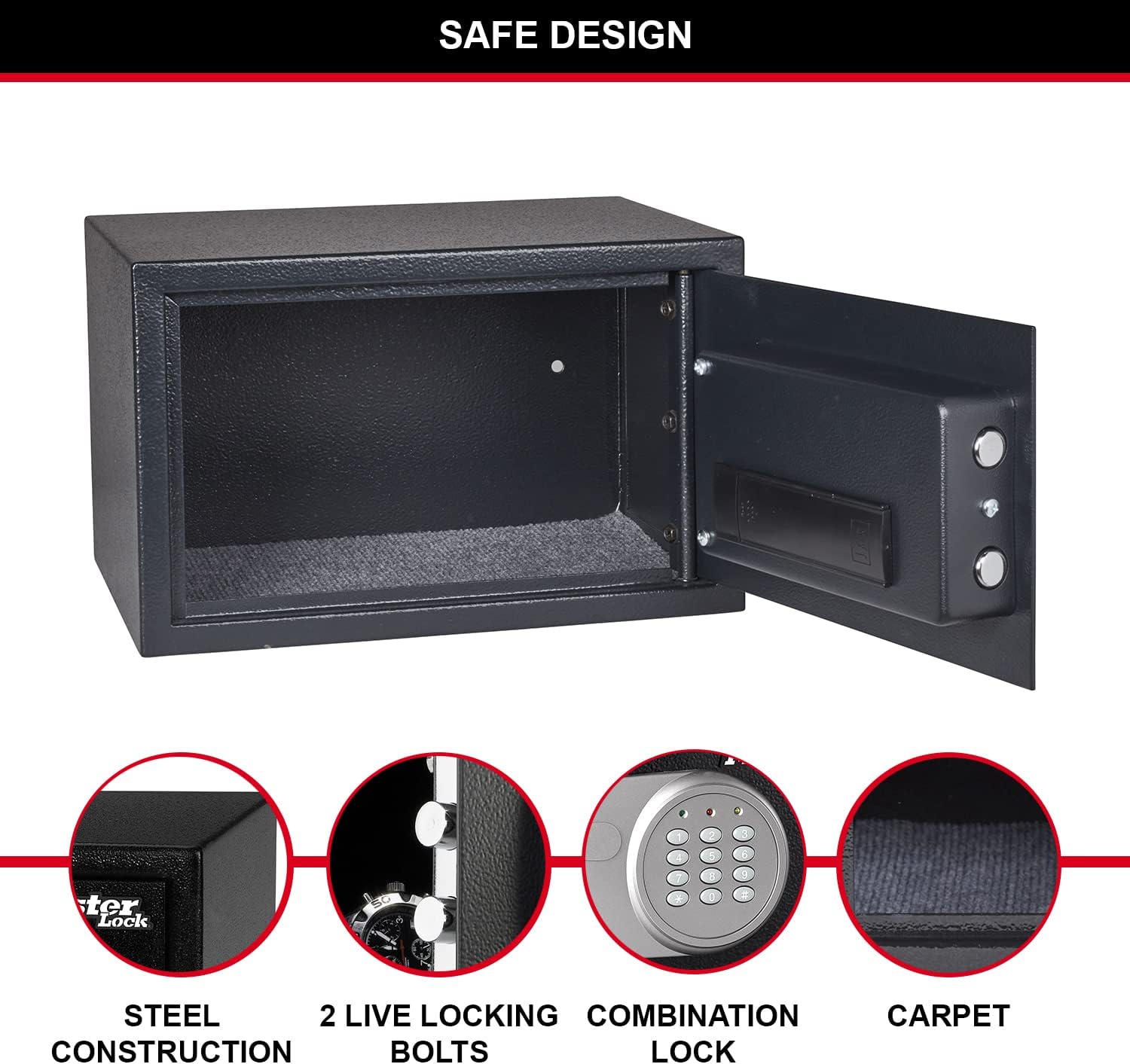
Figure 1: Inside of the safe door, highlighting the battery compartment and live-locking bolts.
2. Setting Your Personal Combination
Upon first use, or after battery replacement, you will need to set your personal combination. The factory default code is typically 1-2-3-4, but it is highly recommended to change it immediately.
- With the safe door open, locate the red reset button on the inside of the door, near the battery compartment.
- Press the red reset button. The yellow light on the keypad will illuminate.
- Enter your new 3 to 8 digit combination on the keypad.
- Press the "A" or "B" button (or "#" or "*" depending on model) to confirm. The yellow light will turn off, indicating the new code is set.
- Test your new combination with the door open to ensure it works correctly before closing the safe.
3. Securing the Safe (Optional)
For maximum security, the safe can be bolted to a floor or wall using the included bolt-down kit. This prevents unauthorized removal of the safe.
- Choose a suitable location for the safe, such as inside a wardrobe or cabinet.
- Mark the drilling points through the pre-drilled holes at the bottom or back of the safe.
- Drill pilot holes into the mounting surface using an appropriate drill bit.
- Align the safe with the drilled holes and secure it using the provided bolts and washers.

Figura 2: Example of safe placement within a cabinet for secure storage.
Instrucións de funcionamento
1. Opening the Safe with Digital Combination
- Enter your personal 3 to 8 digit combination on the keypad.
- Press the "A" or "B" button (or "#" or "*" depending on model) to confirm.
- If the code is correct, the green light will illuminate. Within 5 seconds, turn the knob clockwise to open the safe door.
- If an incorrect code is entered, the yellow light will flash. After three incorrect attempts, the safe will enter a lockout period.

Figura 3: Fronte view of the safe with the digital combination lock.
2. Opening the Safe with Override Key
The override key provides emergency access to the safe, useful if batteries are depleted or the combination is forgotten.
- Localiza o burato da fechadura, que normalmente está agochado detrás dunha pequena tapa no panel do teclado.
- Insert one of the provided override keys into the keyhole.
- Xire a chave no sentido das agullas do reloxo mentres xira simultaneamente o pomo no sentido das agullas do reloxo para abrir a porta da caixa forte.
- Remove the key once the safe is open.
3. Peche e bloqueo da caixa forte
To lock the safe, simply close the door and turn the knob counter-clockwise until the bolts engage. The electronic lock will automatically secure the safe.
Mantemento
1. Substitución da batería
When the batteries are low, the red light on the keypad may flash or the safe may not respond to combination entries. Replace all 4 AA batteries as described in the "Battery Installation" section under Setup.
2. Limpeza
Limpa o exterior da caixa forte cun pano suave eamp cloth. Do not use abrasive cleaners or solvents. Keep the keypad and internal components dry.
Resolución de problemas
| Problema | Causa posible | Solución |
|---|---|---|
| Safe does not open with combination. | Incorrect combination entered; low batteries. | Re-enter combination carefully. Replace batteries. Use override key. |
| As luces do teclado non se acenden. | Baterías gastadas ou instaladas incorrectamente. | Substitúa as 4 pilas AA, asegurándose de manter a polaridade correcta. |
| A porta da caixa forte non pecha correctamente. | Obstruction in the door frame; bolts not fully retracted. | Check for obstructions. Ensure the knob is fully turned to retract bolts before closing. |
| Combinación esquecida. | Combination lost or forgotten. | Use the override key to open the safe, then reset the combination. |
Especificacións
| Característica | Detalle |
|---|---|
| Número de modelo | X055ML |
| Exterior Dimensions (HxWxD) | 13.78" H x 8.66" W x 10.63" D (22 x 35 x 27 cm) |
| Interior Dimensions (HxWxD) | 21.6 cm de alto x 34.6 cm de ancho x 22 cm de fondo |
| Capacidade | 16 litros |
| Peso | 14.11 libras (6400 gramos) |
| Tipo de bloqueo | Digital Combination with Key Override |
| Material | Aceiro de aliaxe |
| Fonte de enerxía | Funciona con pilas (requírense 4 pilas AA, non incluídas) |
| Características especiais | Pry-resistant door, two live-locking bolts, carpeted floor, bolt-down hardware included. |

Figure 4: Detailed dimensions of the safe.
Garantía e soporte
This Master Lock product is covered by a 1-year spare part availability duration in the EU. For specific warranty details, technical support, or to inquire about replacement parts, please refer to the official Master Lock websitio web ou póñase en contacto directamente co servizo de atención ao cliente. Garde o recibo de compra para reclamacións de garantía.
Para obter máis asistencia, visite o Master Lock Store on Amazon.


