PRORECK Party 15 Portable PA Speaker System
Manual de usuario
Model: PARTY 15
Introdución
Grazas pola compraasing the PRORECK Party 15 Portable PA Speaker System. This system is designed to deliver powerful and clear audio for various applications, including parties, DJ events, home studios, and social gatherings. Featuring Bluetooth connectivity, USB/SD card playback, FM radio, and integrated LED lights, the Party 15 offers versatile audio solutions. Please read this manual thoroughly before operating the system to ensure proper use and to maximize its performance and longevity.
Información importante de seguridade
Siga sempre as precaucións de seguridade básicas ao usar este produto para reducir o risco de incendio, descarga eléctrica e lesións.
- Non expoña este equipo á choiva nin á humidade.
- Non abra a carcasa do altofalante. No seu interior non hai pezas que o usuario poida reparar. Encargue calquera mantemento a persoal de servizo cualificado.
- Asegúrese de que a fonte de alimentación voltage coincide co voltage especificado na unidade.
- Protexa o cable de alimentación para evitar que se pise ou se pinche, especialmente nos enchufes, tomas de corrente e no punto de saída do aparello.
- Desenchufe este aparello durante tormentas eléctricas ou cando non se use durante longos períodos de tempo.
- Non bloquee ningunha abertura de ventilación. Instáleo segundo as instrucións do fabricante.
- Use só co carro, soporte, trípode, soporte ou mesa especificados polo fabricante ou vendidos co aparello.
O que hai na caixa
Carefully unpack your PRORECK Party 15 system and ensure all items listed below are present and in good condition. If any items are missing or damaged, please contact your retailer immediately.

Image: Complete PRORECK Party 15 system with all included accessories.
- 1 x altofalante activo
- 1 altofalante pasivo
- 2 x soportes para altofalantes
- 1 x micrófono con cable
- 1 x Speakon Cable (for connecting active to passive speaker)
- 1 x cable de alimentación
- 1 x mando a distancia

Imaxe: Detallada view of the wired microphone, remote control, and various cables.
Configuración
Follow these steps to set up your PRORECK Party 15 speaker system.
1. Montaxe do soporte do altofalante
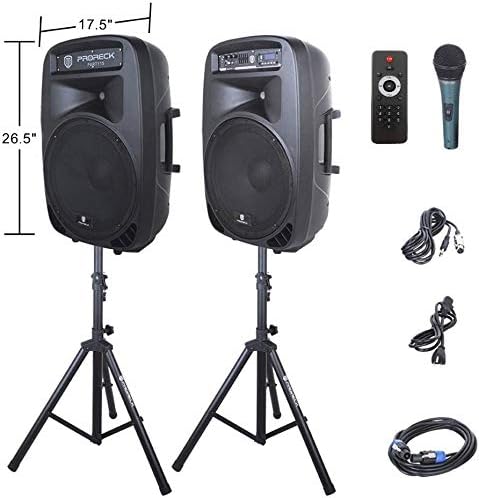
Image: The two included speaker stands.
- Unfold the tripod legs of each speaker stand until they are fully extended and stable.
- Loosen the height adjustment knob on the stand and extend the pole to your desired height. Ensure the safety pin is inserted through the appropriate hole to secure the height.
- Aperte firmemente o botón de axuste de altura.
2. Colocación de altofalantes
- Carefully lift each speaker and place it onto the top pole of a speaker stand. Ensure the speaker is securely seated.
- Position the active speaker (the one with the control panel) near a power outlet.
- Place the passive speaker within reach of the included Speakon cable from the active speaker.
Image: PRORECK Party 15 speakers set up on their stands.
3. Conexión de altofalantes
- Locate the Speakon output on the rear panel of the active speaker and the Speakon input on the rear panel of the passive speaker.
- Connect one end of the Speakon cable to the active speaker's Speakon output and the other end to the passive speaker's Speakon input. Ensure a secure connection.

Image: Rear panels of the active and passive speakers, highlighting the Speakon connection.
4. Conexión de alimentación
- Ensure the master volume knob on the active speaker is turned down to its minimum setting.
- Connect the power cable to the active speaker's power input and then plug it into a suitable electrical outlet.
Instrucións de funcionamento
This section details how to operate your PRORECK Party 15 speaker system and utilize its various features.
Panel de control rematadoview

Imaxe: Detallada view of the active speaker's control panel.
The active speaker features a comprehensive control panel with an LCD display, various input options, volume controls, and an equalizer.
1. Acendido/apagado
- After connecting the power cable, locate the power switch on the rear panel of the active speaker.
- Flip the switch to the "ON" position to power on the system. The LCD display will illuminate.
- To power off, flip the switch to the "OFF" position.
2. Selección de modo
Preme o MODO button on the control panel or remote control to cycle through available input modes: Bluetooth, USB, SD Card, FM Radio, and Line Input.
3. Conectividade Bluetooth
- Select "Bluetooth" mode using the MODO botón. A pantalla LCD mostrará "AZUL".
- No teu dispositivo con Bluetooth (teléfono intelixente, tableta, etc.), busca os dispositivos Bluetooth dispoñibles.
- Select "PRORECK PARTY 15" from the list. Once paired, the speaker will emit a confirmation sound.
- Agora podes reproducir audio desde o teu dispositivo a través dos altofalantes.
4. Reprodución mediante USB/tarxeta SD
- Insira unha unidade USB ou unha tarxeta SD que conteña son MP3 files na ranura correspondente do panel de control.
- The system will automatically switch to USB or SD mode and begin playing the first compatible audio fileSe non, prema a tecla MODO botón para seleccionar a entrada correcta.
- Usa o REPRODUCIR/PAUSA, ANTERIOR, e SEGUINTE buttons on the control panel or remote to manage playback.
5. Radio FM
- Select "FM Radio" mode using the MODO botón.
- Preme o REPRODUCIR/PAUSA button to initiate an automatic scan for available FM stations. The system will save detected stations.
- Usa o ANTERIOR e SEGUINTE botóns para navegar polas emisoras gardadas.
6. Uso do micrófono
- Connect the wired microphone to the 1/4'' MIC input on the control panel.
- Adjust the "MIC VOL" knob to control the microphone's volume level.
- Ensure the main volume is set appropriately to avoid feedback.
7. Funcións de control remoto
Image: The included remote control.
The remote control allows for convenient operation from a distance (up to 20 feet). Functions include:
- MODO: Switch between input modes.
- REPRODUCIR/PAUSA: Reproducir ou pausar a reprodución de audio.
- ANTERIOR/SEGUINTE: Saltar cancións ou navegar polas emisoras de FM.
- VOL + / VOL-: Axustar o volume mestre.
- EQ: Percorrer os preajustes do ecualizador.
- Numeric buttons for direct track selection (in USB/SD mode).
8. Equalizer Adjustment
The control panel features a 5-band graphic equalizer. Adjust the sliders to fine-tune the audio output to your preference. Experiment with different settings to achieve the desired sound for various music genres or vocal performances.
9. Luces LED

Image: PRORECK Party 15 speakers demonstrating various LED light colors.
The PRORECK Party 15 speakers are equipped with built-in LED lights that activate with sound. These lights enhance the party atmosphere. There is a dedicated switch on the rear of the active speaker to turn the LED lights on or off.
Mantemento
Proper maintenance ensures the longevity and optimal performance of your speaker system.
- Limpeza: Use a soft, dry cloth to clean the exterior of the speakers. Do not use abrasive cleaners, waxes, or solvents.
- Almacenamento: Cando non os use durante períodos prolongados, garde os altofalantes nun lugar fresco e seco, lonxe da luz solar directa e de temperaturas extremas.
- Ventilación: Asegúrate de que as aberturas de ventilación estean libres de po e residuos para evitar o sobrequecemento.
- Cables: Regularly check all cables for signs of wear or damage. Replace any damaged cables immediately.
Resolución de problemas
If you encounter issues with your PRORECK Party 15 system, refer to the following common problems and solutions.
| Problema | Causa posible | Solución |
|---|---|---|
| Sen poder | Cable de alimentación non conectado; interruptor de alimentación apagado; avaría da toma de corrente. | Ensure power cable is securely connected and plugged into a working outlet. Check power switch on rear panel. |
| Non hai son dos altofalantes | Volume too low; Incorrect input mode; Speakon cable loose/damaged; Audio source issue. | Increase master volume. Select correct input mode. Check Speakon cable connection between active and passive speakers. Verify audio source is playing. |
| Bluetooth non se sincroniza | O altofalante non está en modo Bluetooth; o dispositivo está demasiado lonxe; o dispositivo xa está emparellado con outro altofalante. | Ensure speaker is in Bluetooth mode ("BLUE" on display). Move device closer to speaker. Disconnect device from other Bluetooth connections. |
| O micrófono non funciona | Mic volume too low; Microphone not connected properly; Microphone faulty. | Increase "MIC VOL" knob. Ensure microphone is fully inserted into the 1/4'' input. Test with another microphone if available. |
| Son distorsionado | Volume too high; Input signal too strong; Equalizer settings. | Reduce master volume or input source volume. Adjust equalizer settings. |
| As luces LED non funcionan | LED switch off; Volume too low for activation. | Ensure the LED switch on the rear panel is in the "ON" position. Increase volume to activate sound-reactive lights. |
Especificacións
| Nome do modelo | FESTA 15 |
| Tipo de altofalante | Woofer |
| Tamaño do altofalante | 15 polgadas |
| Potencia de saída máxima do altofalante | 2000 Watts P.M.P.O (Peak Music Power Output) |
| Tecnoloxía de conectividade | Con cable, sen fíos (Bluetooth) |
| Tecnoloxía de comunicación sen fíos | Bluetooth |
| Alcance Bluetooth | 10 metros (aprox. 33 pés) |
| Características especiais | LED Light, FM Radio, USB Port, SD Card Reader, Digital LCD Display |
| Entradas | 1/4'' Mic, RCA Line Inputs, USB, SD Card |
| Saídas | Speakon Output (for passive speaker), RCA Line Output |
| Material | Acrilonitrilo Butadieno Estireno (ABS) |
| Dimensións do produto (cada altofalante) | 19"D x 30"W x 29"H (approximate, likely including handles/feet) |
| Peso do artigo (total) | 81.6 libras |
| Fonte de enerxía | Eléctrico con cable |
Garantía e Soporte
PRORECK products come with a limited warranty. For specific warranty terms and conditions, please refer to the warranty card included with your product or visit the official PRORECK website. For technical support, troubleshooting assistance, or parts inquiries, please contact PRORECK customer service through their official channels.
Manufacturer: PRORECK AUDIO


