Introdución
Grazas pola compraasing the Capello Self-Setting Atomic Clock with Calendar & Indoor Temperature. This clock is designed to provide accurate timekeeping, date display, and indoor temperature readings, all within a sleek, contemporary design. Its self-setting atomic feature ensures precise time synchronization.
Características clave
- Self-Setting Atomic Time: Automatically synchronizes with the WWVB radio signal for precise time.
- Pantalla dixital: Bright and easy-to-read digital readout.
- Función do calendario: Displays month, date, and day of the week.
- Temperatura interior: Provides current indoor temperature in Fahrenheit or Celsius.
- Alarmas dobres: Two independent alarm settings for versatile use.
- Deseño elegante: Durable polyurethane frame with a black plastic face, suitable for any room decor.
- Alimentado por batería: Operates on AAA batteries (not included).
Contido do paquete
- Capello Self-Setting Atomic Clock
- Manual de usuario (este documento)
Configuración
1. Instalación da batería
Locate the battery compartment on the back of the clock. Insert 3 AAA batteries (not included) according to the polarity indicators (+ and -). Ensure the battery compartment cover is securely closed.
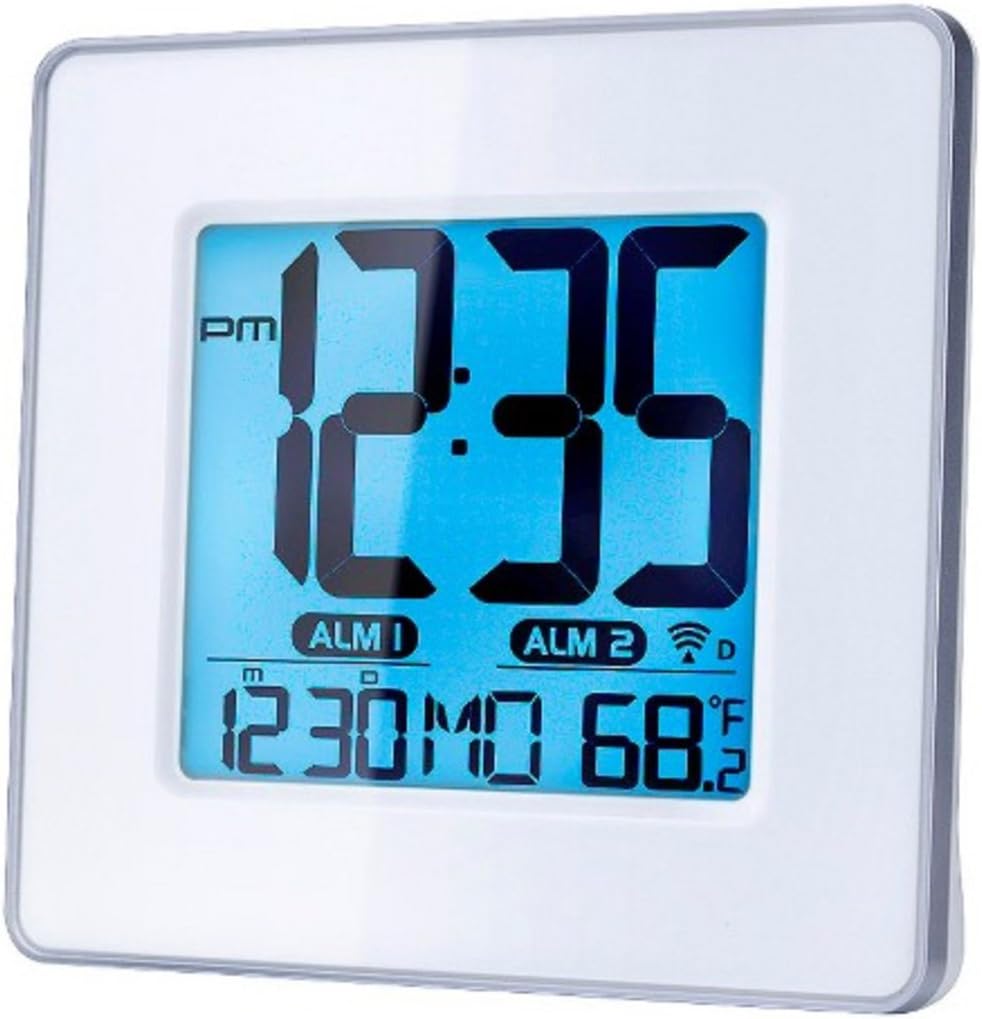
Figura 1: Fronte view of the Capello Self-Setting Atomic Clock. This image displays the clock's digital screen, showing the time (12:35 PM), two alarm indicators (ALM 1, ALM 2), the date (12:30 MO), and the indoor temperature (68.2°F). The clock has a white frame and a blue-tinted digital display.
2. Initial Power-On and Atomic Signal Reception
Upon battery installation, the clock will automatically attempt to receive the WWVB atomic time signal. This process may take several minutes to several hours, especially during initial setup. For best reception, place the clock near a window and away from electronic devices that may cause interference. The atomic signal is typically stronger at night.

Figura 2: Primeiro plano frontal view of the Capello Self-Setting Atomic Clock. This image highlights the clear digital display, which shows the time, date, and temperature. The white frame of the clock is visible, emphasizing its clean design.
A signal strength indicator (often a tower icon with waves) will appear on the display once a successful signal is received. If the signal is not received immediately, the clock will default to a manual time setting. You can manually initiate a signal search by holding the "WAVE" button (if present) on the back of the clock for a few seconds.
Instrucións de funcionamento
1. Axuste manual da hora e da data
In case the atomic signal is not available or for manual adjustment:
- Manteña premido o SET button (or similar, refer to back panel buttons) for a few seconds until the display flashes.
- Usa o UP e ABAIXO botóns para axustar o valor que parpadea (por exemplo, hora, minuto, ano, mes, día).
- Preme SET again to confirm the selection and move to the next setting.
- Repeat until all desired settings are configured.
2. Configuración da alarma
The clock features two independent alarms (ALM 1 and ALM 2).
- Preme o ALARMA button (or ALM 1/ALM 2 button) to select the alarm you wish to set.
- Manteña premido o CONXUNTO DE ALARMA button (or similar) until the alarm time flashes.
- Usa o UP e ABAIXO botóns para axustar a hora e os minutos da alarma.
- Preme CONXUNTO DE ALARMA para confirmar.
- To activate/deactivate an alarm, press the corresponding ALARMA ON / OFF botón. Aparecerá unha icona de alarma na pantalla cando estea activa.
3. Visualización da temperatura
The clock displays indoor temperature. To switch between Fahrenheit (°F) and Celsius (°C), locate the °F/°C button on the back of the unit and press it.

Figura 3: En ángulo view of the Capello Self-Setting Atomic Clock. This perspective shows the clock's depth and the sleek design of its white frame, along with the clear digital display from a side angle.
Mantemento
Limpeza
Limpe o reloxo cun pano suave e seco. Non empregue produtos de limpeza abrasivos nin disolventes, xa que poden danar a pantalla ou a memoria.asing.
Substitución da batería
When the display dims or the clock stops functioning, replace the AAA batteries. Always replace all batteries at the same time with new ones. Dispose of old batteries responsibly according to local regulations.
Resolución de problemas
| Problema | Causa posible | Solución |
|---|---|---|
| O reloxo non se axusta automaticamente. | Weak or no atomic signal reception. Interference from other electronics. Incorrect time zone setting. | Relocate the clock closer to a window, away from electronic devices (TVs, computers, microwaves). Try initiating a manual signal search (WAVE button). Ensure correct time zone is set if applicable. Note that the signal is often stronger at night. |
| A pantalla está escura ou en branco. | Pilas baixas. | Replace all AAA batteries with new ones. |
| Time is incorrect after Daylight Saving Time change. | Atomic clock may take up to 24 hours to adjust or requires manual adjustment for DST. | Allow up to 24 hours for automatic adjustment. If it doesn't adjust, manually set the time. Some atomic clocks may not automatically adjust for DST and require manual intervention. |
| A alarma non soa. | A alarma non está activada. Volume da alarma demasiado baixo (se é axustable). | Ensure the alarm icon is visible on the display. Check alarm settings and ensure the time is correctly set. |
Especificacións
| Característica | Detalle |
|---|---|
| Marca | Capello |
| Modelo | B0170ZSMGG |
| Tipo de visualización | Dixital |
| Fonte de enerxía | Alimentado por pilas (3 pilas AAA, non incluídas) |
| Característica especial | Atomic, Alarm, Calendar, Indoor Temperature |
| Tipo de montaxe | Mesa |
| Dimensións do produto | 0.71 x 5.79 x 5.35 polgadas |
| Peso do elemento | 9.6 onzas |
| Material do marco | Poliuretano |
| Cor | White (Frame), Black (Dial) |
Garantía e Soporte
For warranty information or technical support, please refer to the contact details provided with your purchase or visit the official Capello websitio. Garde o recibo da compra como xustificante da mesma.
For further assistance, you may contact Capello customer service through their official channels. Please have your model number (B0170ZSMGG) ready when contacting support.


