Bluestone Automatic Wrist Blood Pressure Monitor User Manual
Modelo: 80-5103
1. Introdución
Thank you for choosing the Bluestone Automatic Wrist Blood Pressure Monitor. This device is designed to provide quick and accurate measurements of your systolic and diastolic blood pressure, as well as your pulse rate. Regular monitoring can help you track your heart health over time. Please read this manual thoroughly before using the device to ensure correct operation and accurate results.
2. Información de seguridade
- Este dispositivo está destinado só para uso doméstico en adultos. Consulte co seu médico para a interpretación das medicións da presión arterial.
- Non empregue este dispositivo en bebés, nenos ou persoas que non poidan expresar o seu consentimento.
- Avoid taking measurements in a moving vehicle or during physical activity.
- Do not self-diagnose or self-medicate based on the measurement results. Always consult a healthcare professional.
- Manteña o dispositivo lonxe de campos electromagnéticos fortes.
- Do not disassemble or attempt to repair the device. Contact customer support if issues arise.
3. Produto rematadoview
The Bluestone Automatic Wrist Blood Pressure Monitor is a compact and portable device designed for ease of use. It features a large LCD screen for clear readings and a memory function to store past measurements.
3.1 Compoñentes
- Wrist Blood Pressure Monitor with integrated cuff
- Estuche de almacenamento
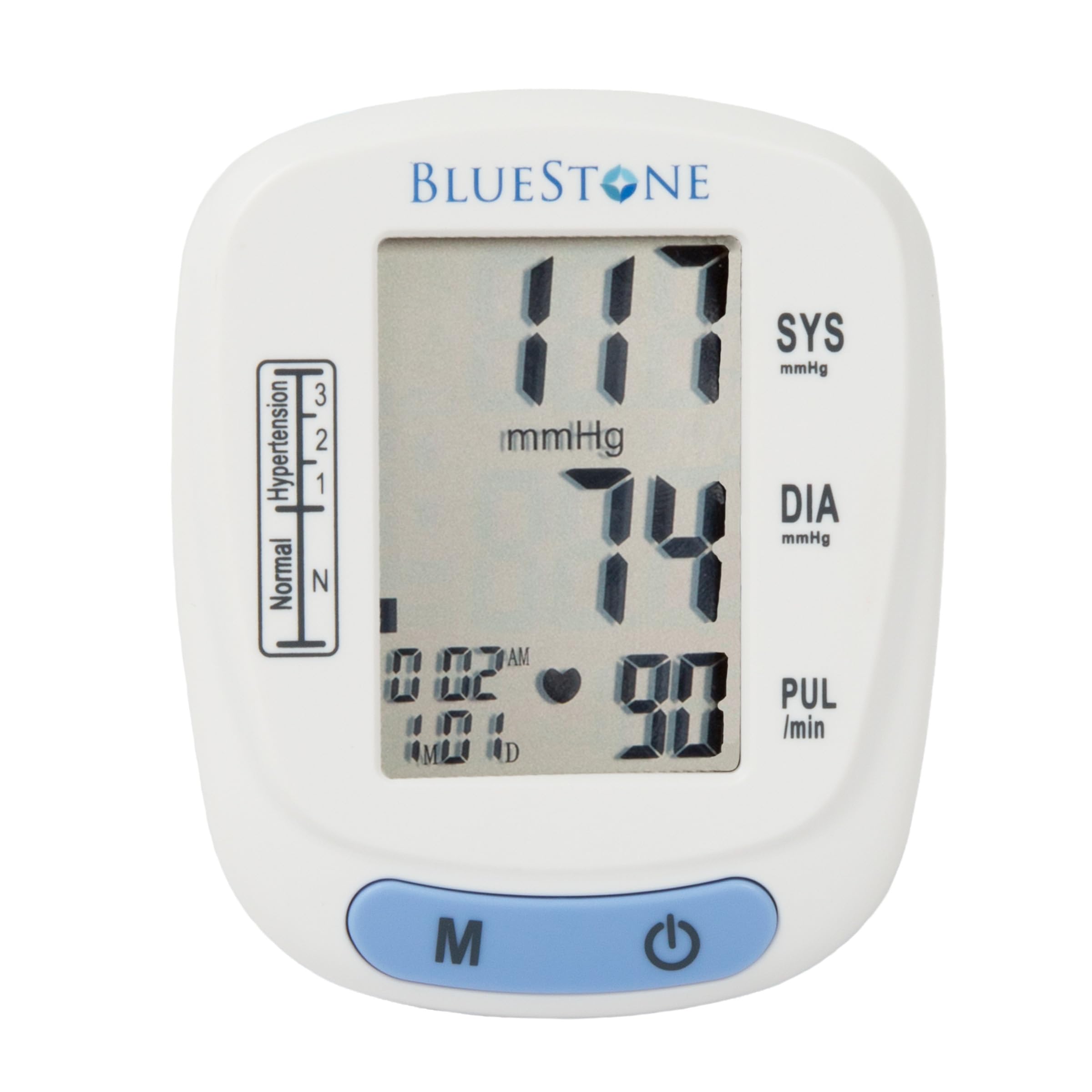
Image 3.1: Bluestone Automatic Wrist Blood Pressure Monitor on a user's wrist.
3.2 Características do dispositivo

Image 3.2: Labeled diagram highlighting the monitor's display elements and buttons.
- Pantalla LCD grande: Displays systolic, diastolic, pulse, date, and time.
- Blood Pressure Level Bar: Indicates blood pressure classification (Normal, Hypertension levels 1, 2, 3).
- Memory Button (M): Accesses stored readings.
- Botón On/Off: Powers the device on and off, and initiates measurements.
- Adjustable Cuff: Designed to fit wrists up to 10 inches in circumference.
4. Configuración
4.1 Instalación da batería
- Abra a tapa do compartimento das baterías na parte traseira do monitor.
- Insira dúas pilas AAA (non incluídas), asegurándose de manter a polaridade correcta (+/-).
- Pecha a tapa do compartimento da batería de forma segura.
4.2 Colocación do manguito
- Remove any tight clothing from your wrist.
- Place the monitor on your left wrist with the display facing upwards. The cuff should be positioned approximately 1-2 cm above your wrist joint.
- Fasten the cuff snugly around your wrist. Ensure it is not too tight or too loose.
- Rest your arm on a table or flat surface so that the monitor is at the same level as your heart. Keep your palm open and relaxed.
5. Instrucións de funcionamento
5.1 Tomar unha medida
- Ensure the cuff is correctly placed on your wrist and your arm is positioned at heart level.
- Press the On/Off button to power on the device. The display will show all symbols briefly, then '00'.
- O manguito inflarase automaticamente e comezará a medición. Permaneza quieto e en silencio durante a medición.
- Once the measurement is complete, the systolic pressure, diastolic pressure, and pulse rate will be displayed on the screen. The device will automatically store this reading.
- Press the On/Off button again to turn off the device, or it will automatically shut off after approximately one minute of inactivity.
5.2 Interpretación dos resultados
The monitor displays your systolic (SYS) and diastolic (DIA) blood pressure in mmHg, and your pulse (PUL) in beats per minute. The blood pressure level bar on the left side of the display indicates your reading's classification according to World Health Organization (WHO) guidelines:
- Normal: Presión arterial óptima.
- Hypertension (Levels 1, 2, 3): Indicates elevated blood pressure. Consult a healthcare professional for advice.

Image 5.1: Monitor displaying a sample reading and highlighting key features.
6. Función de memoria
The monitor can store up to 120 measurements with date and time stamps, allowing you to track your blood pressure trends.
6.1 Storing Readings
Each successful measurement is automatically stored in the device's memory.
6.2 Recalling Readings
- With the device off, press the 'M' (Memory) button.
- A lectura máis recente mostrarase primeiro.
- Press the 'M' button repeatedly to scroll through previous measurements.
- To exit memory mode, press the On/Off button or wait for the device to automatically shut off.
7. Mantemento
7.1 Limpeza
- Limpe o monitor e o manguito cun pano suave e seco.
- Non empregues produtos de limpeza abrasivos nin mergulles o dispositivo en auga.
7.2 Almacenamento
- Store the monitor in its included protective case when not in use.
- Garda o dispositivo nun lugar fresco e seco, lonxe da luz solar directa e de temperaturas extremas.
- Se o dispositivo non se vai usar durante un período prolongado, retire as baterías para evitar fugas.

Image 7.1: Monitor stored in its protective case.
8 Solución de problemas
| Problema | Causa posible | Solución |
|---|---|---|
| Sen pantalla cando está acendido | As pilas están gastadas ou inseridas incorrectamente. | Substitúa as pilas por pilas AAA novas, asegurándose de manter a polaridade correcta. |
| Mensaxe de erro (por exemplo, 'Err') | Movement during measurement, improper cuff placement, or device malfunction. | Remain still and silent. Re-apply cuff correctly. If error persists, contact support. |
| Lecturas inconsistentes | Improper posture, talking during measurement, or recent physical activity. | Ensure proper technique (see Section 5.1). Take measurements at the same time each day. |
9. Especificacións

Image 9.1: Dimensions of the Bluestone Blood Pressure Monitor.
| Característica | Detalle |
|---|---|
| Número de modelo | 80-5103 |
| Dimensións do produto | 3" L x 2.5" W x 2.5" Th |
| Peso do elemento | 8.3 onzas |
| Circunferencia do manguito | Fits up to 10" wrists |
| Fonte de enerxía | 2 pilas AAA (non incluídas) |
| Tipo de visualización | LCD dixital |
| Capacidade de memoria | Up to 120 readings with date/time stamp |
10. Garantía e soporte
Bluestone products are manufactured with quality and care. For warranty information or technical support, please refer to the contact details provided with your purchase documentation or visit the official Bluestone websitio. Garde o comprobante de compra para calquera reclamación de garantía.


