Introdución
The Master & Dynamic MW60 Wireless Bluetooth Foldable Headphones are designed to deliver a high-quality audio experience with effective sound isolation. They feature 45mm neodymium drivers for clear audio reproduction across various music genres. Equipped with Bluetooth 4.1, these headphones offer wireless connectivity and up to 16 hours of battery life. Constructed with lightweight stainless steel and aluminum, and featuring leather ear pads, the MW60 headphones are designed for comfort and durability, with a foldable design for portability.
O que hai na caixa
- Master & Dynamic MW60 Wireless Headphones
- Cable de audio (3.5 mm)
- Adaptador de audio
- Cable de carga micro USB a USB
- Carry Case for Headphones
- Carry Pouch for Accessories
Produto rematadoview
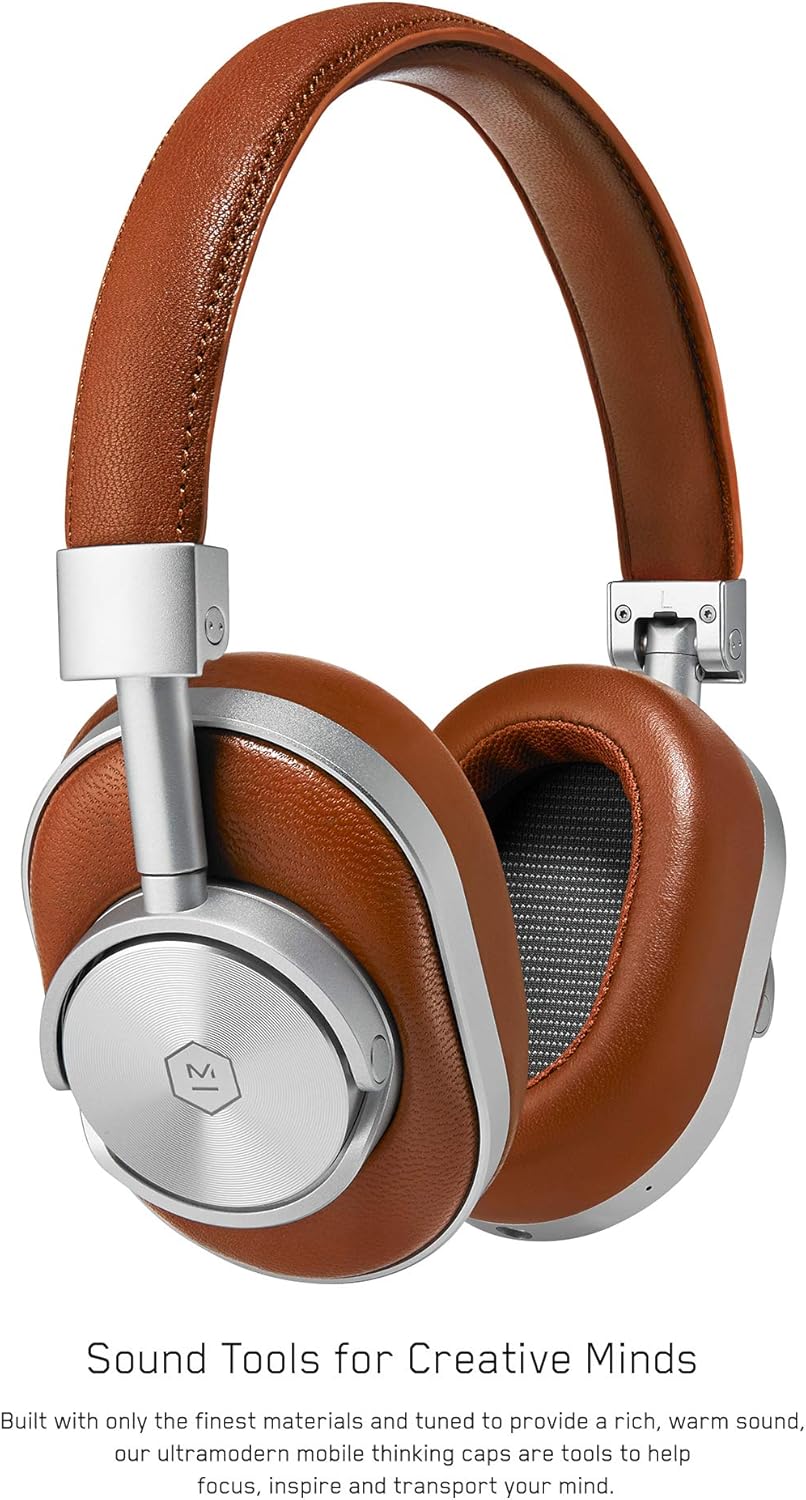
Figura 1: Fronte view of the Master & Dynamic MW60 Wireless Headphones. This image displays the over-ear design with silver metal accents and brown leather earcups and headband.

Figura 2: Close-up of the right earcup showing the control buttons and ports. Visible controls include volume up/down, a multi-function button, and the power/pairing switch. A 3.5mm audio jack and micro USB charging port are also present.
Controis e portos
- Power/Pairing Switch: Located on the earcup, used to turn the headphones on/off and initiate Bluetooth pairing.
- Botón multifunción: Controls playback (play/pause), call management, and voice assistant activation.
- Botóns subir / baixar volume: Adjusts audio volume. Can also be used for track skipping (hold for next/previous track).
- Conector de audio de 3.5 mm: Para conexión por cable usando o cable de audio incluído.
- Porto micro USB: Para cargar a batería interna.
- Micrófono: Integrado para chamadas mans libres.
Configuración
Cargando os auriculares
- Connect the Micro USB end of the charging cable to the Micro USB port on the headphone earcup.
- Conecta o extremo USB-A do cable de carga a un porto USB con alimentación (por exemplo, un ordenador ou un adaptador de parede).
- O indicador luminoso mostrará o estado da carga. Unha carga completa adoita tardar aproximadamente 2 horas.
Emparejamento Bluetooth
- Asegúrate de que os auriculares estean completamente cargados.
- Slide the Power/Pairing switch to the ON position.
- To enter pairing mode, slide and hold the Power/Pairing switch to the far right (pairing icon) until the indicator light begins to flash.
- No teu dispositivo (teléfono intelixente, tableta, ordenador), activa o Bluetooth e busca os dispositivos dispoñibles.
- Select "MW60" from the list of detected devices.
- Once paired, the indicator light will turn solid blue or white, depending on the model.
Instrucións de funcionamento
Funcións básicas
- Encendido/apagado: Slide the Power/Pairing switch to the ON or OFF position.
- Reproducir/Pausa: Prema o botón multifunción unha vez.
- Control de volume: Prema os botóns Subir volume (+) ou Baixar volume (-).
- Próxima pista: Manteña premido o botón para subir o volume (+).
- Pista anterior: Manteña premido o botón para baixar o volume (-).
Xestión de chamadas
- Responder/Finalizar chamada: Prema o botón multifunción unha vez.
- Rexeitar a chamada: Manteña premido o botón multifunción.
- Activar o asistente de voz: Prema dúas veces o botón multifunción.
Conexión por cable
To use the headphones with a wired connection, plug the included 3.5mm audio cable into the audio jack on the earcup and the other end into your audio source. The headphones will automatically switch to wired mode, conserving battery life.
Mantemento
Limpeza
- Limpe os auriculares cun pano suave e seco.
- Non use produtos químicos agresivos ou materiais abrasivos.
- For leather parts, use a specialized leather cleaner if necessary, following product instructions.
Almacenamento

Figura 3: The MW60 headphones folded into a compact form, demonstrating their portability and ease of storage in the included carry case.
- When not in use, fold the headphones and store them in the provided carry case to protect them from dust and damage.
- Evite o almacenamento en temperaturas extremas ou alta humidade.
Resolución de problemas
| Problema | Posible Solución |
|---|---|
| Os auriculares non se acenden | Ensure the headphones are fully charged. Connect to a power source using the Micro USB cable. |
| Non se pode emparellar por Bluetooth | Ensure headphones are in pairing mode (flashing indicator light). Turn off and on Bluetooth on your device. Try forgetting the device on your phone and re-pairing. Ensure no other devices are actively connected. |
| Intermittent audio or connection drops | Ensure your device is within the Bluetooth range. Avoid physical obstructions between the headphones and your device. Minimize interference from other wireless devices. |
| Sen son no modo con cable | Ensure the 3.5mm audio cable is securely connected to both the headphones and the audio source. Check the volume levels on both the headphones and the audio source. |
| Earcups detach easily | Ensure earcups are properly aligned and securely attached to the magnetic mounts. |
Especificacións
| Característica | Detalle |
|---|---|
| Nome do modelo | MW60S2 |
| Tecnoloxía de conectividade | Sen fíos (Bluetooth 4.1) |
| Tipo de controlador de audio | 45mm Neodymium Dynamic Drivers |
| Duración da batería | Ata 16 horas |
| Materiais | Aluminum, Stainless Steel, Leather |
| Peso do elemento | 3 libras (aproximadamente 1.36 kg) |
| Dimensións do produto | 10 x 3.75 x 8 polgadas (25.4 x 9.5 x 20.3 cm) |
| Impedancia | 32 ohmios |
| Control de ruído | Illamento acústico (pasivo) |
| Jack para auriculares | Jack de 3.5 mm |
Garantía e Soporte
Warranty information for your Master & Dynamic MW60 Wireless Headphones is typically provided with your purchase. Please refer to the documentation included in your product packaging for specific warranty terms and conditions.
For technical support, service, or further inquiries, please contact Master & Dynamic customer service directly. Contact details can usually be found on the manufacturer's official websitio web ou na documentación do produto.


