1. Introdución
Grazas pola compraasing the Vivitar 4-Device Jumbo Universal Remote Control. This remote is designed to simplify your home entertainment experience by controlling up to four different audio/video devices from a single unit. It is compatible with most major brands of televisions, Blu-Ray players, DVD players, VCRs, cable boxes, satellite receivers, and home theater systems. Please read this manual thoroughly to ensure proper setup and operation.
2. Configuración
2.1 Instalación da batería
The Vivitar Jumbo Universal Remote requires two (2) AAA batteries (not included).
- Localice a tapa do compartimento da batería na parte traseira do control remoto.
- Prema a pestana e deslice a tapa para retirala.
- Insira dúas pilas AAA novas, asegurándose de que os terminais positivo (+) e negativo (-) coincidan cos diagramas do interior do compartimento.
- Deslice a tapa do compartimento da batería de volta ao seu lugar ata que faga clic de forma segura.
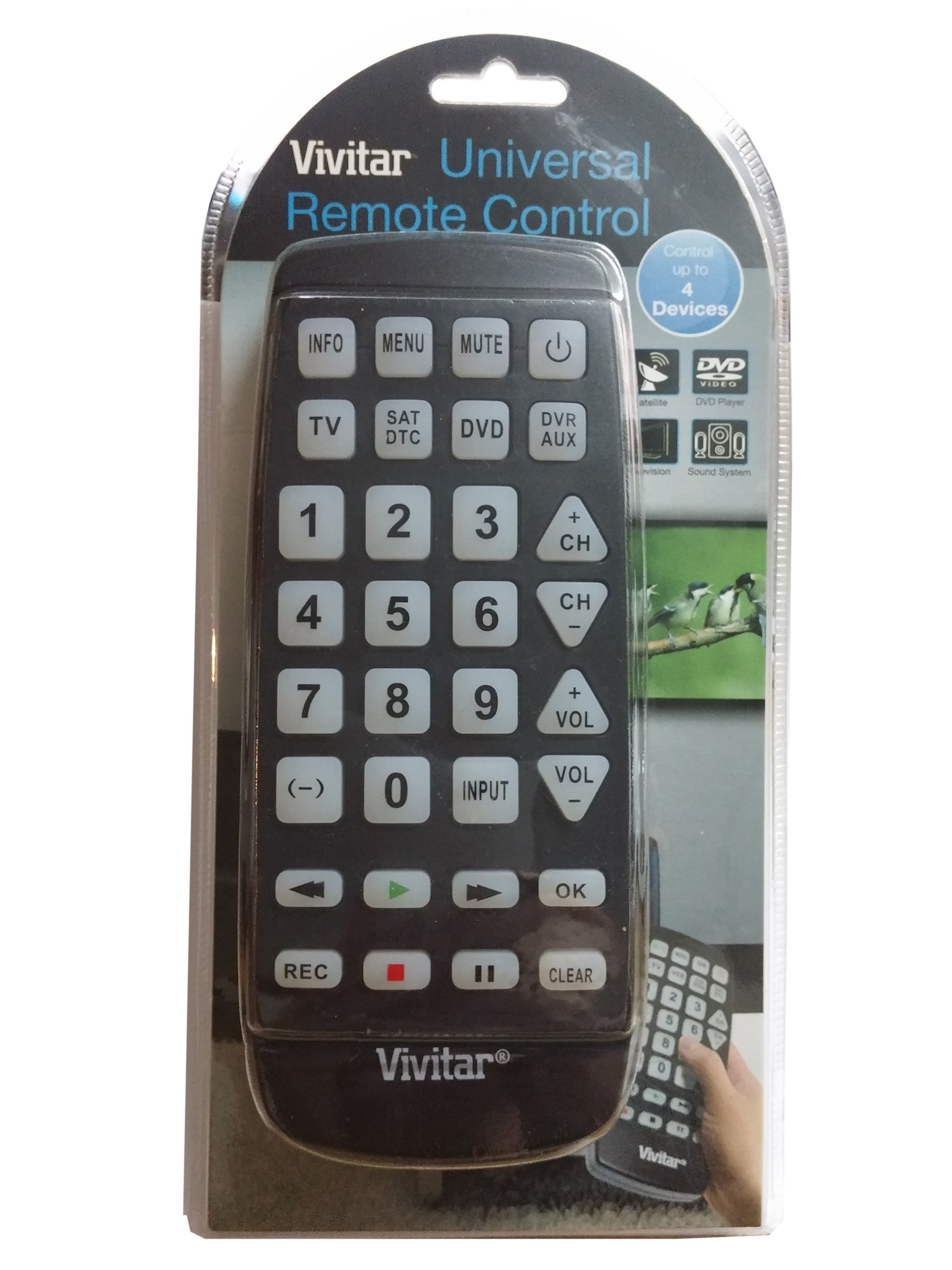
Imaxe: Fronte view of the Vivitar 4-Device Jumbo Universal Remote Control, showing its large buttons and ergonomic design. The battery compartment is located on the rear.
2.2 Programming Your Remote (Code Entry Method)
To program the remote for your specific device, you will need to enter a 3-digit code corresponding to your device's brand. A list of common codes is usually provided in a separate code booklet (not included in this digital manual).
- Acenda o dispositivo que desexa controlar (por exemplo, o televisor, o reprodutor de DVD).
- Manteña premido o SET button on the remote until the red indicator light illuminates.
- Mentres sostén SET, press the desired device button (e.g., TV, DVD, CBL) once. The red indicator light will blink once and then remain lit.
- Soltar o SET botón.
- Enter the 3-digit code for your device brand using the number buttons. After entering the third digit, the red indicator light should turn off.
- Proba o mando a distancia premendo o botón POTENCIA button. If the device turns off, the code was accepted. If not, repeat the process with the next code listed for your brand.
Nota: If your device does not respond after trying all codes for its brand, proceed to the Auto Code Search method.
2.3 Busca automática de códigos
If you cannot find a working code for your device, the remote can search for it automatically.
- Acende o dispositivo que desexas controlar.
- Manteña premido o SET button until the red indicator light illuminates.
- Mentres sostén SET, press the desired device button (e.g., TV, DVD, CBL) once. The red indicator light will blink once and then remain lit.
- Soltar o SET botón.
- Apunte o mando a distancia ao dispositivo e prema repetidamente o botón POTENCIA botón (o CH+ for TV/VCR, XOGAR for DVD/VCR) slowly, pausing briefly after each press. The remote is sending different codes with each press.
- As soon as your device turns off (or performs the desired function), immediately press the SET button once to save the code. The red indicator light will turn off.
- Test the remote's functions (Volume, Channel, Playback) to ensure all controls work correctly. If not, repeat the auto code search.
3. Operating Your Remote
Once programmed, operating your Vivitar Jumbo Universal Remote is straightforward.
3.1 Selección de dispositivos
Para controlar un dispositivo específico, prema o botón do dispositivo correspondente na parte superior do mando a distancia (TV, DVD, CBL, AUX). The remote will then send commands only to the selected device.
3.2 Funcións básicas
- POTENCIA: Acende ou apaga o dispositivo seleccionado.
- VOL + / VOL-: Increases or decreases the volume of the selected device.
- CH+/CH-: Changes the channel up or down on the selected device.
- MUTO: Silencia ou activa o audio.
- NÚMERO DE BOTÓNS (0-9): Used for direct channel entry or code programming.
- PLAY/PAUSE/STOP/REW/FF: Controls playback functions for DVD, Blu-Ray, or VCR devices.
- MENÚ: Accesses the menu of the selected device.
- GUÍA: Displays the program guide (for Cable/Satellite boxes).
- ENTRADA/FONTE: Cambia a fonte de entrada do teu televisor.
4. Mantemento
4.1 Limpeza
To clean your remote control, use a soft, slightly damp cloth. Do not use abrasive cleaners, solvents, or harsh chemicals, as these can damage the remote's finish or internal components. Ensure no liquid enters the remote.
4.2 Substitución da batería
Replace batteries when the remote's performance degrades or the indicator light fails to illuminate. Always replace both batteries at the same time with new AAA batteries. Do not mix old and new batteries, or different types of batteries. Remove batteries if the remote will not be used for an extended period to prevent leakage.
4.3 Almacenamento
Garde o mando a distancia nun lugar fresco e seco, lonxe da luz solar directa e de temperaturas extremas.
5 Solución de problemas
5.1 Remote Not Working
- Comprobe as baterías: Asegúrate de que as pilas estean inseridas correctamente coa polaridade correcta (+/-) e que non estean esgotadas. Substitúeas por pilas AAA novas se é necesario.
- Liña de visión: Make sure there is a clear line of sight between the remote and the device you are trying to control. Obstructions can block the infrared signal.
- Selección do dispositivo: Confirm you have pressed the correct device button (TV, DVD, CBL, AUX) for the device you intend to control.
5.2 Device Not Responding to Commands
- Código incorrecto: The remote may be programmed with an incorrect code. Try reprogramming the remote using a different code from the code list for your device's brand, or use the Auto Code Search method.
- Compatibilidade do dispositivo: While this remote is universal, some older or very new devices may not be compatible.
5.3 Indicator Light Not Illuminating
- This usually indicates dead or incorrectly inserted batteries. Replace batteries and check polarity.
5.4 Resetting the Remote
If you encounter persistent issues, you can try resetting the remote to its factory default settings. Remove the batteries, wait for 30 seconds, then reinsert them. You will need to reprogram all your devices after a reset.
6. Especificacións
| Número de modelo: | 4330255290 |
| Marca: | En directo |
| Dimensións do produto: | 11.3 x 1.8 x 5.6 polgadas |
| Peso do artigo: | 13.1 onzas |
| Tipo de batería: | 2 x AAA (non incluído) |
| Número de dispositivos: | 4 (TV, DVD, Cable/Satellite, AUX) |
| Característica especial: | Compatibilidade universal |
| Tipo de controlador: | Control de botón |
7. Garantía e soporte
7.1 Garantía limitada
Vivitar warrants this product against defects in materials and workmanship for a period of one (1) year from the original date of purchase. This warranty does not cover damage caused by misuse, abuse, accident, unauthorized modification, or normal wear and tear. Proof of purchase is required for all warranty claims.
7.2 Atención ao cliente
For technical assistance, troubleshooting, or warranty inquiries, please contact Vivitar Customer Support. Refer to the Vivitar official websitio web para obter a información de contacto máis actualizada, incluídos números de teléfono e enderezos de correo electrónico.


