Introdución
This manual provides essential instructions for the safe and efficient operation of your ICOM IC-7300 Direct Sampling Shortwave Radio. Please read this manual thoroughly before using the transceiver to ensure proper functionality and to prevent damage.
The ICOM IC-7300 is a high-performance HF/50MHz transceiver featuring RF direct sampling technology. It includes a 4.3-inch color touchscreen LCD, a real-time spectrum scope, and a built-in automatic antenna tuner. It supports various modes including SSB, CW, RTTY, AM, and FM, with a maximum output power of 100 Watts.
Información de seguridade
- Do not operate the transceiver in explosive atmospheres.
- Asegúrese de conectar a terra adecuada para evitar descargas eléctricas.
- Avoid exposing the unit to direct sunlight, rain, or extreme temperatures.
- Use only the specified power supply (13.8V DC).
- Do not open the transceiver casing; encomende o servizo técnico a persoal cualificado.
Contido do paquete
Verifica que todos os elementos estean presentes no paquete:
- ICOM IC-7300 Radio Unit
- HM-219 Hand Microphone
- Cable de alimentación DC
- Hardware de instalación
- Manual de usuario (este documento)
Configuración
1. Conectando a fonte de alimentación
Connect the supplied DC power cable to the transceiver's DC IN connector and to a stable 13.8V DC power source. Ensure correct polarity (red to positive, black to negative) to prevent damage.
2. Conectando a antena
Connect a suitable HF/50MHz antenna to the ANT connector on the rear panel. For optimal performance and to protect the transceiver, use an antenna designed for the operating frequencies and ensure it is properly matched.
3. Conexión do micrófono
Plug the HM-219 hand microphone into the MIC connector on the front panel.
4. Acendido inicial
Preme o POTENCIA button to turn on the transceiver. The ICOM logo will appear on the display, followed by the operating screen.

Image: Front panel of the ICOM IC-7300, displaying the main operating screen with frequency, mode, and spectrum scope.
Instrucións de funcionamento
Operación básica
- Selección de frecuencia: Usa o grande MULTI dial to change the operating frequency. You can also directly input frequencies using the touchscreen keypad.
- Selección de modo: Tap the mode indicator on the touchscreen (e.g., USB, LSB) to cycle through available modes (SSB, CW, RTTY, AM, FM).
- Axuste de volume: Usa o AF/RF/SQL botón para axustar o nivel de saída de audio.
- Transmitindo: Preme o TRANSMITIR button or the PTT button on the microphone to transmit. Ensure your antenna is tuned before transmitting.
Uso da pantalla táctil
The 4.3-inch color touchscreen provides intuitive access to various functions and settings.
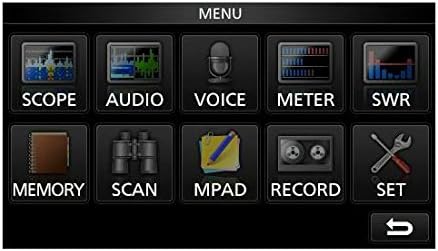
Image: The main menu screen of the IC-7300, accessible via the touchscreen, showing various function icons.
- Spectrum Scope: Toca ALCANCE a view the real-time spectrum scope, which displays signal activity across a selected frequency range.
- Pantalla do medidor: Toca METRO a view various operational parameters such as output power, ALC, SWR, and voltage.
- Configuración: Toca SET to access detailed configuration options for the transceiver.
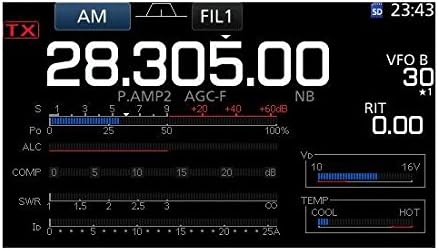
Imaxe: Unha detallada view of the IC-7300's display in AM mode, showing frequency, filter settings, and various operational meters.
Built-in Auto Tuner
The IC-7300 includes an internal automatic antenna tuner. To activate, press the AUTOTUNE button. The tuner will automatically adjust to achieve the lowest possible SWR for your connected antenna. This function is effective for SWR values up to approximately 3:1.
Mantemento
- Limpeza: Empregue un pano suave e seco para limpar o exterior do transceptor. Non empregue produtos de limpeza abrasivos nin disolventes.
- Ventilación: Ensure the ventilation holes on the top and sides of the unit are not obstructed to prevent overheating.
- Almacenamento: When not in use for extended periods, store the transceiver in a dry, dust-free environment.
Resolución de problemas
| Problema | Causa posible | Solución |
|---|---|---|
| Sen poder | Power cable disconnected; incorrect voltage; blown fuse. | Check power cable connections; verify 13.8V DC supply; inspect and replace fuse if necessary. |
| Sen saída de audio | Volume too low; speaker/headphone disconnected; squelch set too high. | Adjust AF/RF/SQL knob; check speaker/headphone connection; reduce squelch level. |
| Non se pode transmitir | Antenna not connected; high SWR; PTT button not pressed. | Connect antenna; use auto tuner or external tuner to reduce SWR; ensure PTT is engaged. |
| Mala recepción | Antenna issue; incorrect mode/frequency; high noise level. | Check antenna connection and type; verify operating mode and frequency; adjust noise reduction (NB, NR) settings. |
Especificacións
| Característica | Detalle |
|---|---|
| Número de modelo | IC-7300 |
| Rango de frecuencia (RX) | 0.030 - 74.800 MHz |
| Potencia de saída | 100 W (SSB, CW, RTTY, FM); 25 W (AM) |
| Tipo de receptor | Directo Sampling |
| Número de canles | 101 |
| Alimentación Voltage | 13.8 V CC (±15%) |
| Dimensións (ancho x alto x prof.) | 9.4 x 3.7 x 9.4 polgadas (240 × 94 × 238 mm) |
| Peso | 8.4 libras (3.8 kg) |
| Características especiais | 4.3-inch Color Touchscreen LCD, Real-time Spectrum Scope, Built-in Auto Tuner |
Garantía e Soporte
For warranty information and technical support, please refer to the official ICOM website or contact your authorized ICOM dealer. Keep your purchase receipt as proof of purchase for warranty claims.
Online resources and additional support may be available at the ICOM America Store on Amazon.
Información de conformidade
Este dispositivo cumpre coa Parte 15 das normas da FCC. O funcionamento está suxeito ás dúas condicións seguintes: (1) Este dispositivo non pode causar interferencias prexudiciais e (2) este dispositivo debe aceptar calquera interferencia recibida, incluídas as que poidan causar un funcionamento non desexado.


