Introdución
The Intermec PB51 is a rugged, 4-inch direct thermal mobile receipt printer designed for demanding field service, route accounting, and point-of-service applications. It offers fast, reliable printing performance to enhance productivity for mobile workers.
This manual provides essential information for the proper setup, operation, maintenance, and troubleshooting of your PB51 printer.
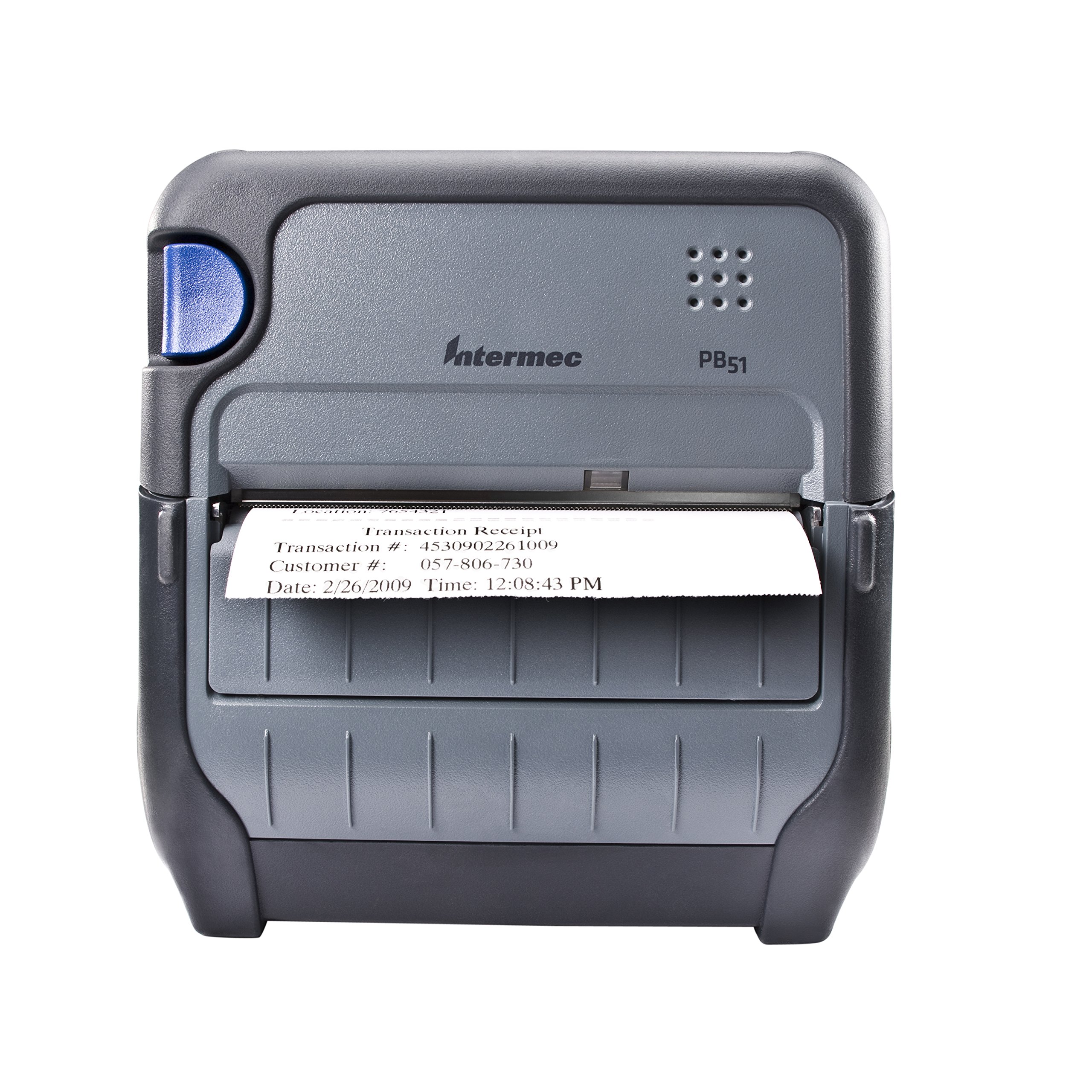
Figura 1: Fronte view of the Intermec PB51 mobile receipt printer. A receipt is partially ejected from the front slot, displaying "Transaction Receipt", "Transaction #: 4530902261009", "Customer #: 057-806-730", and "Date: 2/26/2009 Time: 12:08:43 PM". The printer features a dark gray casing with a blue button on the left side and the "Intermec PB51" logo on the top panel.
Configuración
1. Desembalaxe e inspección
- Retire con coidado a impresora e todos os accesorios da embalaxe.
- Verifique que estean presentes todos os compoñentes listados na nota de embalaxe.
- Inspect the printer for any visible damage. If damage is found, contact your supplier immediately.
2. Instalación e carga da batería
- Asegúrese de que a impresora estea apagada.
- Locate the battery compartment on the printer.
- Introduza a batería, asegurándose de que estea ben aliñada cos contactos.
- Pecha o compartimento da batería de forma segura.
- Connect the AC adapter to the printer and a power outlet. The battery indicator light will show charging status. Allow the battery to fully charge before first use.
3. Cargar papel térmico
- Abra a tapa do compartimento do papel.
- Insert the thermal paper roll with the print-side facing the print head.
- Pull a small amount of paper out past the print mechanism.
- Close the paper compartment cover firmly until it latches.
- The printer's paper sensors will detect the paper, minimizing lost transactions.
4. Connectivity Setup (Bluetooth / USB / Serial)
- Bluetooth: Turn on the printer and enable Bluetooth on your host device (e.g., smartphone, tablet, or computer). Busca available devices and select the PB51. Pair using the default PIN (refer to the printer's display or documentation for the specific PIN).
- USB: Connect the printer to your host device using a standard USB cable. Install the necessary printer drivers on your host device if prompted.
- Serie: Connect the printer to your host device using a serial cable. Configure the serial port settings (baud rate, data bits, parity, stop bits) on both the printer and the host device to match.
Instrucións de funcionamento
1. Acendido/apagado
- Para acender, manteña premido o botón de acendido ata que se ilumine a pantalla.
- To power off, press and hold the power button until the display indicates shutdown, then release.
2. Printing a Receipt
- Ensure the printer is powered on and connected to your host device.
- Open the application on your host device that generates receipts or invoices.
- Initiate the print command from your application. The PB51 is designed for 20-30% faster time-to-receipt printing.
- The printer will automatically feed and print the receipt.
- Tear off the receipt along the serrated edge.
3. Uso da pantalla LCD
The standard LCD display provides important information about the printer's status, battery level, connectivity, and error messages. Use the navigation buttons (if present) to scroll through menu options and settings.
Mantemento
1. Limpeza do cabezal de impresión
- Power off the printer and disconnect it from any power source.
- Abre o compartimento do papel.
- Limpe suavemente a superficie do cabezal de impresión cun pano que non deixe fiapos dampcon alcohol isopropílico.
- Deixe que o cabezal de impresión seque completamente antes de pechar a tapa e acender a impresora.
- Perform this cleaning regularly, especially if print quality degrades.
2. Coidado da batería
- Para maximizar a duración da batería, evite descargala completamente con frecuencia.
- Store the printer and battery in a cool, dry place when not in use for extended periods.
- Use only genuine Intermec replacement batteries.
3. Limpeza xeral
Limpe o exterior da impresora cun pano suave eamp cloth. Do not use harsh chemicals or abrasive cleaners. Ensure no liquid enters the printer's openings.
Resolución de problemas
| Problema | Causa posible | Solución |
|---|---|---|
| A impresora non se acende | Low or dead battery; faulty power adapter; loose battery connection. | Charge the battery; check power adapter connection; re-seat the battery. |
| Sen saída de impresión | No paper; paper loaded incorrectly; connectivity issue; print head dirty. | Load paper correctly; check Bluetooth/USB/Serial connection; clean print head. |
| Mala calidade de impresión | Dirty print head; incorrect paper type; low battery. | Clean print head; ensure thermal paper is used; charge battery. |
| Problemas de conectividade | Incorrect pairing; driver issues; out of range. | Re-pair Bluetooth; reinstall drivers; move closer to host device. |
If the problem persists after attempting these solutions, please contact Intermec customer support.
Especificacións
| Característica | Detalle |
|---|---|
| Nome do modelo | PB51B33004100 |
| Tecnoloxía de impresión | Térmica directa |
| Saída da impresora | Monocromo |
| Tamaño máximo do soporte | 4 polgadas |
| Tecnoloxía de conectividade | USB, Serial, Bluetooth |
| Peso do elemento | 42 onzas (aprox. 2.63 libras) |
| Dimensións do paquete | 10.2 x 10 x 5 polgadas |
| Tipo de controlador | Android (compatible) |
| Fabricante | Intermec |
Garantía e Soporte
Specific warranty information for the Intermec PB51 printer is not available in this document. Please refer to the warranty card included with your product or visit the official Intermec (now Honeywell) websitio web para obter información detallada sobre os termos e condicións da garantía.
For technical support, service, or to purchase accessories, please contact your authorized Intermec/Honeywell dealer or visit their official support portal.


