1. Introdución
The YI Pro Home Security Camera is an advanced indoor surveillance device designed to provide comprehensive monitoring for your home. It features person, vehicle, and animal detection capabilities, allowing for precise alerts. Compatible with popular smart home ecosystems like Alexa and Google Assistant, this camera offers a versatile solution for baby, pet, and general home monitoring.
As características principais inclúen:
- Fácil de View and Share with YI Home App: Monitor and control your camera, customize settings, receive activity alerts, share access with family, and share recordings to social media.
- Enhanced Alert System with Abnormal Sound Detection / Human Detection: Identify sounds within a 16-foot range and customize sound alert levels. AI human detection filters out false positives from objects or insects.
- Privacy Mode with Scheduling Power Off: Schedule camera standby times for enhanced privacy.
2. Produto rematadoview e contido do paquete

The YI Pro Home Security Camera is a compact and elegantly designed indoor camera. It features a spherical camera head mounted on a sleek, flat stand with a magnetic base for versatile placement. The camera is primarily white with black accents around the lens.
Contido do paquete:
- YI Pro Home Security Camera
- Adaptador de alimentación
- Cable USB
- Soporte de montaxe
3. Guía de configuración
3.1 Installing the YI Home App
- Download the YI Home App from your device's app store (available for iOS and Android).
- Open the app and create a new YI Home Account. If you already have an account, log in.
3.2 Connecting Your Camera
- Power on your YI Pro Home Security Camera using the provided power adapter and USB cable.
- In the YI Home App, select the '+' icon to add a new camera.
- Follow the on-screen prompts to select your Wi-Fi network and enter your Wi-Fi password. Then, select "Connect to Wi-Fi".
- The app will display a QR Code. Hold your camera approximately 4-8 inches (10-20 cm) in front of your phone screen to scan the QR Code. The camera will emit a voice prompt upon successful scanning.
- Once the QR Code has scanned, select "Next" in the app.
- Select "Save", then "Start using" to complete the pairing process.
- If the connection fails, locate the Reset button on your camera (usually a small pinhole) and press it for a few seconds until the camera resets. Then, try the setup process again from step 2.
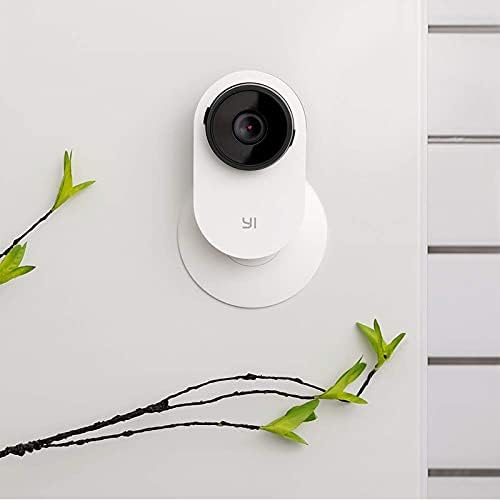
The camera features a magnetic base, allowing for easy and versatile mounting on various metal surfaces without the need for screws. This provides flexibility in camera placement.
3.3 Wi-Fi Settings Considerations
- YI Home cameras require connection to a 2.4GHz Wi-Fi band network. 5GHz Wi-Fi bands are not supported.
- If you encounter an "Unknown SSID" issue during setup, ensure that location services are enabled on your smartphone.
- Your Wi-Fi network's encryption mode must be set to WPA/WPA2 (mixed mode) or WPA2 for optimal security and compatibility.
- Your Wi-Fi password should be between 8 and 20 characters in length.
4. Funcionamento
4.1 En directo View e Gravación
Once connected, you can access the live video feed from your camera through the YI Home App. The app allows you to view foo en tempo realtage, initiate manual recordings, and capture screenshots. Recordings can be stored on a local microSD card (up to 128GB supported, though official documentation may state 32GB) or via the optional YI Cloud Service.
4.2 Audio bidireccional

The camera supports two-way audio communication. Tap the microphone icon in the YI Home App to speak through the camera's speaker, and listen to audio from the camera's environment through your phone's speaker. This feature is ideal for communicating with family members, pets, or deterring intruders.
4.3 Funcións de detección intelixente
- Detección humana: The camera utilizes AI to detect human figures, reducing false alarms caused by pets, shadows, or other non-human movements. When a human is detected, you will receive an alert on your smartphone.

The camera's advanced algorithms can distinguish human shapes from other moving objects, providing more accurate alerts for security purposes.
- Abnormal Sound Detection / Baby Crying Detection: The camera can identify unusual sounds within a 16-foot radius. This includes specific detection for baby crying, making it an effective baby monitor. You can customize the sound alert sensitivity (50dB to 90+dB) to suit your environment.

This feature specifically alerts you to the sound of a baby crying, providing peace of mind for parents. The camera analyzes audio patterns to differentiate crying from other noises.

Beyond baby crying, the camera can detect other abnormal sounds, such as a dog barking excessively or a loud crash, and send immediate notifications to your phone.
4.4 Visión nocturna mellorada

The YI Pro Home Security Camera is equipped with enhanced night vision capabilities, allowing it to capture clear video footagmesmo con pouca luz ou na escuridade completa. Isto garante unha monitorización continua as 24 horas do día.
4.5 Modo de privacidade
Utilize the Privacy Mode feature to schedule specific times when the camera should power off or enter a standby state. This allows you to customize the camera's operation to align with your daily routine, ensuring privacy when you are at home.
5. Mantemento
5.1 Limpeza da cámara
To maintain optimal performance, periodically clean the camera lens and body. Use a soft, dry, lint-free cloth. For stubborn smudges on the lens, a slightly dampened microfiber cloth can be used, followed by a dry one. Avoid using harsh chemicals or abrasive cleaners.
5.2 Actualizacións de firmware
Ensure your camera's firmware is up to date. The YI Home App will typically notify you of available updates. Follow the in-app instructions to perform firmware upgrades, which can improve performance, add new features, and enhance security.
5.3 Xestión da tarxeta MicroSD
If you are using a microSD card for local storage, ensure it is properly inserted and formatted via the YI Home App. Regularly check the card's health and capacity. While official specifications may vary, users have reported successful operation with microSD cards up to 128GB for extended continuous recording.
6 Solución de problemas
- A cámara non se conecta á wifi:
- Asegúrate de que a túa rede wifi sexa de 2.4 GHz. As redes de 5 GHz non son compatibles.
- Verify your Wi-Fi password is correct and between 8-20 characters.
- Check that your router's encryption is WPA/WPA2 (mixed mode) or WPA2.
- If "Unknown SSID" appears, enable location services on your phone during setup.
- Try resetting the camera by pressing the reset button for a few seconds and re-attempting setup.
- Desconexións frecuentes:
- Ensure the camera is within good range of your Wi-Fi router. Obstacles like thick walls can weaken the signal.
- Comproba se hai interferencias de wifi doutros dispositivos.
- Reinicia o teu enrutador Wi-Fi e a cámara.
- Alertas falsas:
- Adjust the sensitivity settings for motion and sound detection within the YI Home App.
- Ensure the camera is not pointed directly at windows where external movement (e.g., passing cars, trees swaying) could trigger alerts.
- Sen visión nocturna:
- Ensure the camera's infrared (IR) lights are not obstructed.
- Check the night vision settings in the YI Home App to ensure it's enabled or set to auto.
7. Especificacións
| Característica | Detalle |
|---|---|
| Nome do modelo | Y25 |
| Número de modelo do artigo | 87105 |
| Uso interior/exterior | Interior |
| Tecnoloxía de conectividade | Sen fíos (Wi-Fi) |
| Banda Wi-Fi | 2.4 GHz (5 GHz non compatible) |
| Resolución de captura de vídeo | 1080 p |
| Resolución efectiva de vídeo | 1080 píxeles |
| Fonte de enerxía | Battery Powered (Note: Product description states USB cable and power adapter, implying wired power. "Battery Powered" from specs might be a general category or refer to internal backup.) |
| Voltage | 240 voltios |
| Wattage | 3 vatios |
| Dispositivos compatibles | Teléfono intelixente |
| Tipo de controlador | Amazon Alexa, Asistente de Google, Vera |
| Tipo de montaxe | Stick Up (Magnetic Base) |
| Dimensións do artigo (L x W x H) | 4.3 x 5.9 x 4.3 polgadas |
| Peso do elemento | 9.6 onzas |
| Material | Metal |
| Característica especial | Motion Sensor, Sound Detection, Night Vision, Two-Way Audio |
| Usos recomendados | Pet Monitoring, Baby Monitoring, Home Security |
8. Garantía e soporte
For any further assistance, technical support, or warranty inquiries, please contact YI Technology customer support.
- Soporte por correo electrónico: support@yitechnology.com
- Guía oficial do usuario (PDF): Descarga aquí
Additionally, the YI Home App provides in-app support options and FAQs.