Introdución
This manual provides detailed instructions for the setup, operation, and maintenance of your Acer R271 bid 27-inch IPS Full HD (1920 x 1080) Display. Please read this manual thoroughly before using your monitor to ensure proper functionality and to maximize your viewexperiencia ing.

Fronte view of the Acer R271 bid 27-inch IPS Full HD Display.
Configuración
Contido do paquete
Verifica que todos os compoñentes estean presentes no paquete:
- Acer R271 bid 27-inch Display
- Soporte para monitor
- Cable de alimentación
- Cable HDMI (pode variar segundo a rexión)
- VGA Cable (may vary by region)
Asemblea de monitores
To assemble the monitor, carefully attach the stand to the back of the display panel. Ensure it clicks securely into place. Place the monitor on a stable, flat surface.
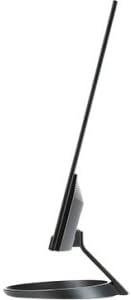
Lado view illustrating the slim design of the Acer R271 bid monitor.
Conectando o monitor
The Acer R271 bid monitor supports multiple input options. Connect the appropriate cable from your computer or device to the corresponding port on the monitor.
- HDMI: Para vídeo e audio dixital de alta definición.
- DVI (w/HDCP): For digital video connection.
- VGA: For analog video connection.
After connecting the video cable, connect the power cord to the monitor and then to a power outlet.
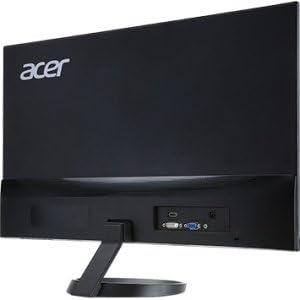
Traseira view of the Acer R271 bid monitor, highlighting the HDMI, DVI, and VGA input ports.
Acendido
Press the power button, usually located on the bottom right side of the monitor, to turn on the display. The monitor will automatically detect the active input source.
Instrucións de funcionamento
Funcións básicas
Use the buttons located on the bottom bezel of the monitor to navigate the On-Screen Display (OSD) menu. These buttons typically allow you to:
- Power On/Off the monitor.
- Select input source (HDMI, DVI, VGA).
- Adjust volume (if applicable).
- Access the OSD menu for advanced settings.
Configuración de visualización
The OSD menu provides options to customize your display. Common adjustments include:
- Brillo: Axusta a luminancia xeral da pantalla.
- Contraste: Modifica a diferenza entre as zonas claras e escuras.
- Configuración de cor: Axuste fino da temperatura da cor, gamma e niveis RGB individuais.
- Modo de imaxe: Select preset modes for different content types (e.g., Standard, Movie, Game).
Características clave
The Acer R271 bid monitor incorporates several features designed to enhance your viewexperiencia:
- Tecnoloxía IPS: Provides clear and bright colors from wide viewing angles (up to 178 degrees).
- Deseño ZeroFrame: An edge-to-edge display that minimizes bezels, ideal for multi-monitor setups.
- Eye Protect Technology: Includes features like Blue Light Filter, Flicker-less, and ComfyView para reducir a fatiga ocular durante o uso prolongado.
Vídeo de presentación oficial do produtoasing the Acer R1 Series monitor's features, including ZeroFrame design, Full HD resolution, IPS technology for wide viewing angles, and Eye Protect technology for user comfort.
Mantemento e coidados
Limpeza do monitor
Para limpar a pantalla, limpe con coidado cun pano suave e sen pelusa. Para marcas difíciles,ampen the cloth with a mild, non-abrasive screen cleaner. Avoid using alcohol-based cleaners or spraying liquid directly onto the screen.
Atención Xeral
Keep the monitor away from direct sunlight, excessive heat, and moisture. Do not block the ventilation openings. Avoid placing heavy objects on the monitor or its cables.
Resolución de problemas
No Display or "No Signal" Message
- Asegúrate de que o cable de alimentación estea conectado correctamente tanto ao monitor como á toma de corrente.
- Verify that the video cable (HDMI, DVI, or VGA) is firmly connected to both the monitor and your computer.
- Comprobe se a fonte de entrada correcta está seleccionada no monitor usando o menú OSD.
- Confirma que o teu ordenador estea acendido e que non estea en modo de suspensión.
Mala calidade da imaxe
- Adjust the brightness, contrast, and color settings through the OSD menu.
- Ensure your computer's display resolution is set to the monitor's native resolution (1920 x 1080).
- Check for any physical damage to the video cable or ports.
Especificacións
| Característica | Especificación |
|---|---|
| Tamaño da pantalla | 27 polgadas |
| Resolución de pantalla | 1920 x 1080 (Full HD) |
| Tipo de panel | IPS |
| Tempo de resposta | 4 ms |
| Pixel Pitch | 0.311 mm |
| Brillo | 250 nits |
| Entradas de sinal | 1 x HDMI, 1 x DVI (w/HDCP), 1 x VGA |
| Relación de aspecto | 16:9 |
| Peso do elemento | 8.05 libras |
| Dimensións do produto (LxWxH) | 24.8 x 18.1 x 9.4 polgadas |
| Cor | Negro |

Detailed dimensions of the Acer R271 bid monitor.
Información da garantía
The Acer R271 bid monitor typically comes with a 3-year limited warranty. Please refer to the warranty card included with your product or visit the official Acer website for specific terms and conditions, as warranty details may vary by region and retailer.
Atención ao cliente
For further assistance, technical support, or to download the latest drivers and software, please visit the official Acer support websitio:
You may also contact Acer customer service directly for personalized support.