Manual do usuario do HTC 10
Model: HTC 10
1. Introdución
This manual provides essential information for the safe and efficient use of your HTC 10 smartphone. Please read it thoroughly before operating your device.

Figure 1: HTC 10 Front View. This image shows the front of the HTC 10 smartphone, highlighting its 5.2-inch display, front camera, and capacitive buttons. The screen displays the current time, date, and weather information.
2. Que hai na caixa
Verifica que todos os elementos estean presentes na embalaxe do produto:
- HTC 10 Smartphone
- Cable USB
- Charger (may be foreign, a FREE US adapter will be included if so)
- Documentation (User Manual, Safety Guide)
3. Configuración
3.1. Inserción da tarxeta SIM e da tarxeta microSD
Locate the SIM card tray on the side of the device. Use the provided SIM ejector tool to open the tray. Insert your Nano-SIM card and, if desired, a microSD card into their respective slots on the tray. Ensure the cards are correctly oriented before reinserting the tray into the phone.
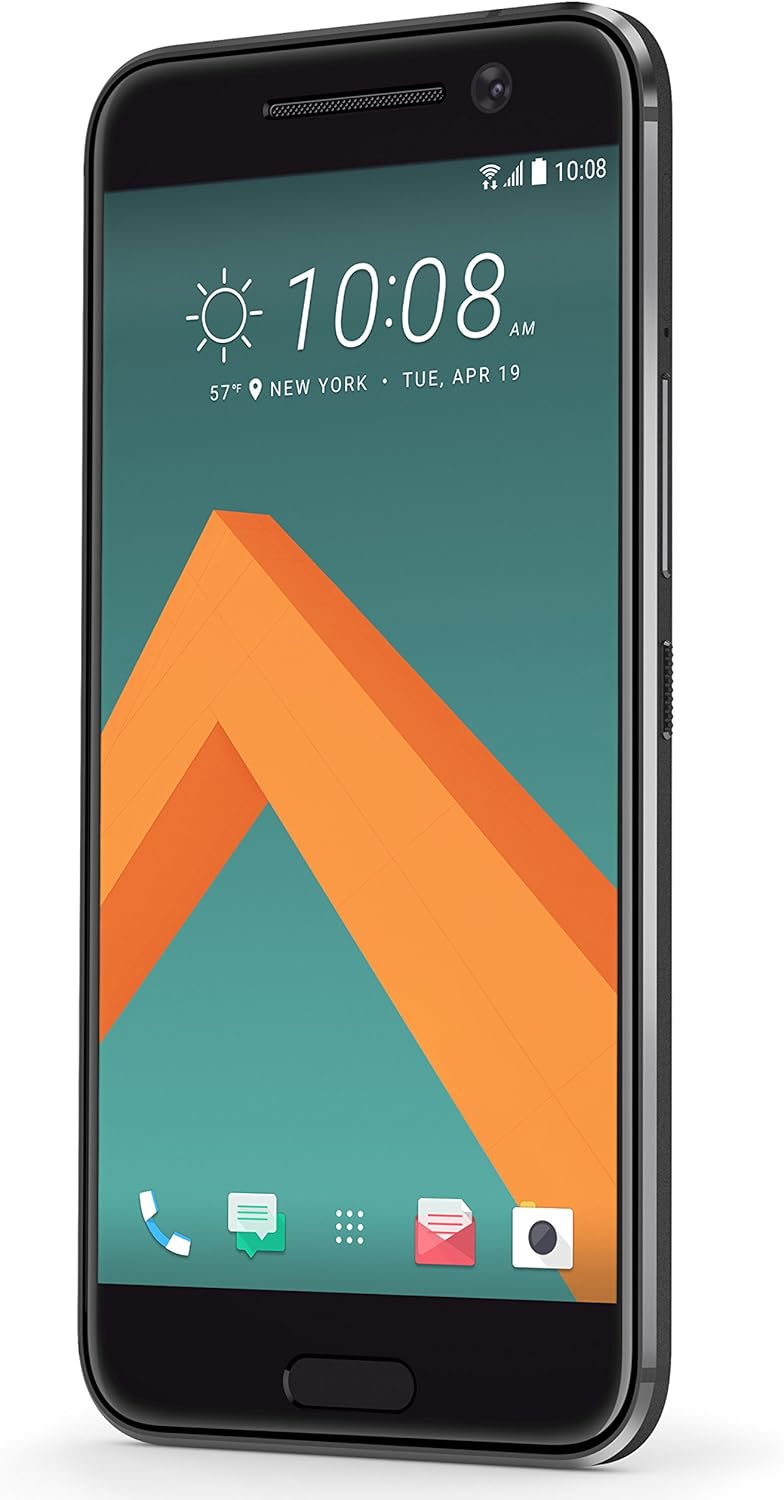
Figure 2: HTC 10 Side View. This image displays the right side of the HTC 10, where the power button and volume rocker are located. The SIM/microSD card tray is typically on the opposite side or top/bottom, but this view helps visualize the phone's profile.
3.2. Asistente de acendido inicial e configuración
Press and hold the power button located on the right side of the device until the HTC logo appears. Follow the on-screen instructions to complete the initial setup, including language selection, Wi-Fi connection, Google account sign-in, and security settings.
4. Operating Your HTC 10
4.1. Pantalla e navegación
The HTC 10 features a 5.2-inch Super LCD5 capacitive touchscreen. Navigation is primarily touch-based. Use gestures such as tap, swipe, pinch-to-zoom, and long-press. The device includes capacitive navigation buttons below the screen for Back, Home, and Recent Apps.
4.2. Funcionamento da cámara
Your HTC 10 is equipped with a 12 MP main camera (f/1.8, 26mm, OIS, laser autofocus, dual-LED flash) and a 5 MP front camera. To open the camera app, tap the camera icon on the home screen or lock screen. Tap the screen to focus, and press the shutter button to capture photos. Swipe left or right to switch between photo and video modes.

Figure 3: HTC 10 Rear View. This image shows the back panel of the HTC 10, featuring the prominent main camera lens, dual-LED flash, and the HTC brand logo.
4.3. Conectividade
The HTC 10 supports various connectivity options:
- Wi-Fi: Conéctate a redes sen fíos para acceder a internet.
- Bluetooth: Combínao con accesorios sen fíos como auriculares ou altofalantes.
- USB: Conéctase a un ordenador para transferir datos ou cargar.
- GSM Cellular: Compatible with GSM carriers such as AT&T and T-Mobile. Note: This is an international model and may not support LTE in the USA.
5. Mantemento
5.1. Limpeza do dispositivo
Use a soft, lint-free cloth to clean the screen and body of your HTC 10. Avoid using abrasive cleaners or solvents, as they may damage the device's finish. For stubborn smudges, slightly dampen o pano con auga.
5.2. Coidado da batería
The HTC 10 contains a non-removable Lithium Ion battery. To prolong battery life, avoid exposing the device to extreme temperatures. Charge the device using only the provided charger and USB cable. Avoid completely draining the battery frequently.
5.3. Actualizacións de software
Regularly check for and install software updates to ensure optimal performance and security. Updates can be found in the device's settings menu under "About phone" or "System updates."
6 Solución de problemas
| Problema | Posible Solución |
|---|---|
| O dispositivo non se acende | Asegúrate de que a batería estea cargada. Conecta o cargador e agarda uns minutos antes de tentar acender de novo. |
| Sinal de rede deficiente ou sen servizo | Check if your SIM card is properly inserted. Verify that your cellular carrier supports the bands for this international model. Restart the device. |
| As aplicacións fallan ou conxélanse | Close and reopen the application. Clear the app's cache in settings. If the issue persists, restart the phone. |
| A batería esgotarase rapidamente | Reduce o brillo da pantalla, desactiva as funcións non utilizadas como o Wi-Fi ou o Bluetooth e pecha as aplicacións en segundo plano. |
7. Especificacións
- Modelo: HTC 10
- Sistema operativo: Android 6.0.1 Marshmallow
- Visualización: 5.2 inches Super LCD5 capacitive touchscreen, 1440 x 2560 resolution
- Procesador: Dual-core 2.15 GHz & Dual-core 1.6 GHz, Qualcomm MSM8996 Snapdragon 820 CPU
- RAM: 4 GB
- Almacenamento interno: 32 GB
- Cámara principal: 12 MP, f/1.8, 26mm, OIS, laser autofocus, dual-LED (dual tone) flash
- Cámara frontal: 5 MP
- Batería: 1 Lithium Ion battery (included), Phone Talk Time: 27 Hours
- Dimensións: 7.64 x 5.91 x 0.14 polgadas
- Peso: 14.8 onzas (0.42 quilogramos)
- Conectividade: GSM, HSDPA, LTE (international bands), Wi-Fi, Bluetooth, USB, GPS
8. Garantía e soporte
This device is an international version. Please note that it may not include a US warranty, as some manufacturers do not honor warranties for international items. For specific warranty information and support, please contact the seller from whom you purchased the device.
For general product information and support resources, you may visit the official HTC website or the HTC Store on Amazon: HTC Store.


