Introdución
This manual provides detailed instructions for the setup, operation, and maintenance of your BIOS Weather Indoor/Outdoor Wireless Thermometer & Hygrometer. Please read this manual thoroughly before using the device to ensure proper function and longevity.
The BIOS Weather Indoor/Outdoor Wireless Thermometer & Hygrometer is designed to provide accurate readings of indoor temperature and humidity, as well as outdoor temperature. It features wireless connectivity for the outdoor sensor, a moon phase display, and the capability to connect with up to three sensors (additional sensors sold separately).
- Wireless range up to 30 meters (100 feet) from the outdoor sensor.
- Indoor monitor includes a hygrometer sensor for RH percentage readings (20% to 95%).
- Displays temperature from up to 3 sensors (Model No. 312TX, sold separately).
- Tracks relative indoor humidity and moon phase.
Contido do paquete
Ao abrir o paquete, comprobe que todos os compoñentes estean presentes e en bo estado:
- 1 x Main Display Unit (Indoor Monitor)
- 1 sensor exterior sen fíos
- 1 x Manual de instrucións (este documento)

Image: The main display unit (left) and the wireless outdoor sensor (right). The main unit shows indoor temperature, humidity, moon phase, time, and outdoor temperature. The outdoor sensor displays its current temperature.
Guía de configuración
1. Instalación da batería
Both the main display unit and the wireless outdoor sensor require batteries (not included).
- Open the battery compartment on the back of both the main display unit and the outdoor sensor.
- Insert the required batteries (e.g., AA or AAA, refer to the battery compartment markings for correct type and polarity).
- Pecha os compartimentos das baterías de forma segura.
Nota:
- It is recommended to insert batteries into the outdoor sensor first, then the main display unit, to facilitate immediate pairing.
- Use high-quality alkaline batteries for optimal performance, especially in cold weather for the outdoor sensor.
2. Colocación do sensor
Proper placement of both units is crucial for accurate readings and reliable wireless communication.
- Unidade de visualización principal: Place indoors, away from direct sunlight, heat sources, or drafts that could affect temperature and humidity readings. Ensure it is within 30 meters (100 feet) of the outdoor sensor.
- Sensor exterior sen fíos:
- Mount in a shaded area to avoid direct sunlight, which can cause artificially high temperature readings.
- Protect from direct rain and snow. An overhang or a weather-resistant enclosure is ideal.
- Avoid placing near large metal objects, electrical appliances, or thick walls that could interfere with the wireless signal.
- Ensure it is within the 30-meter (100-foot) wireless range of the main unit.
3. Emparejamento Inicial
The main display unit and outdoor sensor should automatically pair upon battery installation. If pairing does not occur:
- Asegúrate de que ambas unidades teñan baterías novas.
- Bring the outdoor sensor closer to the main display unit.
- Press the "CH" (Channel) button on the main display unit to cycle through channels or initiate a search for the sensor.
- If issues persist, remove batteries from both units, wait a few minutes, and reinsert them, starting with the outdoor sensor.
Instrucións de funcionamento
1. Mostrarview
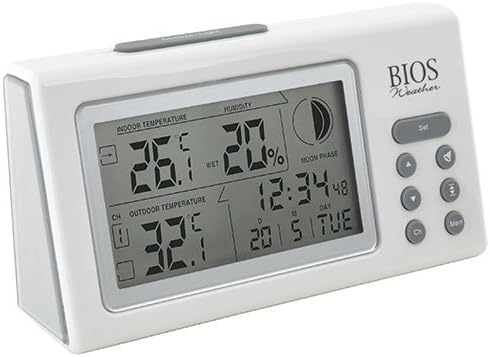
Imaxe: En ángulo view of the main display unit, highlighting the various segments for indoor temperature, humidity, moon phase, time, and outdoor temperature.
The main display unit provides the following information:
- Temperatura interior: Displays the current temperature inside the room where the main unit is located.
- Humidade: Shows the relative indoor humidity percentage.
- Temperatura exterior: Displays the temperature from the connected wireless outdoor sensor.
- Data e hora: Data e hora actual.
- Fase da Lúa: An icon indicating the current moon phase.
- Indicador de canle: Shows which outdoor sensor channel is currently displayed (if multiple sensors are used).
2. Funcións dos botóns
The main display unit features several buttons for configuration and viewdatos de entrada:
| Botón | Función |
|---|---|
| SET | Enters setup mode for time, date, and other settings. Press to confirm settings. |
| ▲ / ▼ (Up/Down) | Adjusts values during setup. Cycles through channels for outdoor sensors. |
| CH (canle) | Switches between outdoor sensor channels (1, 2, 3) or initiates a search for sensors. |
| MEM (Memoria) | Displays maximum and minimum temperature/humidity readings. Press again to clear. |
3. Axuste da hora e da data
- Manteña premido o SET botón ata que a pantalla da hora parpadee.
- Usa o ▲ or ▼ botóns para axustar a hora.
- Preme SET to confirm and move to the next setting (minutes, year, month, day).
- Repita os pasos 2 e 3 ata que todos os axustes estean configurados.
- Preme SET one last time to exit setup mode.
4. Viewing Max/Min Readings
Preme o MEM botón para view the maximum recorded indoor temperature, humidity, and outdoor temperature. Press MEM de novo a view the minimum readings. To clear the memory, press and hold the MEM button while the max/min readings are displayed.
Mantemento
1. Limpeza
To clean the display unit and outdoor sensor, use a soft, damp cloth. Do not use abrasive cleaners, solvents, or harsh chemicals, as these may damage the plastic casing ou compoñentes electrónicos.
2. Substitución da batería
When the battery indicator appears on the display, it is time to replace the batteries in the respective unit (main unit or outdoor sensor). Always replace all batteries in a unit at the same time with new, high-quality batteries of the correct type.
Importante:
- Elimina as pilas antigas de forma responsable segundo a normativa local.
- Se non se vai usar a unidade durante un período prolongado, retire as baterías para evitar fugas e danos.
Resolución de problemas
If you experience issues with your BIOS Weather Thermometer & Hygrometer, please refer to the following common problems and solutions:
| Problema | Posible causa/solución |
|---|---|
| Non se mostra ningunha lectura de temperatura exterior nin "---". |
|
| Lecturas de temperatura/humidade incorrectas. |
|
| A pantalla está escura ou en branco. |
|
| A hora/data é incorrecta. |
|
Especificacións do produto

Image: The main display unit with indicated dimensions: 21.59 cm (length), 7.62 cm (width), and 19.05 cm (height).
| Característica | Detalle |
|---|---|
| Número de modelo | BBYCA10300783 (312BC) |
| Tipo | Indoor/Outdoor Thermometer and Hygrometer |
| Material | Plástico |
| Cor | Branco |
| Dimensións (unidade principal) | Alto: 19.05 cm, Ancho: 7.62 cm, Fondo: 21.59 cm |
| Peso | 0.30 kg |
| distancia wireless | Ata 30 metros (100 pés) |
| Rango de humidade interior | 20% a 95% RH |
| Sensor Capability | Supports up to 3 outdoor sensors (additional sensors Model No. 312TX, sold separately) |
| Características especiais | Wireless connectivity, Multi-Sensor support, Humidity Tracking, Moon Phase Display |
| Fonte de enerxía | Alimentado por batería |
Información da garantía
This BIOS Weather product comes with a 1 anos de garantía nas pezas from the date of purchase. This warranty covers defects in materials and workmanship under normal use. It does not cover damage resulting from misuse, accident, unauthorized modification, or improper installation.
Conserve o comprobante de compra para reclamacións de garantía.
Atención ao cliente
If you have any questions, require technical assistance, or need to make a warranty claim, please contact Bios customer support. For more information and resources, you may also visit the official Bios store on Amazon:
Visit the Bios Store on Amazon
Please have your product model number (BBYCA10300783) and purchase date ready when contacting support.


