1. Produto rematadoview
The Xiaomi Mi Bluetooth Speaker Mini (Model: XMYX02YM) is a compact and portable wireless speaker designed for high-quality audio playback. It features Bluetooth connectivity for seamless pairing with various devices and a durable, waterproof design for versatile use.
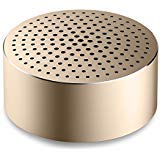
Image: The Xiaomi Mi Bluetooth Speaker Mini, a small, cylindrical black speaker with a mesh grille, showcasing o seu deseño compacto.
2. Configuración
2.1 Desembalaxe
Carefully remove all components from the packaging. The box should contain the Mi Bluetooth Speaker Mini.
2.2 Carga do altofalante
The speaker is powered by an internal battery. Before first use, ensure the speaker is fully charged. Connect the appropriate charging cable (not included) to the speaker's charging port and to a compatible USB power source. The charging indicator light will provide status updates.
2.3 Emparejamento Bluetooth
- Encendido: Press and hold the power button on the speaker until you hear an audible prompt or see the indicator light flash, indicating it is in pairing mode.
- Activar Bluetooth: On your device (smartphone, tablet, laptop, MP3 player), enable Bluetooth.
- Select Speaker: In your device's Bluetooth settings, search for available devices. Select "Mi Bluetooth Speaker Mini" from the list.
- Confirmar conexión: Once paired, the speaker will provide an audible confirmation, and the indicator light will change to a steady state.
The speaker is now ready for audio playback.
3. Instrucións de funcionamento
3.1 Encendido/apagado
- Para acender: Manteña premido o botón de acendido durante aproximadamente 2-3 segundos.
- Para apagar: Press and hold the power button for approximately 3-4 seconds until the speaker powers down.
3.2 Reprodución de audio
After successful Bluetooth pairing, play audio from your connected device. The sound will be transmitted wirelessly to the Mi Bluetooth Speaker Mini. The speaker supports stereo audio output.
3.3 Controis táctiles
The speaker features touch controls for basic functions. Refer to the specific touch areas on your speaker for volume adjustment, play/pause, and track navigation. (Specific touch control details may vary; consult product packaging or quick start guide for exact touch gestures).
3.4 Entrada auxiliar
While primarily a Bluetooth speaker, the device may support an auxiliary audio input. If available, connect an audio cable (not included) from your device's audio output to the speaker's auxiliary input port for wired audio playback.
4. Mantemento
4.1 Limpeza
To clean the speaker, use a soft, dry, lint-free cloth. Do not use abrasive cleaners, solvents, or strong chemicals, as these can damage the speaker's surface or internal components.
4.2 Resistencia á auga
The Xiaomi Mi Bluetooth Speaker Mini is waterproof. While it can withstand splashes and light exposure to water, it is not designed for prolonged submersion. Ensure all ports are securely closed before exposure to water. After exposure, dry the speaker thoroughly before charging or using it again.
4.3 Almacenamento
When not in use for extended periods, store the speaker in a cool, dry place away from direct sunlight and extreme temperatures. It is recommended to charge the speaker periodically to maintain battery health.
5 Solución de problemas
- O altofalante non se acende: Asegúrate de que a batería estea cargada. Conecta o altofalante a unha fonte de alimentación e inténtao de novo.
- Non se pode emparellar co dispositivo:
- Asegúrate de que o altofalante estea no modo de emparellamento (luz indicadora parpadeando).
- Desactiva e activa o Bluetooth no teu dispositivo.
- Achega o altofalante ao teu dispositivo.
- Borra as conexións Bluetooth anteriores no teu dispositivo e tenta emparellalo de novo.
- Sen son durante a reprodución:
- Comprobe os niveis de volume tanto no altofalante como no dispositivo conectado.
- Asegúrate de que o altofalante estea emparellado e conectado correctamente ao teu dispositivo.
- Tenta reproducir audio desde unha aplicación ou dispositivo diferente.
- Mala calidade de audio:
- Asegúrate de que non haxa obstáculos entre o altofalante e o dispositivo.
- Afástese de fontes de interferencias (por exemplo, routers Wi-Fi ou outros dispositivos Bluetooth).
- Comproba a calidade da fonte de son.
6. Especificacións
| Característica | Detalle |
|---|---|
| Modelo | XMYX02YM |
| Marca | XIAOMI |
| Tipo de altofalante | Estante de libros (portátil) |
| Tecnoloxía de conectividade | Bluetooth, Sen fíos |
| Tecnoloxía de comunicación sen fíos | Bluetooth |
| Dispositivos compatibles | Ordenador portátil, reprodutor de MP3, teléfono intelixente, tableta |
| Fonte de enerxía | Alimentado por batería |
| Método de control | Toca |
| Modo de saída de audio | Estéreo |
| Tipo de controlador de audio | Driver dinámico |
| Configuración da canle de son envolvente | 2.1 |
| Peso do elemento | 59 g |
| Dimensións do produto (LxWxH) | 0.43 x 0.43 x 0.2 cm (4 x 4 x 2 milímetros) |
| Cor | Negro |
| Impermeable | Si |
| Pilas necesarias | Yes (Internal, rechargeable) |
| Compoñentes incluídos | Mi Bluetooth Speaker Mini |
| Fabricante | Xiaomi Technology Inc. |
7. Garantía e soporte
For warranty information, please refer to the documentation included with your purchase or visit the official Xiaomi website. For technical support or service inquiries, please contact Xiaomi customer service through their official channels.