1. Introdución
This manual provides detailed instructions for the proper setup, operation, and maintenance of your LyxPro SPA-5.5 Small PA Speaker Monitor. Please read this manual thoroughly before using the device to ensure optimal performance and safety.
The LyxPro SPA-5.5 is a compact and powerful active speaker system featuring a Class-D amplifier, a 3-channel mixer, and a 3-band equalizer. It is designed for various applications including vocal and instrument monitoring, public address, and as a guitar amplifier or karaoke system.
2. Instrucións de seguridade
- Fonte de enerxía: Connect the unit only to the specified power supply (100V – 240V AC). Ensure the power cord is not damaged or pinched.
- Ventilación: Non bloquee as aberturas de ventilación. Asegúrese de que haxa un fluxo de aire axeitado arredor da unidade para evitar o sobrequecemento.
- Auga e humidade: Do not expose the unit to rain, moisture, or any liquids. Do not place objects filled with liquids on the unit.
- Fontes de calor: Manteña a unidade lonxe de fontes de calor como radiadores, reixas de calor, estufas ou outros aparellos que produzan calor.
- Limpeza: Clean only with a dry cloth. Disconnect from power before cleaning.
- Servizo: Non intente atender este produto vostede mesmo. Remita todo o servizo a persoal de servizo cualificado.
- Colocación: Place the unit on a stable surface. If mounting on a microphone stand, ensure the stand is stable and capable of supporting the unit's weight.
3. Contido do paquete
Verifica que todos os elementos estean presentes no paquete:
- LyxPro SPA-5.5 Speaker Monitor
- Cable de alimentación
- Microphone Stand Mounting Hardware
- Manual de usuario (este documento)
4. Características do produto
- 125W RMS / 150W Peak Class-D Ampmáis vivo
- Integrated 3-Channel Mixer
- 3-Band Equalizer (Bass, Mid, Treble)
- +48V Phantom Power Supply for Condenser Microphones
- Multiple Inputs: XLR, 1/4" (6.35mm), RCA, and 3.5mm (1/8") Aux
- Instrument Switch for Direct Instrument Connection
- XLR Thru Connection for Daisy-Chaining
- Control de eco
- Conectividade Bluetooth integrada
- Compatibilidade con tarxetas SD
- Mounts on Standard Microphone Stands
- Durable and Compact Design
5. Controis e conexións
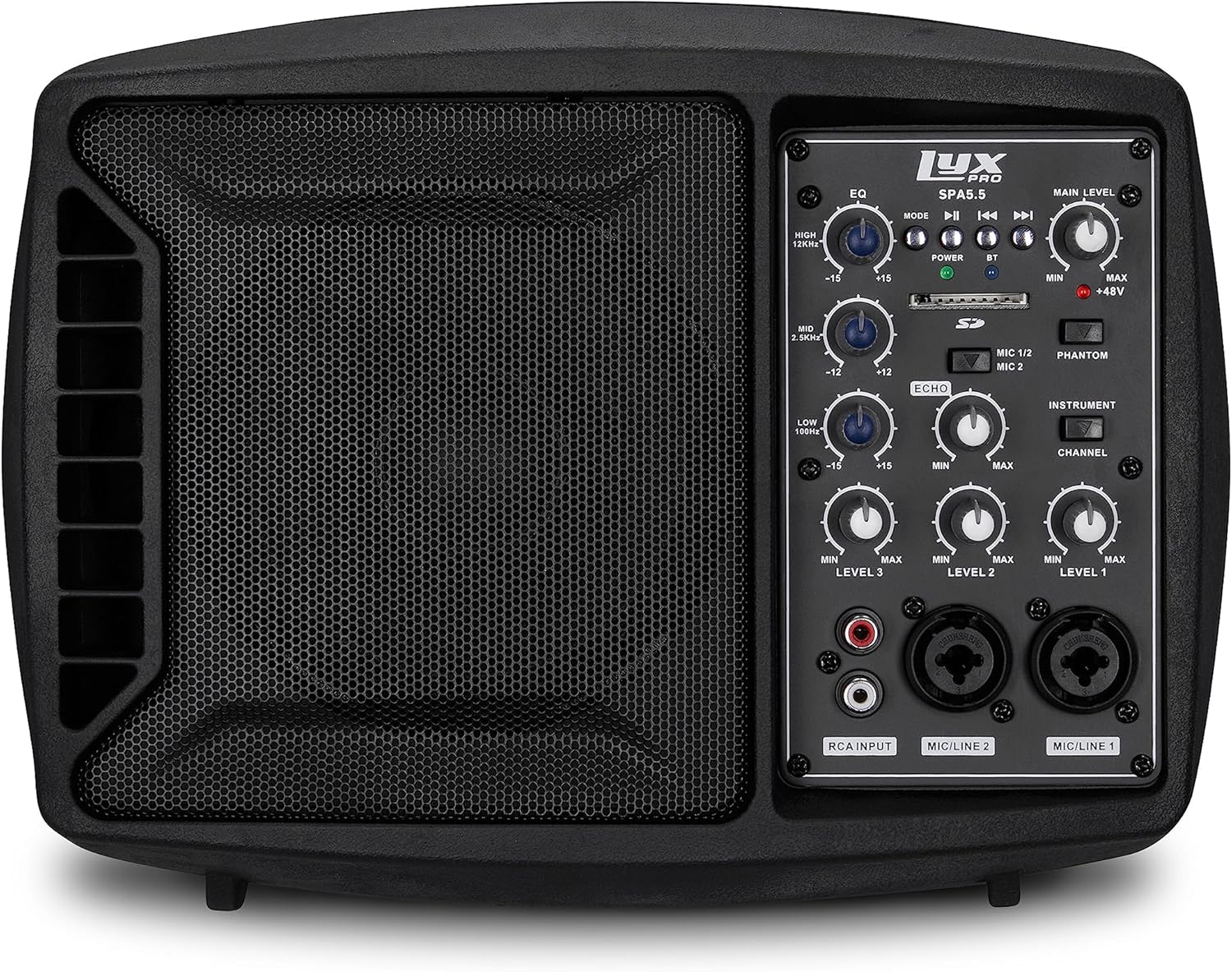
Figura 5.1: Fronte view of the LyxPro SPA-5.5 speaker monitor, showing the speaker grille and control panel.
5.1 Controis do panel frontal

Figure 5.2: Detailed diagram of the LyxPro SPA-5.5 front control panel with labeled components.
- Ecualizador (EQ):
- HIGH (12kHz): Adjusts high frequencies. Range: ±15dB.
- MID (2.5kHz): Adjusts mid frequencies. Range: ±15dB.
- LOW (80Hz): Adjusts low frequencies. Range: ±15dB.
- Nivel principal: Controla o volume de saída xeral do altofalante.
- Luz de potencia: Indica cando a unidade está acendida.
- BT (Bluetooth) Light: Indica o estado da conexión Bluetooth.
- Ranura para tarxetas SD: Para reproducir audio files dunha tarxeta SD.
- Phantom Power Switch (+48V): Activates +48V phantom power for condenser microphones connected to MIC 1 or MIC 2.
- MIC 1/2 Switch: Selects between MIC 1 and MIC 2 inputs for Channel 1.
- Interruptor de instrumento: Optimizes input impedance for direct connection of instruments (e.g., guitar) to Channel 1.
- Control de eco: Adjusts the level of echo effect applied to microphone inputs.
- Channel Level Controls (LEVEL 1, LEVEL 2, LEVEL 3): Adjusts the individual volume for each input channel.
- RCA Input (LINE 3): Stereo RCA inputs for connecting devices like CD players, MP3 players, or keyboards.
- Entrada de micrófono/liña 2: Combo XLR/1/4" (6.35mm) input for microphones or line-level devices.
- Entrada de micrófono/liña 1: Combo XLR/1/4" (6.35mm) input for microphones or line-level devices.
5.2 Conexións do panel traseiro

Figure 5.3: Detailed diagram of the LyxPro SPA-5.5 rear panel with labeled connections.
- MAIN IN (XLR): Main input for connecting external audio sources.
- MIC/LINE Level Switch: Selects between microphone or line level for the MAIN IN.
- THRU (XLR): XLR output for daisy-chaining to other speakers or sending the mixed signal to another device.
- Interruptor de alimentación: Acende ou apaga a unidade.
- ENTRADA CA: Power connector for the included AC power cable (100V – 240V AC).
6. Configuración
6.1 Encendido inicial
- Ensure all level controls (Main Level, Channel Levels) are set to minimum.
- Connect the provided AC power cable to the AC INPUT on the rear panel and then to a suitable power outlet.
- Flip the Power Switch on the rear panel to the "ON" position. The Power Light on the front panel will illuminate.
6.2 Opcións de montaxe
The SPA-5.5 can be used in various configurations:
- Monitor de piso: Place the unit on the floor in front of the performer, angled upwards.
- Mesa: Colócase nunha superficie plana e estable.
- Microphone Stand Mounting: The unit includes hardware to mount it directly onto a standard microphone stand.

Figure 6.1: The LyxPro SPA-5.5 speaker monitor positioned on a microphone stand, demonstrating its use as a personal monitor for a musician.

Figure 6.2: A band performing outdoors, utilizing the compact LyxPro SPA-5.5 speaker for sound reinforcement.
7. Instrucións de funcionamento
7.1 Conexión de micrófonos e instrumentos
- Micrófonos: Connect dynamic or condenser microphones to the MIC/LINE 1 or MIC/LINE 2 inputs using XLR cables. If using a condenser microphone, activate the +48V Phantom Power Switch. Adjust the corresponding Channel Level control.
- Instrumentos: Connect instruments (e.g., guitar, bass) directly to MIC/LINE 1 or MIC/LINE 2 using a 1/4" (6.35mm) cable. Engage the Instrument Switch for optimal impedance matching. Adjust the corresponding Channel Level control.
- Dispositivos de nivel de liña: Connect devices like keyboards or audio interfaces to MIC/LINE 1 or MIC/LINE 2 using 1/4" (6.35mm) cables. Ensure the Instrument Switch is disengaged. Adjust the corresponding Channel Level control.
- Stereo Audio Sources: Connect CD players, MP3 players, or other stereo sources to the RCA Input (LINE 3). Adjust LEVEL 3.
7.2 Axuste do son
- Channel Levels: Use the LEVEL 1, LEVEL 2, and LEVEL 3 controls to balance the volume of individual inputs.
- Nivel principal: Adjust the Main Level knob to control the overall output volume of the speaker.
- Ecualizador (EQ): Use the HIGH, MID, and LOW knobs to shape the tone of your sound.
- Increase HIGH for brighter sound.
- Adjust MID for vocal clarity or instrument presence.
- Increase LOW for more bass.
- Control de eco: Turn the Echo knob to add a reverberation effect to the microphone inputs.
7.3 Media Playback (SD Card & Bluetooth)

Figure 7.1: Icons indicating SD card compatibility and built-in Bluetooth functionality on the LyxPro SPA-5.5.
- Tarxeta SD: Insert an SD card containing audio files into the SD Card Slot. The unit will automatically detect and begin playback. Use the built-in controls (Mode, Play/Pause, Skip) to manage playback.
- Bluetooth:
- Asegúrese de que a unidade estea acendida.
- Activa o Bluetooth no teu dispositivo móbil.
- Busca "LyxPro SPA-5.5" in your device's Bluetooth settings and pair. The BT light on the unit will indicate a successful connection.
- Play audio from your device. Adjust volume using both your device and the SPA-5.5's Main Level control.

Figure 7.2: A musician utilizing the LyxPro SPA-5.5 as a personal monitor in a studio environment.
8. Mantemento
- Limpeza: Empregue un pano suave e seco para limpar o exterior da unidade. Non empregue produtos de limpeza líquidos nin aerosois.
- Almacenamento: Cando non se use durante períodos prolongados, garde a unidade nun lugar fresco e seco, lonxe da luz solar directa e de temperaturas extremas.
- Substitución de fusibles: If the unit does not power on, check the fuse located near the AC input. Replace with a fuse of the same type and rating (T 3.15 A H 250V). Refer to qualified personnel if unsure.
9 Solución de problemas
| Problema | Causa posible | Solución |
|---|---|---|
| Sen poder | Cable de alimentación desconectado; interruptor de alimentación apagado; fusible fundido | Check power cable connection; Turn power switch on; Replace fuse (refer to Maintenance section) |
| Sen saída de son | Main Level or Channel Levels too low; Input device not connected or muted; Incorrect input selected | Increase Main Level and Channel Levels; Check input device connection and volume; Verify correct input is used |
| Son distorsionado | Input signal too high; Main Level too high; EQ settings incorrect | Reduce input device volume; Lower Main Level; Adjust EQ settings |
| O micrófono non funciona (micrófono de condensador) | Phantom power not enabled | Activate the +48V Phantom Power Switch |
| Bluetooth non se conecta | A unidade non está en modo de emparellamento; Dispositivo demasiado lonxe; Dispositivo incorrecto seleccionado | Ensure Bluetooth is active on SPA-5.5 and device; Move device closer; Select "LyxPro SPA-5.5" from device list |
10. Especificacións

Figure 10.1: Diagram illustrating the compact dimensions of the LyxPro SPA-5.5 speaker monitor.
| Característica | Detalle |
|---|---|
| Potencia de saída | 125 W RMS / 150 W Pico |
| Tamaño do altofalante | 5 polgadas |
| AmpTipo máis vivo | Clase-D |
| Resposta en frecuencia (-10 dB) | 80 Hz - 14 kHz |
| Resposta en frecuencia (-3 dB) | 100 Hz - 10 kHz |
| Máx. SPL | 114dB SPL @ 1M |
| Poder Fantasma | +48 V |
| Impedancia de entrada | 20K Ω |
| EQ High (12kHz) | ± 15 dB |
| EQ Mid (2.5kHz) | ± 15 dB |
| EQ Low (80Hz) | ± 15 dB |
| Vol. De entradatage | 100V-240V AC |
| Consumo de enerxía | 180W máx. |
| Dimensións (L x W x H) | 13.5" x 9" x 11.8" (34.3 cm x 22.9 cm x 30 cm) |
| Peso | 6.1 libras (2.77 kg) |
11. Garantía e soporte
For warranty information and technical support, please refer to the warranty card included with your product or visit the official LyxPro websitio. Garde o recibo da compra como xustificante da mesma.
For further assistance, contact LyxPro customer support.


