1. Introdución
The Risco Rokkonet RPKEL0B000A Touch Elegant Keypad is an advanced interface designed for seamless integration with RISCO wired and hybrid alarm systems. This keypad provides an intuitive touch control experience for managing your security system, featuring an elegant black design and an additional zone input for enhanced flexibility. It is engineered for professional wired installation and supports automatic firmware updates from compatible LightSYS central units.
2. Información de seguridade
- Instalación profesional: This device requires professional installation by a qualified technician.
- Fonte de enerxía: Connect only to the specified wired electrical power source as per installation guidelines.
- Condicións ambientais: Do not expose the keypad to extreme temperatures, humidity, or direct water contact.
- Mantemento: Refer to the maintenance section for cleaning instructions. Do not attempt to open or repair the device yourself.
- Eliminación: Desfágase do produto segundo a normativa local sobre residuos electrónicos.
3. Contido do paquete
- 1 x Risco Rokkonet RPKEL0B000A Touch Elegant Keypad
- Installation hardware (wall mount, screws)
4. Configuración e instalación
The RPKEL0B000A keypad is designed for professional wired installation. Ensure all power is disconnected before beginning the installation process.
4.1 Montaxe
The keypad is prepared for direct mounting onto an electrical box model 503, allowing for horizontal installation. Use the provided wall holder and screws to securely attach the keypad to the desired location.
4.2 Cableado
Connect the keypad to your RISCO alarm system's central unit using appropriate wiring. The keypad includes an additional zone input, which can be used to directly wire a contact, such as a door contact, without needing to route it through the central panel.
4.3 Acendido e configuración inicial
Once wired, power up the central unit. The keypad will initialize. Refer to your RISCO central unit's manual for specific instructions on adding and configuring keypads within the system. The keypad's firmware will be automatically updated by the LightSYS central unit during installation, provided the central unit's firmware version is 2.70 or higher.
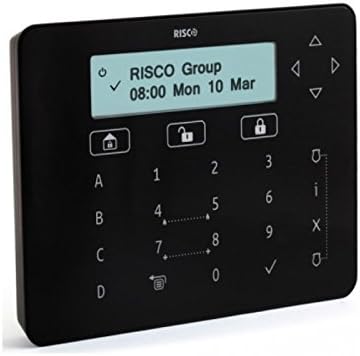
Figura 1: Risco Rokkonet Touch Elegant Keypad. This image displays the Risco Rokkonet Touch Elegant Keypad in black. The central display shows 'RISCO Group' and '08:00 Mon 10 Mar'. Below the display are touch-sensitive buttons including numeric keys (0-9), alphabetical keys (A-D), and function icons for home, unlock, lock, navigation arrows, checkmark, and 'X'.
5. Instrucións de funcionamento
The RPKEL0B000A keypad features a touch-sensitive interface for easy operation of your alarm system.
5.1 Keypad Layout
- Visualización: Shows system status, time, date, and menu options.
- Teclas numéricas (0-9): Used for entering user codes and navigating menus.
- Alphabetical Keys (A-D): May be used for specific zone bypasses or quick arming functions, depending on system configuration.
- Icona de inicio: Typically used to return to the main screen or arm the system in 'Home' mode.
- Unlock Icon: Used to disarm the system.
- Icona de bloqueo: Used to arm the system in 'Away' mode.
- Teclas de frecha (arriba, abaixo, esquerda, dereita): Para a navegación polo menú.
- Checkmark (✓): To confirm selections or enter codes.
- X Icon: To cancel an action or go back.
- 'i' Icon: Information button, often used to view system status or event logs.
5.2 Operacións básicas
- Arming the System (Away): Preme o Bloqueo icon, then enter your user code.
- Arming the System (Home): Preme o Casa icon, then enter your user code.
- Desarmado do sistema: Preme o Desbloquear icon, then enter your user code.
- Zonas de exclusión: Navigate through the menu using the arrow keys to find the 'Bypass' option. Select the zones to bypass and confirm with the Marca de verificación.
- Viewing System Status: Preme o 'i' icon to access system information.
For detailed operation instructions and advanced features, please refer to the user manual of your specific RISCO central alarm unit.
6. Mantemento
6.1 Limpeza
To clean the keypad, gently wipe the surface with a soft, dry, or slightly damp cloth. Do not use abrasive cleaners, solvents, or spray liquids directly onto the keypad.
6.2 Actualizacións de firmware
The keypad's firmware is designed to update automatically via the connected LightSYS central unit. Ensure your central unit's firmware is kept up-to-date (version 2.70 or higher recommended for full functionality) to receive the latest keypad enhancements.
7 Solución de problemas
- O teclado non responde: Check the power connection to the central unit and the wiring between the keypad and the central unit. Ensure the central unit is powered on.
- A pantalla non funciona: Verify power and wiring. If the issue persists, contact professional support.
- Incorrect Code Entry: Ensure you are entering the correct user code. If forgotten, refer to your central unit's manual for administrator options or contact your installer.
- Erros do sistema: Any error messages displayed on the keypad should be cross-referenced with your central unit's manual for specific troubleshooting steps.
- Problemas de actualización do firmware: Ensure the LightSYS central unit has firmware version 2.70 or higher. If automatic updates fail, consult your installer.
For complex issues, it is recommended to contact your professional installer or Risco technical support.
8. Especificacións
- Marca: Risco
- Número de modelo: RPKEL0B000A
- Cor: Negro
- Fonte de enerxía: Eléctrico con cable
- Método de instalación: Professional Wired
- Dispositivos compatibles: RISCO alarm systems (wired and hybrid)
- Tecnoloxía de conectividade: Wired (for keypad connection to central unit)
- Método de control: Toca
- Características: Extra zone input, automatic firmware updates (with LightSYS v2.70+)
- Primeira data dispoñible: 21 de febreiro de 2020
9. Garantía e soporte
Risco products are manufactured to high standards and are typically covered by a limited warranty against defects in materials and workmanship. The specific warranty period and terms may vary by region and retailer. Please retain your proof of purchase for warranty claims.
For technical support, warranty inquiries, or service, please contact your authorized Risco installer or visit the official Risco website for contact information in your region. Do not attempt to service the device yourself, as this may void the warranty.
Recursos en liña: For additional documentation, FAQs, and software updates, please visit the official Risco support portal.


