1. Introdución
The Logitech Z625 THX Certified 2.1 Speaker System is designed to deliver a powerful audio experience for various entertainment needs, including gaming, movies, and music. This system features two satellite speakers and a subwoofer, providing 400 Watts Peak power for crisp sound and deep bass. It supports multiple input options, allowing connection to up to three compatible devices simultaneously.

Image 1.1: The Logitech Z625 THX Certified 2.1 Speaker System, showcasing the subwoofer and two satellite speakers.
2. Que hai na caixa
Carefully unpack the contents of your Logitech Z625 speaker system. The package should contain the following items:
- Subwoofer
- Dous altofalantes satélite
- Cable de audio de 3.5 mm
- Cable óptico
- Guía de inicio rápido

Image 2.1: Contents of the Logitech Z625 package, showing the subwoofer, satellite speakers, and connection cables.
3. Instrucións de configuración
Siga estes pasos para configurar o seu sistema de altofalantes Logitech Z625:
- Colocación: Position the subwoofer on the floor, ideally near a wall for enhanced bass. Place the two satellite speakers on either side of your monitor or television, ensuring they are equidistant from your listening position for optimal stereo imaging.
- Conectar altofalantes satélite: Connect the cables from the satellite speakers to the corresponding ports on the back of the subwoofer. Ensure a secure connection.
- Conectar a fonte de audio: The Z625 system supports multiple input options. Choose the appropriate cable for your device:
- Entrada de 3.5 mm: Use the included 3.5mm audio cable to connect your computer, smartphone, or other devices with a 3.5mm audio output to the AUX input on the right satellite speaker or the 3.5mm input on the subwoofer.
- Entrada óptica: Use an optical cable (included) to connect your television, game console, or other devices with an optical audio output to the OPTICAL input on the subwoofer.
- Entrada RCA: Use an RCA cable (not included) to connect devices with RCA audio outputs to the RCA inputs on the subwoofer.
- Conexión de alimentación: Conecta o cable de alimentación do subwoofer a unha toma de corrente.
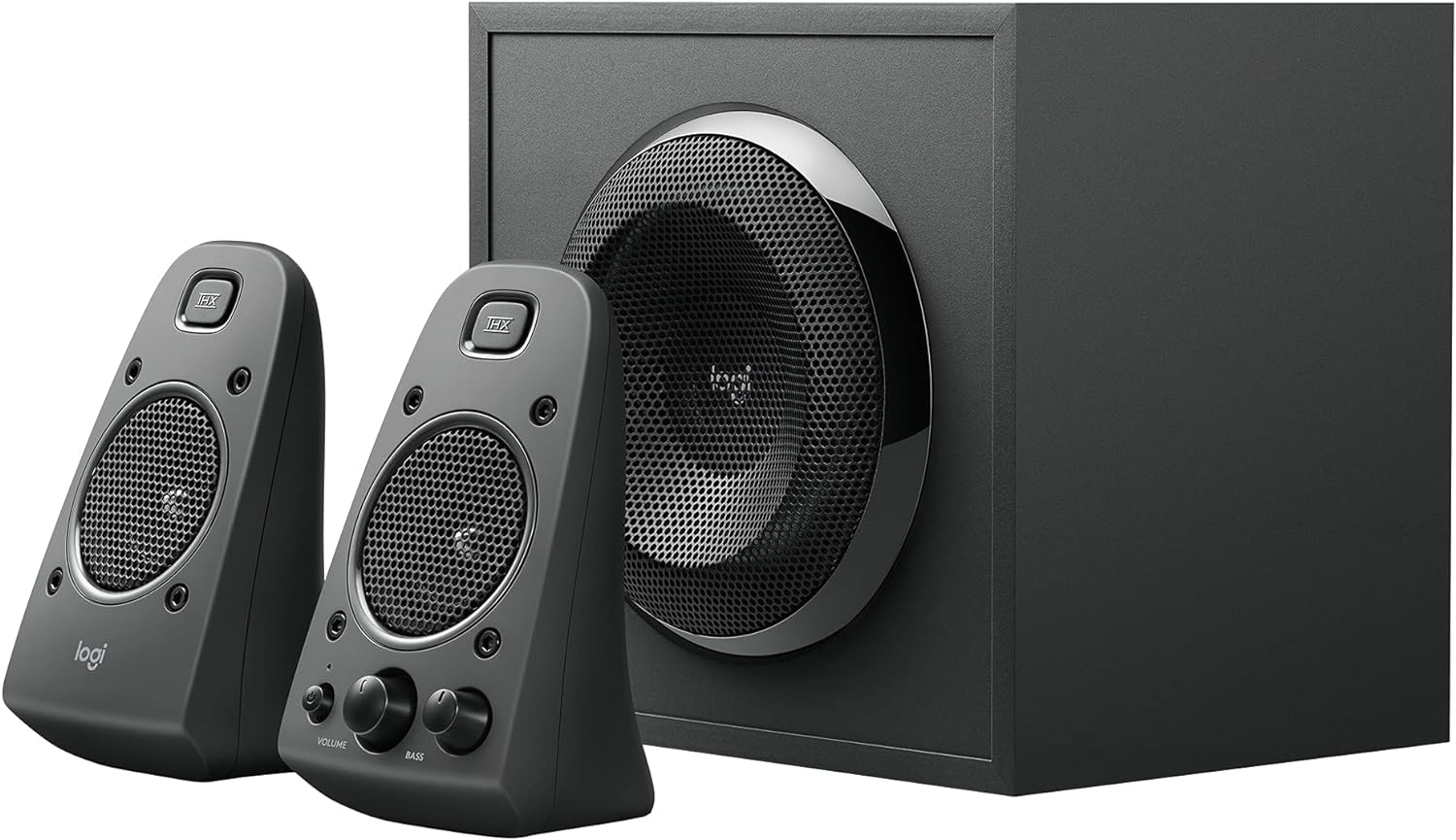
Image 3.1: Rear panel of the Z625 subwoofer, illustrating the various audio input options and satellite speaker connections.
4. Instrucións de funcionamento
All primary controls for the Logitech Z625 system are conveniently located on the right satellite speaker.
- Botón de encendido: Press the power button to turn the speaker system on or off. An indicator light will confirm the power status.
- Control de volume: Rotate the large volume knob to adjust the overall audio level.
- Control de graves: Rotate the bass knob to increase or decrease the subwoofer's output. Adjust this to your preference for optimal bass response.
- Jack para auriculares: Connect headphones to this 3.5mm jack for private listening. When headphones are connected, audio output from the speakers will be muted.
- Entrada auxiliar: This 3.5mm input allows for quick connection of portable audio devices.
The system supports simultaneous connection of up to three devices. To switch between audio sources, simply play audio from the desired connected device. The system will automatically prioritize the active input.

Image 4.1: Controls located on the right satellite speaker of the Z625 system.
5. Mantemento
To ensure the longevity and optimal performance of your Logitech Z625 speaker system, follow these maintenance guidelines:
- Limpeza: Use a soft, dry cloth to clean the surfaces of the speakers and subwoofer. Avoid using liquid cleaners or abrasive materials, as these can damage the finish or internal components.
- Ventilación: Ensure that the subwoofer and satellite speakers have adequate ventilation. Do not block any vents, especially on the subwoofer, to prevent overheating.
- Ambiente: Keep the speaker system away from direct sunlight, excessive heat, humidity, and dust. Avoid placing it near strong magnetic fields.
- Xestión de cables Periodically check all cable connections to ensure they are secure and free from damage. Avoid bending cables sharply.
6 Solución de problemas
If you encounter issues with your Logitech Z625 speaker system, refer to the following common troubleshooting steps:
- Sen enerxía:
- Ensure the power cable is securely plugged into both the subwoofer and a working wall outlet.
- Verify that the power button on the right satellite speaker is pressed.
- Sen son:
- Check all audio cable connections (3.5mm, optical, RCA) between the speaker system and your audio source.
- Increase the volume on both the speaker system and your audio source device.
- Ensure no headphones are plugged into the headphone jack on the right satellite speaker.
- Confirm that the correct audio output is selected on your source device (e.g., PC sound settings, TV audio output).
- Son distorsionado ou pouco claro:
- Reduce the volume on both the speaker system and your audio source.
- Adjust the bass control knob on the right satellite speaker.
- Test with a different audio source or cable to rule out source-specific issues.
- Son intermitente:
- Comprobe se hai conexións de cable soltas.
- Ensure the speaker system is not in standby mode. If it enters standby, power cycling the unit may resolve the issue.
For more detailed troubleshooting or persistent issues, please refer to the official Logitech support resources or the complete user guide PDF.
7. Especificacións
| Característica | Especificación |
|---|---|
| Marca | Logitech |
| Nome do modelo | Z625 Powerful THX Sound |
| Número de modelo do artigo | 980-001258 |
| Tipo de altofalante | Monitor, Satellite |
| Configuración da canle de son envolvente | 2.1 |
| Tecnoloxía de conectividade | Auxiliary, Optical, RCA |
| Modo de saída de audio | Estéreo, Envolvente |
| Potencia de saída máxima do altofalante | Pico de 400 vatios / 200 vatios RMS |
| Resposta en frecuencia | 35 Hz - 20 kHz |
| Vol. De entradatage | 120 voltios |
| Dispositivos compatibles | Personal Computer, Phones, Television, Gaming Consoles |
| Método de control | Touch (on right satellite) |
| Dimensións do produto | 10.4" D x 11.9" W x 11.1" H |
| Peso do elemento | 18.1 libras |
| Material | Plástico, madeira |
| Cor | Negro |
8. Garantía e soporte
The Logitech Z625 THX Certified 2.1 Speaker System comes with a Garantía limitada. For specific terms and conditions of your warranty, please refer to the documentation included with your product or visit the official Logitech websitio.
For further assistance, detailed product information, or to download the complete user guide, please visit the official Logitech support page:
Descargar a Guía do usuario oficial (PDF)
Tamén podes visitar o Tenda Logitech en Amazon para máis produtos e información.


