1. Introdución
This manual provides essential information for setting up, operating, maintaining, and troubleshooting your Apple MacBook Air 11.6-inch laptop. The MacBook Air is designed for portability and performance, featuring a thin and lightweight design. This particular unit is a renewed product, which means it has been inspected and tested by Amazon-qualified suppliers to ensure it functions like new. Packaging and accessories may be generic.
Key features include a 4th Generation Haswell Intel Core i5 processor, Intel HD Graphics 5000, 802.11ac Wi-Fi, Bluetooth 4.0, and a 720p FaceTime HD camera. The 11.6-inch LED-backlit display offers a native resolution of 1366 by 768 pixels.
2. Que hai na caixa
Upon unboxing your Apple MacBook Air, ensure all components are present:
- Apple MacBook Air 11.6-Inch Laptop
- Adaptador de alimentación
Nota: Ao ser un produto renovado, os accesorios poden ser xenéricos.
3. Configuración
3.1 Acendido e carga iniciais
Before first use, it is recommended to fully charge your MacBook Air. Connect the power adapter to the MagSafe 2 power port on the side of the laptop and then plug it into a power outlet.
Imaxe: Lateral view of the MacBook Air, illustrating the MagSafe 2 power port for charging.
3.2 First-Time Setup Assistant
Once powered on, the macOS Setup Assistant will guide you through the initial configuration steps, including:
- Selecting your country or region.
- Conectando a unha rede wifi.
- Transferring information to this Mac (optional).
- Signing in with your Apple ID or creating a new one.
- Setting up user accounts and passwords.

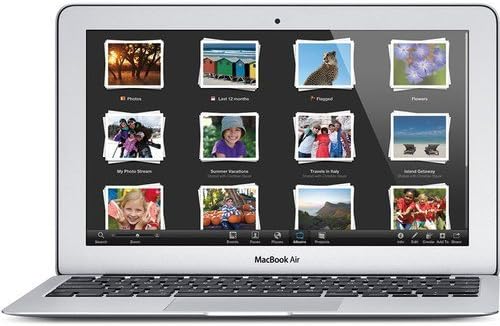
Imaxe: Fronte view of the MacBook Air, open and ready for use, displaying the screen and keyboard.
4. Operating Your MacBook Air
4.1 Acendido/apagado e repouso
- Encendido: Open the display or press the power button located on the top right of the keyboard.
- Durmir: Close the display or select 'Sleep' from the Apple menu.
- Apagar: Select 'Shut Down' from the Apple menu.
4.2 Pantalla e gráficos
The 11.6-inch LED-backlit display provides a resolution of 1366x768 pixels. Graphics are handled by the integrated Intel HD Graphics 5000, suitable for everyday tasks and moderate graphics-intensive applications.
4.3 Conectividade
- Wi-Fi: Supports 802.11ac for fast wireless connectivity. Connect to available networks via the Wi-Fi icon in the menu bar.
- Bluetooth: Bluetooth 4.0 allows connection to various wireless peripherals such as speakers, headphones, and keyboards.
- Portos USB: The laptop includes USB ports for connecting external devices.

Imaxe: Lateral view of the MacBook Air, highlighting the USB ports and other connectivity options.
4.4 FaceTime HD Camera
The integrated 720p FaceTime HD camera allows for video calls and conferencing. Access it through applications like FaceTime or Photo Booth.
5. Mantemento
Proper maintenance ensures the longevity and optimal performance of your MacBook Air.
- Limpeza: Usa un pano suave e sen fiapos para limpar a pantalla e o exterior. Evita materiais abrasivos ou produtos químicos agresivos.
- Actualizacións de software: Regularly update macOS and applications to ensure security and performance improvements.
- Coidado da batería: For optimal battery life, avoid extreme temperatures and allow the battery to discharge and recharge periodically. The laptop offers up to 9 hours of battery life under normal usage.
- Xestión de almacenamento: Periódicamente review and manage your 128GB flash storage to free up space and maintain performance.

Imaxe: Arriba view of the closed MacBook Air, illustrating its sleek design for easy cleaning and handling.
6 Solución de problemas
If you encounter issues with your MacBook Air, try the following common troubleshooting steps:
- Sen alimentación/Non se acende: Ensure the power adapter is securely connected and the power outlet is functional. Try a different outlet. If the battery is completely drained, it may take a few minutes for the laptop to respond after connecting the charger.
- Rendemento lento: Close unnecessary applications, check for available storage space, and ensure macOS is up to date. Restarting the laptop can often resolve temporary slowdowns.
- Problemas de conectividade wifi: Restart your Wi-Fi router and your MacBook Air. Ensure you are within range of the Wi-Fi network and that the password is correct.
- Applications Not Responding: Force quit the application by pressing Command + Option + Esc, then select the unresponsive application and click 'Force Quit'.
- Problemas de pantalla: If the screen is black or frozen, try restarting the laptop. If external display issues occur, check cable connections.
7. Especificacións
| Característica | Especificación |
|---|---|
| Número de modelo | MD711LLA-PB-2RC |
| Tamaño de visualización | 11.6 polgadas |
| Resolución de pantalla | 1366 x 768 píxeles |
| Procesador | 1.3 GHz Intel Core i5 (Dual-Core) |
| RAM | 4 GB LPDDR3 |
| Disco duro | 128 GB SSD (Flash Storage) |
| Coprocesador gráfico | Gráficos Intel HD 5000 |
| Tipo sen fíos | Wi-Fi 802.11ac, Bluetooth 4.0 |
| Sistema Operativo | Mac OS |
| Duración media da batería | Ata 9 horas |
| Peso do elemento | 0.088 onzas (aproximadamente 2.38 libras) |
| Dimensións do produto | 11.8 x 0.7 x 7.6 polgadas |
8. Garantía e soporte
This renewed product comes with a minimum 90-day supplier-backed warranty. For warranty claims or technical support, please refer to the documentation provided by the Amazon-qualified supplier or contact Amazon Renewed customer service.
For general information and support regarding macOS and Apple products, visit the official Apple Support websitio: support.apple.com.
9. Vídeos oficiais de produtos
No official product videos from the seller are available for this item.


