Introdución
This manual provides essential information for the safe and efficient operation of your Amazon Basics 15-Sheet Cross-Cut Paper, CD, and Credit Card Shredder. Please read all instructions carefully before use and retain this manual for future reference.
Información de seguridade
Para garantir un funcionamento seguro, siga sempre as seguintes pautas:
- Manteña as mans, o cabelo e a roupa solta lonxe da ranura de entrada de papel.
- Non pulverice nin manteña produtos en aerosol dentro ou arredor da trituradora.
- Do not shred items like metallic credit cards, adhesive labels, or continuous forms.
- Desconecte a trituradora cando non a estea a usar ou antes de limpala.
- Keep the shredder out of reach of children and pets.
- Non faga funcionar a trituradora se o cable de alimentación está danado.
Produto rematadoview
The Amazon Basics 15-Sheet Cross-Cut Shredder is designed for efficient document destruction, offering a high level of security for personal and office use.

Figura 1: Fronte view of the Amazon Basics 15-Sheet Cross-Cut Shredder.
Características principais:
- Capacidade de 15 follas: Shreds up to 15 sheets of 20 lb. paper at once.
- Cross-Cut Shredding: Shreds paper into 3/16" x 1-7/32" (4.7 x 31mm) particles for enhanced security (Security Level P-4).
- Multi-Material Shredding: Also destroys CD/DVDs, credit cards, staples, and small paper clips.
- Tempo de execución ampliado: Features a 20-minute continuous run time.
- Características de seguridade: Includes Overheat / Overload protection.
- Indicadores LED: Provides visual alerts for Standby, Overheat, Overload, Door open, and Bin full status.
- Large Capacity Bin: Equipped with a 6-gallon pull-out basket for easy waste disposal.
- Mobilidade: Casters included for convenient movement.
- 4-Mode Switch: Auto/Off/Forward/Reverse settings for versatile control.
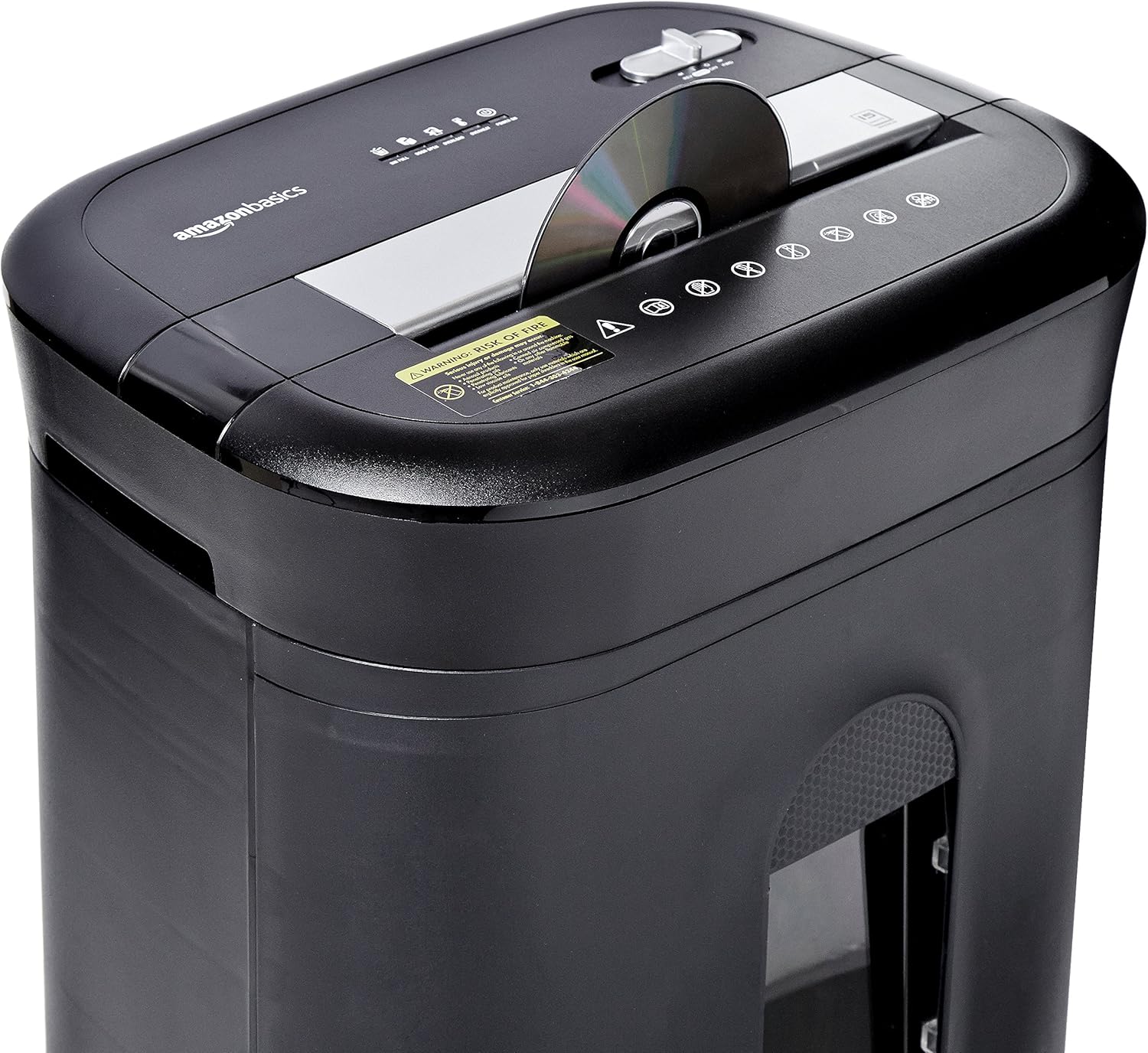
Figure 2: Diagram illustrating key features of the shredder.
Configuración
Follow these steps to set up your shredder:
- Desempaquetar: Retire coidadosamente todos os compoñentes da embalaxe.
- Posición: Place the shredder on a flat, stable surface. Ensure the waste bin is securely closed and properly inserted into the main unit.
- Conectar enerxía: Plug the power cord into a standard 120-volt AC outlet.
Video 1: Official product video demonstrating the setup and basic operation of the Amazon Basics 15-Sheet Cross-Cut Shredder.
Instrucións de funcionamento
Interruptor de modo de alimentación:
The shredder features a 4-mode slide switch located on the top panel:
- AUTO (I): The shredder will automatically start when paper is inserted and stop when shredding is complete. This is the recommended setting for normal use.
- OFF (O): Turns off all shredder functions. Always select this setting when emptying the waste bin or when the shredder is not in use.
- FORWARD (▶▶): Manually activates the shredder to continuously cut. Useful for clearing minor jams.
- REVERSE (◀◀): Reverses the shredder mechanism to help clear paper jams.

Figure 3: Close-up of the control panel with the 4-mode switch.
Papel triturador:
- Ensure the power mode switch is set to AUTO (I).
- Insert up to 15 sheets of paper (20 lb. bond) straight into the paper entry slot. The shredder will automatically start and stop.
- Do not force paper into the shredder. If the shredder struggles, reduce the number of sheets.

Figure 4: Inserting paper into the shredder.
Shredding Credit Cards and CDs/DVDs:
- Ensure the power mode switch is set to AUTO (I).
- Insert one credit card or CD/DVD at a time into the dedicated slot.
- A trituradora arrancará e parará automaticamente.

Figure 5: Shredding a credit card.
Mantemento
Emptying the Shredder Bin:
Regularly empty the waste bin to prevent paper jams and ensure optimal performance.
- Set the power mode switch to DESACTIVADO (O) and unplug the shredder.
- Tire do colector de lixo da parte dianteira da trituradora.
- Desfágase do material triturado.
- Deslice o colector de residuos de volta na trituradora ata que encaixe firmemente no seu lugar.

Figure 6: Pull-out waste bin for easy emptying.
Engraxando a trituradora:
To maintain the shredder's performance and longevity, it is recommended to oil the cutting blades periodically, especially after emptying the bin multiple times or if performance decreases.
- Apply shredder oil (or vegetable oil) in a zigzag pattern across the paper entry slot.
- Set the power mode switch to FORWARD (▶▶) for 2-3 seconds to distribute the oil.
- Then, set the switch to REVERSE (◀◀) durante 2-3 segundos.
- Shred a few sheets of paper to remove any excess oil.
Resolución de problemas
The shredder is equipped with LED indicators to help diagnose common issues:
- Standby (Green): Indica que a trituradora está acendida e lista para funcionar.
- Sobrequecemento (vermello): The shredder has exceeded its maximum operating temperature. Allow it to cool down for approximately 20-30 minutes before resuming use.
- Sobrecarga (vermello): Too much material has been inserted. Use the REVERSE (◀◀) function to clear the jam, then reduce the amount of material.
- Porta aberta (vermella): The waste bin is not properly closed or inserted. Ensure the bin is fully pushed in.
- Caixa chea (vermella): The waste bin is full and needs to be emptied.
| Problema | Causa posible | Solución |
|---|---|---|
| A trituradora non se acende. | Not plugged in; Power switch in OFF position; Waste bin not properly inserted. | Check power connection; Set switch to AUTO; Re-insert waste bin securely. |
| A trituradora para durante o funcionamento. | Overheat protection activated; Overload protection activated; Bin full. | Allow to cool down; Clear jam using REVERSE, then reduce material; Empty bin. |
| Atasco de papel. | Too much paper inserted; Paper inserted at an angle. | Use REVERSE function; Reduce paper quantity; Insert paper straight. |
Especificacións
| Característica | Especificación |
|---|---|
| Marca | Conceptos básicos de Amazon |
| Número de modelo | PBH-49976 |
| Tipo de trituración | Corte transversal |
| Tamaño de trituración | 3/16" x 1-7/32" (4.7 x 31mm) |
| Nivel de seguridade | P-4 |
| Capacidade de folla | 15 sheets (20 lb. paper) |
| Tempo de execución continuo | minutos 20 |
| Tempo de arrefriamento | minutos 30 |
| Capacidade do lixo | 6 litros |
| Peso do elemento | 22 libras |
| Dimensións do produto | 11 x 14.4 x 20.9 polgadas |
| Cor | Negro |
Garantía e Soporte
For warranty information or technical support, please refer to the documentation included with your product or contact Amazon Basics customer service.
Customer Service: 1-844-303-4244
Para obter recursos adicionais, visite o Amazon Basics Store.


