1. Introdución
This manual provides essential information for the safe and efficient use of your Lenovo IdeaPad Miix 510-12ISK 2-in-1 Tablet. The Miix 510 is a versatile device designed to function as both a laptop and a tablet, adapting to various tasks with its detachable keyboard and integrated kickstand. Please read this manual thoroughly before operating your device.
2. Contido do paquete
Verifica que todos os elementos estean presentes na embalaxe do teu produto:
- Lenovo IdeaPad Miix 510-12ISK Tablet
- Teclado desmontable
- Webleva (integrada)
- Adaptador de alimentación
- Guía de inicio rápido (se se inclúe)
3. Configuración
3.1 Carga inicial
Before first use, connect the tablet to a power outlet using the provided power adapter. Allow the device to charge fully. The charging indicator light will typically change color or turn off when charging is complete.
3.2 Conexión do teclado
Align the magnetic connectors on the bottom edge of the tablet with the corresponding connectors on the keyboard. The keyboard will snap into place securely. To detach, gently pull the tablet away from the keyboard.

Image: The Lenovo IdeaPad Miix 510-12ISK in laptop mode, showing the tablet connected to its detachable keyboard. The screen displays the Windows 10 operating system interface.
3.3 Primeiro acendido
Press and hold the power button (usually located on the side or top edge of the tablet) until the Lenovo logo appears. Follow the on-screen instructions to complete the initial Windows 10 Pro setup, including language selection, network connection, and user account creation.
4. Instrucións de funcionamento
4.1 Acendido/apagado e modo de repouso
- Encendido: Manteña premido o botón de acendido.
- Apagado: From the Windows Start menu, select Power > Shut down.
- Modo de suspensión: Briefly press the power button, or select Power > Sleep from the Start menu.
4.2 Using Tablet and Laptop Modes
The Miix 510 automatically switches between tablet and laptop modes when the keyboard is attached or detached. You can also manually switch modes via the Action Center in Windows 10.
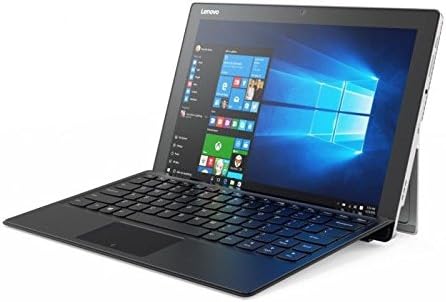
Imaxe: Un ángulo view of the Lenovo IdeaPad Miix 510-12ISK, showcasing its kickstand functionality when used with the detachable keyboard in laptop configuration.
4.3 Touch Screen and Keyboard Usage
- Pantalla táctil: Use gestures such as tap, swipe, pinch-to-zoom, and long-press for navigation and interaction.
- Teclado: The detachable keyboard provides a full QWERTY layout and a touchpad for precise input.
4.4 Conectividade
Your device supports Wi-Fi and Bluetooth for wireless connectivity. Access network settings via the Windows Action Center or Settings app to connect to available networks and pair Bluetooth devices.
5. Mantemento
5.1 Limpeza
- Use un pano suave e sen pelusa lixeiramente dampenxugado con auga ou cun limpador de pantallas para limpar a pantalla.
- Limpa as superficies exteriores cun pano suave e seco. Evita produtos químicos agresivos ou materiais abrasivos.
5.2 Actualizacións de software
Regularly check for and install Windows updates to ensure optimal performance, security, and compatibility. Access updates via Windows Settings > Update & Security.
5.3 Coidado coa batería
To prolong battery life, avoid extreme temperatures and allow the battery to discharge partially before recharging. For long-term storage, charge the battery to approximately 50%.
6 Solución de problemas
6.1 O dispositivo non se acende
- Asegúrate de que o dispositivo estea cargado. Conecta o adaptador de corrente e agarda uns minutos antes de tentar acenderlo.
- Tenta manter premido o botón de acendido durante 10-15 segundos para realizar un reinicio completo.
6.2 Problemas coa pantalla
- If the screen is blank, ensure the device is powered on and not in sleep mode.
- Axusta a configuración de brillo da pantalla.
6.3 O teclado ou o panel táctil non responden
- Ensure the keyboard is securely attached to the tablet.
- Reinicie a tableta.
- Check for updated drivers in Windows Device Manager.
6.4 Problemas de conectividade Wi-Fi ou Bluetooth
- Activa e desactiva o Wi-Fi ou o Bluetooth na configuración de Windows.
- Reinicia o teu router/módem para solucionar problemas co wifi.
- Ensure devices are within range and properly paired for Bluetooth.
Para problemas persistentes, consulte o soporte de Lenovo websitio ou póñase en contacto co servizo de atención ao cliente.
7. Especificacións
| Marca | Lenovo |
| Nome do modelo | 80U1006EUS |
| Tamaño da pantalla | 12.2 polgadas |
| Resolución de pantalla | 1920 x 1080 píxeles |
| Procesador | 2.3 GHz Intel Core i5-6200U |
| RAM | 8 GB |
| Disco duro | 256 GB Solid State Drive (SSD) |
| Coprocesador gráfico | Gráficos Intel HD 520 |
| Sistema Operativo | Windows 10 Pro |
| Tipo sen fíos | Bluetooth |
| Peso do elemento | 2.78 libras |
| Dimensións do produto | 4.48 x 5.8 x 0.6 polgadas |
| Traseira WebResolución de cámara | 5 MP |
8. Garantía e soporte
This product is covered by Lenovo's standard warranty. For detailed warranty terms, registration, and technical support, please visit the official Lenovo support websitio web ou póñase en contacto co servizo de atención ao cliente. Garde o comprobante de compra para reclamacións de garantía.
No official product videos were provided by the seller for this model.


