1. Produto rematadoview
The BRIO World 33873 Smart Tech Engine Set with Action Tunnels offers an interactive and engaging train play experience. This 17-piece set allows children to control train actions through Smart Tech accessories, fostering imaginative play and developing fine motor skills.

Figure 1: Complete BRIO World Smart Tech Engine Set with Action Tunnels layout.
2. Configuración
2.1 Desembalaxe e comprobación de compoñentes
Carefully unpack all components from the box. Verify that all 17 pieces are present:
- 1x Smart Tech Engine
- 1x Passenger Wagon
- 1x Figura de pasaxeiro
- 1x Smart Tech Bridge
- 3x Smart Tech Action Tunnels (Red, Green, Grey)
- 9x Wooden Tracks
- 1x Track Stop
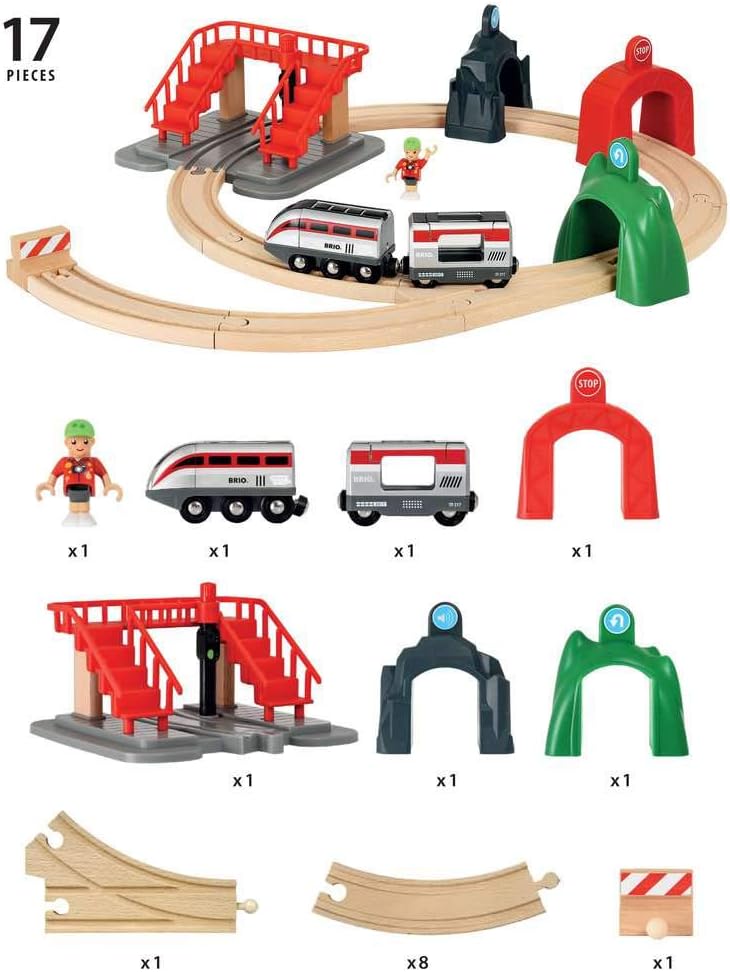
Figure 2: All components included in the 33873 set.
2.2 Instalación da batería
The Smart Tech Engine requires 2 AA batteries (not included). To install:
- Locate the battery compartment on the underside of the Smart Tech Engine.
- Usando un pequeno destornillador Phillips, desenrosque a tapa do compartimento da batería.
- Insira 2 pilas AA, asegurándose de polaridade correcta (+/-).
- Coloque a tapa e fíxaa co parafuso.

Figure 3: Smart Tech Engine with battery compartment indicated.
2.3 Montaxe da pista
Connect the wooden track pieces to form a desired layout. The set includes various straight and curved tracks, along with a Smart Tech Bridge and Action Tunnels. Ensure all connections are secure for smooth train operation.

Figura 4: Example of an assembled track layout.
3. Instrucións de funcionamento
3.1 Smart Tech Engine Controls
The Smart Tech Engine has buttons on its top for basic control:
- Press the forward button to make the train move forward.
- Press the backward button to make the train move backward.
- Press the stop button to halt the train.
3.2 Smart Tech Action Tunnels
The Smart Tech Action Tunnels interact with the engine to trigger specific actions:
- Red Tunnel (Stop): When the engine approaches the red tunnel, it will automatically stop.
- Green Tunnel (Reverse): When the engine passes through the green tunnel, it will reverse direction.
- Grey Tunnel (Sound & Lights): When the engine passes through the grey tunnel, it will honk its horn and flash its lights.

Figure 5: Smart Tech Engine interacting with an Action Tunnel.
3.3 Smart Tech Bridge
The Smart Tech Bridge features a signal that controls the train's movement:
- If the signal is set to red, the train will stop on the bridge.
- If the signal is set to green, the train will continue moving across the bridge.

Figure 6: Smart Tech Engine interacting with the Smart Tech Bridge.
3.4 Track Switching
Some track pieces allow for changing the train's direction. Use the red lever to switch the track path, guiding the train to different routes.
Video 1: Demonstration of the Smart Tech Engine Set with Action Tunnels, showing various interactions and track switching.
4. Mantemento
4.1 Limpeza
Wipe all wooden and plastic components with a damp cloth. Do not immerse electronic parts in water. Ensure all parts are dry before storage or next use.
4.2 Substitución da batería
Replace batteries in the Smart Tech Engine when performance decreases. Refer to Section 2.2 for battery installation instructions.
5 Solución de problemas
5.1 Engine Not Responding to Accessories
If the Smart Tech Engine does not respond to the Action Tunnels or Bridge, ensure:
- Batteries are correctly installed and have sufficient power.
- The engine is properly aligned on the track when passing through accessories.
- The accessories are placed correctly on the track.
5.2 Train Not Moving Smoothly
If the train experiences difficulty moving on the track:
- Check that all track pieces are securely connected and laid on a flat surface.
- Ensure the engine's wheels are clean and free from debris.
- Verify that the batteries are not depleted.
6. Especificacións
| Característica | Detalle |
|---|---|
| Dimensións do produto | 23.23 x 0.39 x 20.24 polgadas |
| Peso do elemento | 3.08 libras |
| Número de modelo do artigo | 33873 |
| Idade recomendada polo fabricante | 36 meses - 7 anos |
| Pilas necesarias | 2 pilas AA |
| Materiais | Wood & Plastic |
| Data de lanzamento | 1 de xuño de 2018 |
7. Información de seguridade
No specific safety warnings are applicable beyond general toy safety. BRIO products are tested thoroughly to meet strict safety requirements.
8. Garantía e soporte
For warranty information or product support, please refer to the official BRIO websitio web ou póñase en contacto directamente co servizo de atención ao cliente. Garde o comprobante de compra para calquera reclamación de garantía.