1. Introdución
This manual provides comprehensive instructions for the safe and efficient use of your Gator Frameworks GFW-UTL-WS250 Adjustable T-Stand. Designed for versatility and stability, this folding T-stand is suitable for supporting various equipment, including keyboards, mixers, DJ controllers, and DJ coffins. Please read this manual thoroughly before assembly and operation to ensure proper usage and longevity of your product.
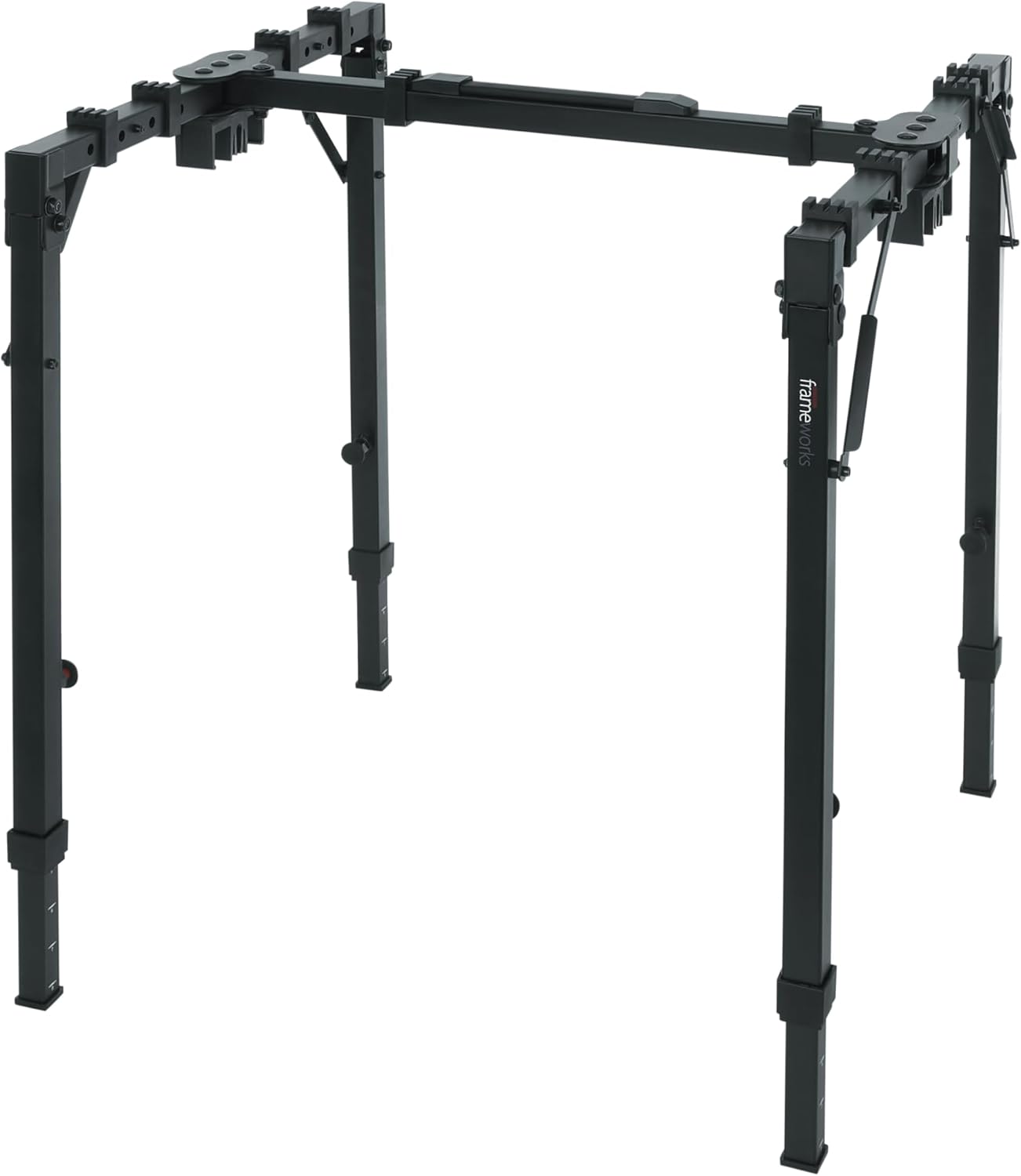
Figure 1: The Gator Frameworks GFW-UTL-WS250 T-Stand in its fully assembled configuration, ready for use as a workstation or keyboard stand.
2. Produto rematadoview
The GFW-UTL-WS250 T-Stand is engineered for durability and ease of use. Key features include:
- Versatile Workstation: Ideal for keyboards, mixers, DJ controllers, and DJ coffins.
- Configuración rápida e sinxela: Features a quick-pull leg height adjustment for fast configuration.
- Adjustable & Customizable: Legs adjust for various setup configurations to fit your needs.
- Compacto e portátil: Collapsible design folds down for easy transport and storage.
- Almofadas protectoras: Adjustable rubber bumper pads provide a soft and secure platform, preventing scratches.
3. Instrucións de configuración
The GFW-UTL-WS250 T-Stand is designed for quick and straightforward setup.
- Unfolding the Stand: Place the folded stand on a flat surface. Gently pull the legs outwards until they lock into an open position. Ensure all four legs are fully extended and stable.
- Axuste de altura: Locate the quick-pull leg lock releases on each leg. Pull the release pin and slide the inner leg section to your desired height. Ensure the pin snaps securely into one of the adjustment holes. Repeat for all four legs to achieve a level surface.
- Axuste de ancho: The horizontal support bars can be adjusted to accommodate different equipment widths. Loosen the knobs on the central crossbar, slide the arms to the desired width, and then tighten the knobs securely.
- Equipamento de posicionamento: Place your keyboard, mixer, or other equipment onto the stand's support arms. Ensure the adjustable rubber bumper pads are correctly positioned to provide maximum grip and protection for your gear.

Figura 2: Arriba view of the Gator Frameworks T-Stand in its compact, folded state, highlighting its portability.

Figure 3: A close-up of the quick-pull leg lock release mechanism, used for adjusting the stand's height.

Figure 4: Detail of the rubber bumper pads on the stand's support arms, designed to protect equipment and prevent slipping.
4. Instrucións de funcionamento
The GFW-UTL-WS250 T-Stand offers flexible configurations to suit various needs.
- Axuste de altura: The stand's height can be adjusted from 25.75 inches (654mm) to 35.50 inches (902mm). This allows for comfortable playing or working positions, whether seated or standing.
- Axuste de ancho: The width is adjustable from 27.375 inches (695mm) to 47.75 inches (1213mm), accommodating a wide range of equipment sizes.
- Uso versátil: Use the stand for a single keyboard, a DJ controller setup, or an audio mixer. The robust design supports up to 250 lbs.

Figure 5: The T-Stand configured to hold a keyboard, demonstrating its use as a musical instrument stand.

Figure 6: The T-Stand supporting a DJ controller and laptop stand, showcasing its versatility as a DJ workstation.

Figure 7: The T-Stand holding an audio mixer, illustrating its suitability for various audio equipment.
5. Mantemento
To ensure the longevity and optimal performance of your T-Stand, follow these maintenance guidelines:
- Limpeza: Limpe o soporte cun suave, damp cloth to remove dust and grime. Avoid abrasive cleaners or solvents that could damage the powder-coated finish.
- Inspección: Periodically check all adjustment knobs, pins, and hinges for tightness and proper function. Ensure rubber bumper pads are intact and providing adequate grip.
- Almacenamento: When not in use, fold the stand to its compact dimensions (3.75" x 3.75" x 47.75") and store it in a dry, cool place to prevent rust or damage.
6 Solución de problemas
If you encounter any issues with your T-Stand, refer to the following common troubleshooting tips:
- O soporte é inestable: Ensure all leg lock release pins are fully engaged in their respective holes. Verify that the width adjustment knobs are tightened securely. Check that the stand is placed on a flat, even surface.
- Dificultade para axustar a altura/ancho: Ensure the quick-pull release pins are fully disengaged before attempting to slide the legs. For width adjustment, ensure the central knobs are sufficiently loosened. Do not force adjustments.
- Equipment Slipping: Verify that the rubber bumper pads are clean and properly positioned under your equipment. Replace any worn or damaged pads.
7. Especificacións
| Número de modelo | GFW-UTL-WS250 |
| Marca | Marcos Gator |
| Material | Aluminum or Plastic |
| Tipo de acabado | Revestido en po |
| Cor | Negro |
| Capacidade de carga | 250 libras (113.4 kg) |
| Altura mínima | 25.75 polgadas (654 mm) |
| Altura máxima | 35.50 polgadas (902 mm) |
| Ancho mínimo | 27.375 polgadas (695 mm) |
| Ancho máximo | 47.75 polgadas (1213 mm) |
| Dimensións dobradas (L x W x H) | 47.75" x 3.75" x 3.75" (1213 mm x 95 mm x 95 mm) |
| Peso do elemento | 18.2 libras (8.26 kg) |
| Requírese montaxe | Non |
8. Garantía e soporte
For warranty information or technical support, please refer to the official Gator Frameworks websitio web ou póñase en contacto directamente co servizo de atención ao cliente. Garde o recibo da compra para calquera reclamación de garantía.


