1. Introdución
This manual provides essential information for the safe and effective operation, maintenance, and troubleshooting of your BLACK+DECKER KC3610 3.6V Cordless Screwdriver. Please read these instructions carefully before using the tool and retain them for future reference.
2. Instrucións de seguridade
Observe sempre as precaucións de seguridade básicas para reducir o risco de incendio, descarga eléctrica e lesións persoais.
- Manter a zona de traballo limpa e ben iluminada. As zonas desordenadas ou escuras invitan a accidentes.
- Non utilice ferramentas eléctricas en atmosferas explosivas, como en presenza de líquidos, gases ou po inflamables. As ferramentas eléctricas crean faíscas que poden acender o po ou os fumes.
- Manteña os nenos e os espectadores afastados mentres manexa unha ferramenta eléctrica. As distraccións poden facer que perdas o control.
- Evite o arranque accidental. Asegúrese de que o interruptor estea na posición de apagado antes de conectar a batería, coller ou transportar a ferramenta.
- Non excedas. Manteña un equilibrio e unha posición adecuada en todo momento. Isto permite un mellor control da ferramenta eléctrica en situacións inesperadas.
- Vístete correctamente. Non use roupa solta nin xoias. Manteña o cabelo e a roupa lonxe das pezas móbiles. A roupa solta, as xoias ou o cabelo longo poden quedar atrapados nas partes móbiles.
- Use equipos de seguridade. Use sempre protección ocular. Debe utilizarse máscara antipolvo, zapatos de seguridade antideslizantes, casco ou protección auditiva nas condicións adecuadas.
- Desconecte a batería da ferramenta eléctrica antes de facer calquera axuste, cambiar accesorios ou almacenar ferramentas eléctricas.
- Guarde as ferramentas eléctricas inactivas fóra do alcance dos nenos e non permita que persoas que non estean familiarizadas coa ferramenta eléctrica ou con estas instrucións a utilicen.
3. Contido do paquete
Verifique que todos os elementos que se indican a continuación estean presentes no seu paquete:
- 1 x BLACK+DECKER KC3610 Cordless Screwdriver
- 1 x cargador de parede
- 1 x Magnetic Bit Holder
- 10 x Screwdriver Bits (various sizes and types)
- 1 x manual de instrucións

Figure 3.1: Complete package contents including the screwdriver, charger, and bit set.

Figure 3.2: Visual representation of the included components.
4. Produto rematadoview
Familiarize yourself with the various parts of your BLACK+DECKER KC3610 Cordless Screwdriver.
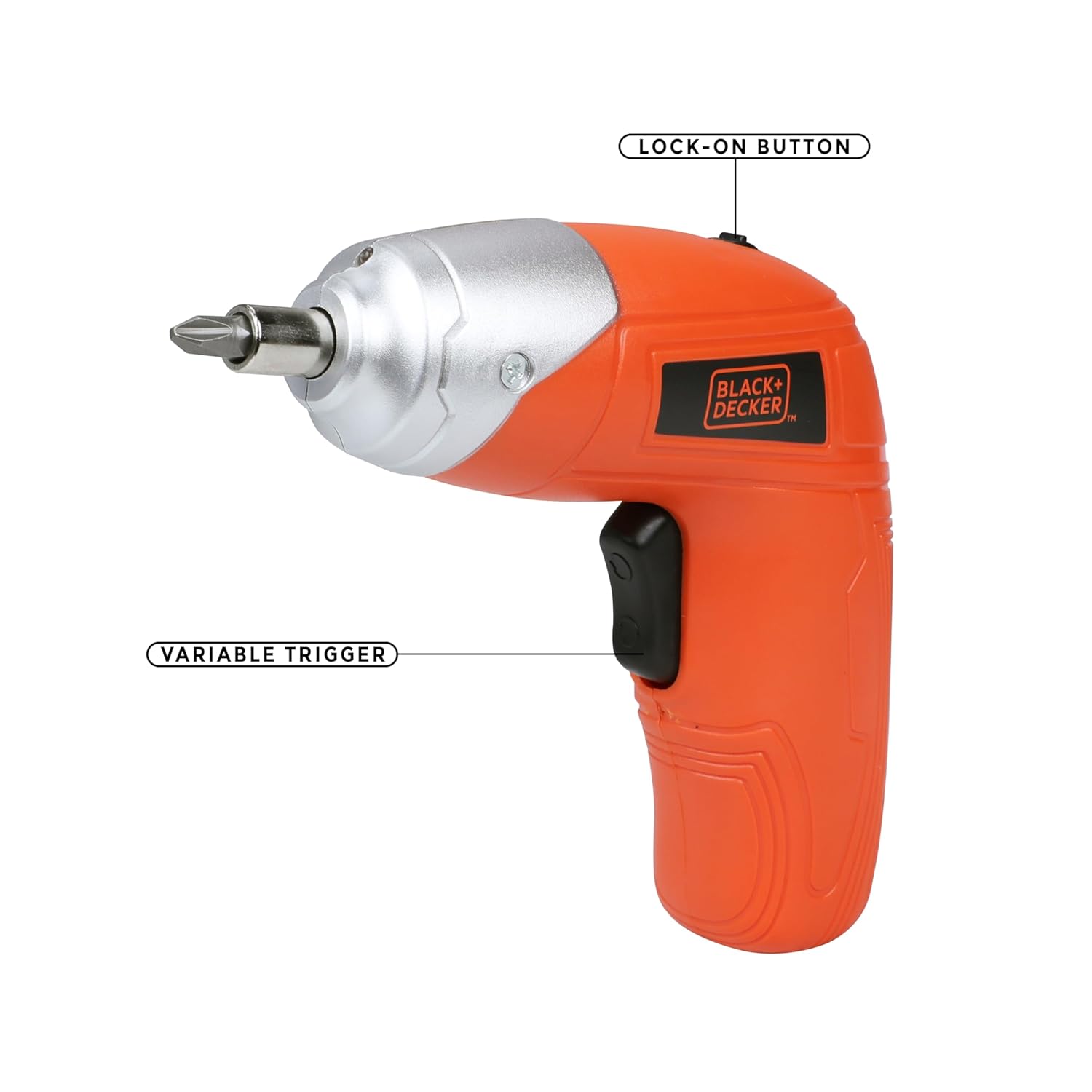
Figure 4.1: Key operational parts: Lock-on Button (top) and Variable Trigger (handle).

Figura 4.2: Fronte view highlighting the Tool Holder (1) and LED Light (2).

Figura 4.3: Lateral view indicating LED Switch (3), Charging Indicator (4), Charging Port (5), and Main Switch (6).
5. Configuración
5.1 Carga da batería
- Connect the wall charger to the charging port (5) on the screwdriver.
- Conecte o cargador a unha toma eléctrica estándar.
- The charging indicator (4) will illuminate to show that the battery is charging.
- Allow approximately 2 hours for a full charge. The indicator may change or turn off once fully charged (refer to specific product behavior if different).
Nota: The screwdriver uses a Lithium-Ion battery. It is recommended to fully charge the battery before first use.
5.2 Inserting and Removing Screwdriver Bits
- Asegúrate de que o destornillador estea apagado.
- Insert the desired screwdriver bit into the tool holder (1) until it is securely seated. For smaller bits, use the magnetic bit holder provided.
- To remove a bit, simply pull it straight out from the tool holder.

Figure 5.1: Proper insertion of a screwdriver bit into the tool holder.
6. Instrucións de funcionamento
6.1 Acendido/apagado e control de dirección
- To operate the screwdriver, slide the main switch (6) to the desired direction (forward for tightening, reverse for loosening).
- Press the variable trigger to start the screwdriver. Release the trigger to stop.
- For continuous use, press the variable trigger and then engage the lock-on button (Figure 4.1). To disengage, press the trigger again.
6.2 Uso da luz de traballo LED
- The integrated LED worklight (2) illuminates the work area for improved visibility.
- To activate the LED light independently, use the LED switch (3). The light may also activate automatically when the trigger is pressed.
6.3 Axuste do par de torsión
The BLACK+DECKER KC3610 features adjustable torque, allowing you to match the fastening power to the task and material, preventing overtightening or stripping screws.
- Locate the torque adjustment mechanism (refer to product diagram if available, typically a collar near the chuck).
- Rotate the collar to select the desired torque setting. Lower settings are for smaller screws and softer materials, while higher settings are for larger screws and harder materials.
Nota: Some user experiences indicate that torque adjustment may not be present or as effective as expected. Always test on a scrap piece of material first to determine the appropriate setting for your application.
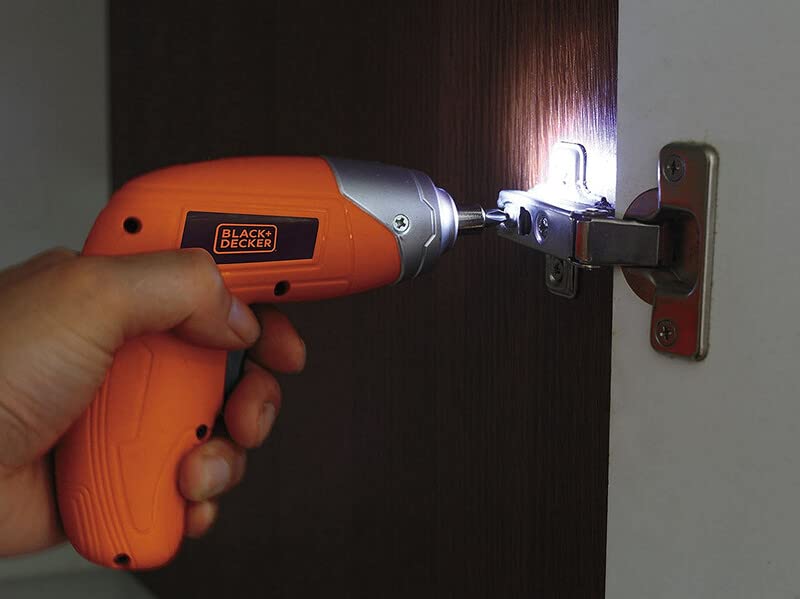
Figure 6.1: Screwdriver in operation, demonstrating the LED worklight.

Figure 6.2: Screwdriver being used for a typical fastening task.
7. Mantemento
Un mantemento regular garante un rendemento óptimo e prolonga a vida útil da súa ferramenta.
- Limpeza: Manteña limpas as ranuras de ventilación da ferramenta para evitar o sobrequecemento. Use un pano suave eamp cloth to clean the housing. Do not use harsh chemicals or abrasive cleaners.
- Almacenamento: Store the screwdriver and accessories in a dry, secure place out of reach of children. Ensure the battery is partially charged before long-term storage.
- Coidado da batería: Do not store the battery in discharged condition. Recharge it periodically if not in use for extended periods.
8 Solución de problemas
Consulta a táboa seguinte para ver os problemas comúns e as súas solucións.
| Problema | Causa posible | Solución |
|---|---|---|
| O destornillador non se acende. | A batería está descargada. O interruptor está na posición OFF. | Cargue a batería. Ensure the main switch is set to forward or reverse. |
| Low power or slow operation. | A batería está baixa. Task is too demanding for the tool. | Recarga a batería. This screwdriver is designed for light-duty fastening tasks, not heavy drilling or driving large screws into dense materials. |
| Screws are stripping or overtightening. | Axuste de torque incorrecto. A broca está desgastada ou do tamaño é incorrecto. | Adjust the torque setting to a lower value. Use the correct size and type of bit for the screw. Replace worn bits. |
| Funcionamento incorrecto do botón ou interruptor. | Fallo de compoñentes internos. | Contact customer support for assistance or warranty service. Do not attempt to repair yourself. |
9. Especificacións
Technical specifications for the BLACK+DECKER KC3610 Cordless Screwdriver:
| Característica | Especificación |
|---|---|
| Número de modelo | KC3610 |
| Voltage | 3.6 voltios |
| Sen velocidade de carga | 200 RPM |
| Fonte de enerxía | Sen fíos |
| Tipo de batería | Ion de litio |
| Capacidade da batería | 1500 mAh |
| Tempo de carga | Aprox. 2 horas |
| Peso do elemento | 450 gramos |
| Dimensións do produto | 13.5L x 5.5W x 13H Centímetros |
| Material | Plástico |
| Luz de traballo LED | Si |
| Indicador de carga | Si |
| Axuste do par | Si |
Nota: As especificacións están suxeitas a cambios sen previo aviso para mellorar o produto.

Figura 9.1: Máisview das especificacións clave do produto.
10. Garantía e atención ao cliente
BLACK+DECKER provides a 1 ano de garantía on this product from the date of purchase, covering manufacturing defects.
For any warranty-related issues, product feedback, or technical assistance, please contact our customer care team:
- Teléfono: 1860-425-1111 (de luns a venres, de 10:00 a 17:00, agás festivos gobernamentais)
- Correo electrónico: COMUNICACIÓNS DO CLIENTE SBD@SBDINC.COM
- WhatsApp: +91 96060 55835
You can also find information on authorized service centers by contacting customer care.

Figure 10.1: BLACK+DECKER Total Care contact details.


