Introdución
The SanDisk iXpand Mini Flash Drive is designed to provide additional storage and easy file transfer between your iPhone, iPad, and computers. Featuring both a Lightning connector and a USB 3.0 connector, this compact device simplifies backing up photos, videos, and other files, freeing up space on your mobile devices.

Image: The SanDisk iXpand Mini Flash Drive, showcasing its dual-connector design with a Lightning connector on one end and a USB 3.0 connector on the other, enabling versatile connectivity.
Configuración
- Descarga a aplicación iXpand Drive: For iPhone and iPad, download the free SanDisk iXpand Drive app from the Apple App Store. This app is essential for managing files, backing up content, and utilizing the drive's features.
- Conectar a iPhone/iPad: Plug the Lightning connector of the iXpand Mini Flash Drive directly into your iPhone or iPad's Lightning port. The iXpand Drive app should launch automatically. If not, open it manually.
- Conectar ao ordenador: Plug the USB 3.0 connector of the iXpand Mini Flash Drive into an available USB port on your Mac or PC. The drive will appear as a removable storage device.

Imaxe: Primeiro plano view of the SanDisk iXpand Mini Flash Drive with its Lightning connector inserted into an iPhone, demonstrating direct mobile device connectivity.
Instrucións de funcionamento
File Transfer (iPhone/iPad to iXpand Drive)
- Open the iXpand Drive app on your iOS device.
- Select the option to 'Copy Files' or 'Backup Photos'.
- Choose the photos, videos, or other files que desexa transferir.
- Confirm the transfer to the iXpand Mini Flash Drive.
File Transfer (iXpand Drive to Computer)
- Plug the USB 3.0 connector into your computer.
- Open the drive folder (e.g., 'iXpand Drive' or 'Removable Disk').
- Arrastra e solta files from the iXpand Drive to your computer, or vice versa.
Playing Media Directly from Drive
Podes reproducir medios files (photos, videos, music) stored on the iXpand Mini Flash Drive directly from the iXpand Drive app on your iPhone or iPad without transferring them to the device's internal storage.

Image: The SanDisk iXpand Mini Flash Drive with both its Lightning and USB 3.0 connectors extended, illustrating its readiness for connection to various devices.
Mantemento
- Protexer os conectores: Always ensure the connectors are retracted or covered when not in use to prevent dust, dirt, or damage.
- Eliminación segura: Always safely eject the drive from your computer before unplugging it to prevent data corruption. For iOS devices, simply unplugging is generally safe after transfers are complete.
- Evita condicións extremas: Do not expose the drive to extreme temperatures, moisture, or strong magnetic fields.
- Copias de seguridade regulares: While the iXpand Mini is great for transfers, it is recommended to regularly back up critical data to multiple locations (e.g., cloud storage, computer hard drive) for maximum security.
Resolución de problemas
- Drive Not Recognized (iOS): Ensure the iXpand Drive app is installed and updated. Try unplugging and re-plugging the drive. Restart your iOS device if the issue persists.
- Drive Not Recognized (PC/Mac): Ensure the USB connector is fully inserted. Try a different USB port. Check your computer's Disk Management (Windows) or Disk Utility (Mac) to see if the drive is detected but unformatted.
- Velocidades de transferencia lentas: Ensure you are using a USB 3.0 port on your computer for optimal speeds. Large file as transferencias poden levar máis tempo, naturalmente.
- Problemas da aplicación: If the iXpand Drive app crashes or behaves unexpectedly, try force-closing and reopening it. Ensure your iOS is up to date.
Especificacións
| Característica | Detalle |
|---|---|
| Número de modelo | SDIX40N-128G-GN6NE |
| Capacidade de almacenamento | 128 GB |
| Tecnoloxía de conectividade | USB, raio |
| Interface de hardware | USB 3.0, Lightning |
| Velocidade de lectura | Ata 45 MB/s |
| Velocidade de escritura | Ata 60 MB/s |
| Plataforma de hardware | Mac, PC, iPhone, iPad |
| Peso do elemento | 0.159 onzas |
| Dimensións do produto | 0.48 x 2.09 x 0.18 polgadas |
| Característica especial | Lixeiro |
| UPC | 619659153113 |
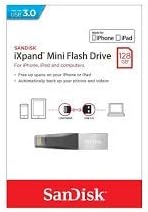
Image: The retail packaging for the SanDisk iXpand Mini Flash Drive, highlighting its USB 3.0 compatibility and suitability for iPhone and iPad devices.
Garantía e Soporte
SanDisk products typically come with a limited warranty. Please refer to the warranty information included with your product packaging or visit the official SanDisk website for detailed warranty terms and conditions. For technical support, product registration, or frequently asked questions, please visit the SanDisk support portal online.
Para obter máis información ou axuda, pode visitar o Tenda SanDisk en Amazon.


