Introdución
The American Lifetime 8-inch Digital Day Clock is designed to provide clear and easy-to-read time, day, and date information. Its large display and customizable features make it a valuable tool for maintaining daily routines and orientation. This manual will guide you through the setup, operation, and maintenance of your new clock.
Características principais:
- Construción duradeira: Built with robust materials for long-lasting use.
- Pantalla fácil de ler: Features a large, clear, high-contrast 8-inch display for optimal visibility, even in low light.
- Configuración sinxela: User-friendly interface with an easy-to-follow manual for quick operation.
- Alarmas personalizables: Set up to 5 daily alarms for reminders such as medication times or appointments.
- Regulación automática: Adjusts display brightness automatically based on ambient room light.
- Soporte multilingüe: Offers various language and time format options.
- Copia de seguridade da batería: Internal battery ensures time and date are maintained during power outages, reiniciándose automaticamente cando volve a enerxía.
- Borrar pantalla: Spells out the time, period of the day, full day of the week, month, and date without confusing abbreviations.
Configuración
Setting up your American Lifetime Digital Day Clock is straightforward. Follow these steps to get started:
- Desempaquetar o reloxo: Retire con coidado o reloxo e todos os accesorios da embalaxe.
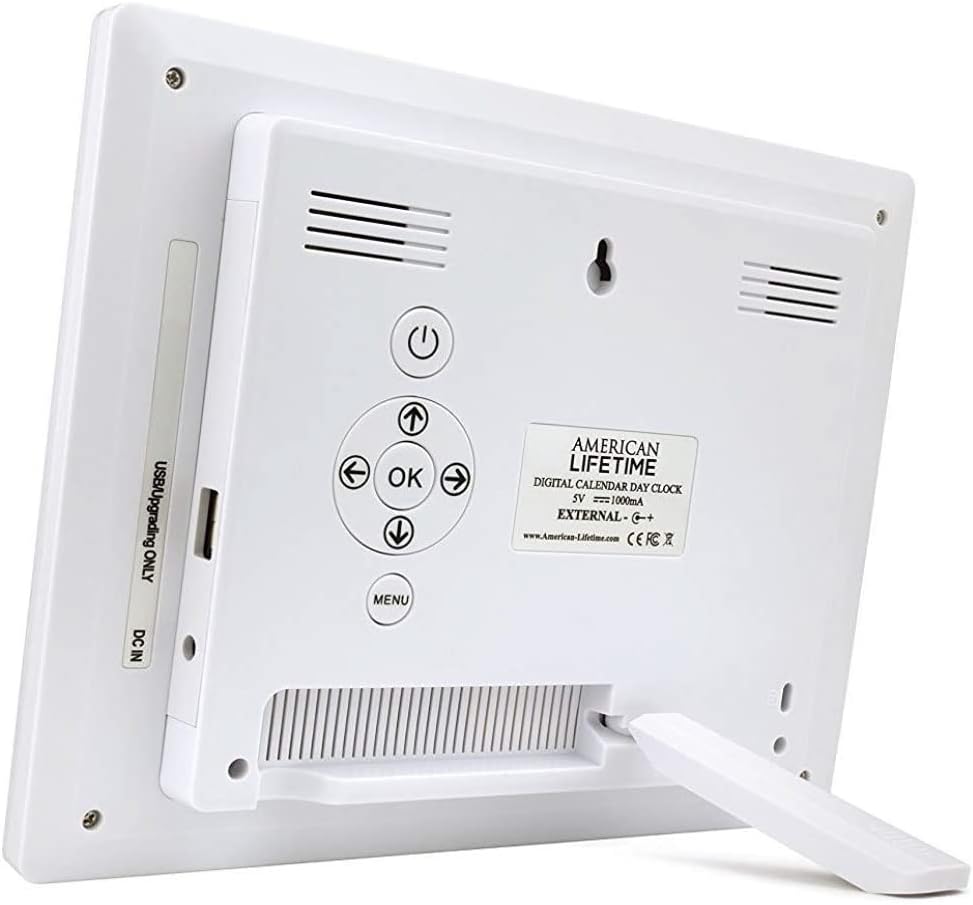
- Coloque o soporte: The clock includes a removable stand that can be inserted into the back for tabletop display. It supports both horizontal and vertical orientations.
- Conectar enerxía: Plug the provided power adapter into the DC IN port on the back of the clock and then into a standard electrical outlet. The clock will automatically power on and display the current time and date.
- Configuración inicial: Use the control buttons on the back of the clock to navigate the menu and set the correct time, date, time mode (12/24 hour), date mode (Month-Day-Year, Day-Month-Year), and language.

Instrucións de funcionamento
Your Digital Day Clock offers several customizable settings to enhance its utility. All adjustments are made using the buttons located on the back of the unit.
Botóns de control:
- Botón de encendido: Activa ou desactiva a pantalla.
- Botón Aceptar: Confirma as seleccións no menú.
- Botóns de frecha (Arriba/Abaixo/Esquerda/Dereita): Navega polas opcións do menú e axusta os valores.
- Botón de menú: Accede ao menú principal de configuración.
Axustar a data e a hora:
- Preme o Menú botón para entrar na configuración.
- Usa o Arriba/Abaixo arrows to select "Set Time" or "Set Date".
- Preme OK to enter the setting. Use Esquerda/Dereita arrows to move between digits/fields and Arriba/Abaixo arrows to change values.
- Preme OK to confirm each change.
Customizing Alarms:
The clock supports up to 5 customizable alarms with messages.
- From the main menu, navigate to "Alarm Time 1" through "Alarm Time 5".
- Preme OK para seleccionar unha alarma.
- Set the alarm time and frequency (e.g., daily, weekdays).
- Choose a pre-set message (e.g., "Time to take medication", "Appointment Reminder") or set a custom message if available.
- Ensure the alarm is set to "On" and press OK para gardar.
Outras opcións:
- Modo de tempo: Switch between 12-hour and 24-hour formats.
- Modo de data: Select your preferred date display format (e.g., Month-Day-Year).
- Idioma: Choose from multiple language options.
- Mostrar período do día: Enable or disable the display of "Morning," "Afternoon," "Evening," or "Night."
- Atenuación automática: Turn this feature on to allow the clock to automatically adjust its brightness.
Mantemento
To ensure the longevity and optimal performance of your Digital Day Clock, follow these simple maintenance guidelines:
- Limpeza: Use a soft, dry cloth to gently wipe the screen and frame. Avoid abrasive cleaners or sprays that could damage the display or finish.
- Colocación: Place the clock on a stable, flat surface or mount it securely on a wall. Avoid direct sunlight or extreme temperatures, which can affect performance and display life.
- Potencia: Empregue sempre o adaptador de corrente orixinal que se inclúe co reloxo.
Resolución de problemas
If you encounter any issues with your American Lifetime Digital Day Clock, refer to the following common problems and solutions:
| Problema | Solución |
|---|---|
| O reloxo non se acende. | Asegúrate de que o adaptador de corrente estea conectado correctamente tanto ao reloxo como a unha toma de corrente que funcione. Proba cunha toma diferente. |
| A pantalla está demasiado escura ou demasiado brillante. | Check the "Auto Dimming" setting in the menu. You can turn it off to manually adjust brightness if needed. |
| A hora ou a data son incorrectas. | Access the "Set Time" and "Set Date" options in the menu to manually correct the settings. |
| Non soan as alarmas. | Verify that the alarm time is correctly set, the alarm is enabled ("On"), and the volume is not muted. |
Especificacións
- Marca: American Lifetime
- Número de modelo: H1-HO1A--JB6HDWLAO4
- Cor: marrón
- Tipo de visualización: Dixital
- Dimensións do produto: 8.5" de ancho x 6.75" de alto
- Fonte de enerxía: Eléctrico con cable
- Material: Plástico
- Tipo de montaxe: Soporte de parede, mesa
- Características especiais: Alarm, Calendar Display, Auto-Dimming, Multi-Language Support, Battery Backup
- Peso do artigo: 15.8 onzas
- UPC: 728044490976
Garantía e Soporte
American Lifetime stands behind its products. Your Digital Day Clock comes with a Garantía limitada do fabricante dun ano. Additionally, you can return the product for free within the first 30 days of purchase, no questions asked.
For any questions, troubleshooting assistance, or warranty claims, please contact American Lifetime customer service. Our team is dedicated to providing support and ensuring your satisfaction.
Visita o American Lifetime Store para obter máis información e recursos de apoio.


