Introdución
Grazas pola compraasing the Trevi RR 501 BT Portable Bluetooth, USB, SD, MP3 Stereo Boombox. This manual provides essential information for the safe and efficient use of your new device. Please read these instructions carefully before operating the unit and retain them for future reference.
Información de seguridade
- Non expoña este aparello á choiva nin á humidade.
- Non bloquee ningunha abertura de ventilación.
- Asegúrese de que o cable de alimentación non estea pisado nin pisado.
- Use só anexos/accesorios especificados polo fabricante.
- Desconecte o aparello durante tormentas eléctricas ou cando non o use durante períodos prolongados.
- Encargue toda a reparación a persoal de servizo cualificado.
- Non abra a unidade casing; non hai pezas no interior que o usuario poida reparar.
Contido do paquete
Comprobe que o seu paquete inclúe os seguintes elementos:
- Trevi RR 501 BT Boombox Unit
- Cable de alimentación de CA.
- Manual de usuario (este documento)
Produto rematadoview
Familiarize yourself with the main components of your Trevi RR 501 BT Boombox.
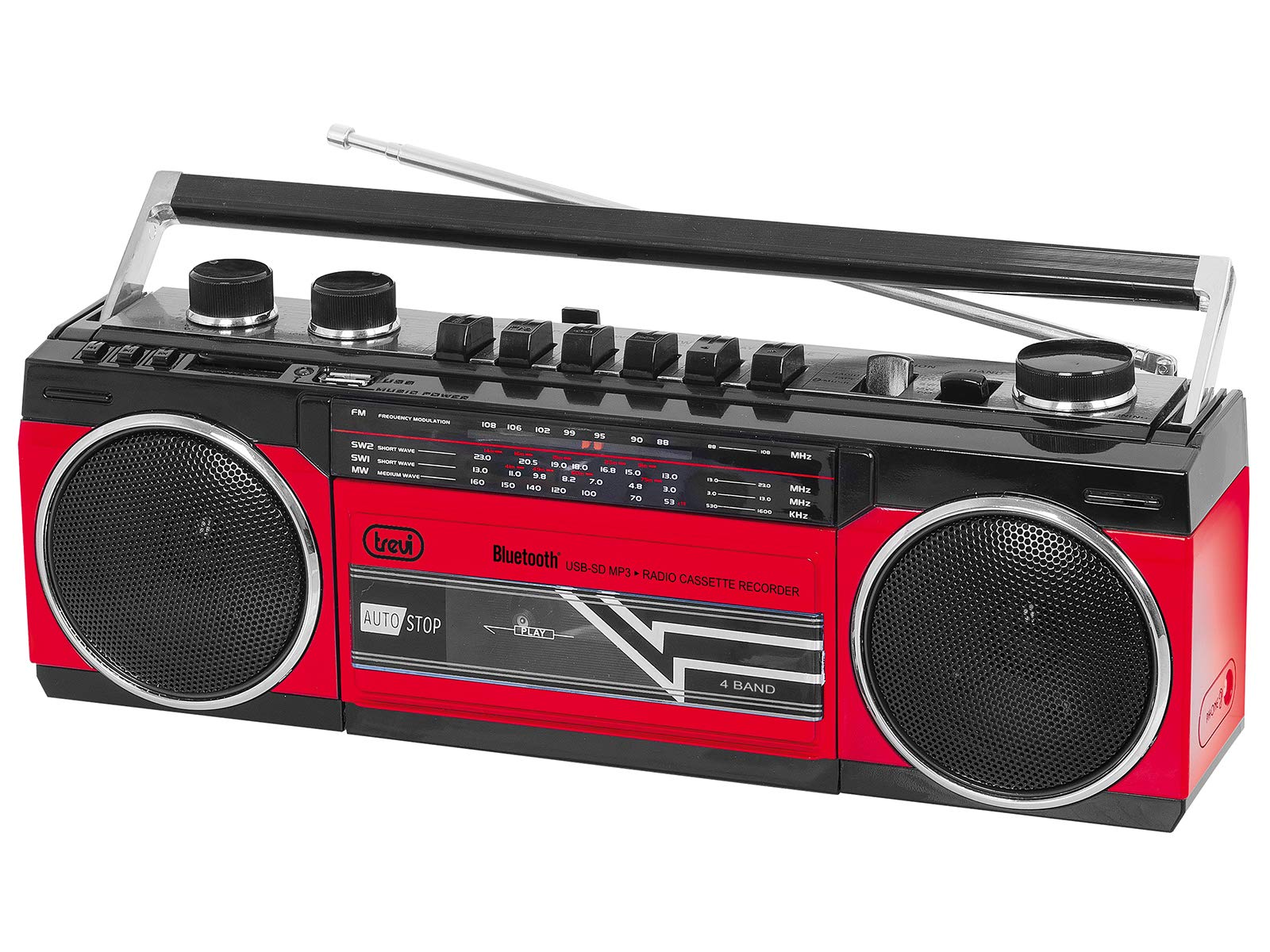
Figura 1: Fronte view of the Trevi RR 501 BT Boombox, showing the dual speakers, control panel, and cassette deck.

Figura 2: En ángulo view of the Trevi RR 501 BT Boombox, highlighting the side profile e manexar.
Compoñentes clave:
- Relatores: Two integrated stereo speakers.
- Panel de control: Buttons for playback, mode selection, and tuning.
- Botón de volume: Axusta o nivel de saída de audio.
- Botón de afinación: For radio frequency selection.
- Selector de modo: Switches between Radio, Bluetooth, USB, SD, and Cassette modes.
- Casete: For playing and recording audio cassettes.
- Porto USB: Para a reprodución desde unha unidade flash USB.
- Ranura para tarxetas SD: Para a reprodución de tarxetas SD.
- Antena: Antena telescópica para recepción de radio FM.
- Entrada de enerxía: Para conectar o cable de alimentación CA.
- Compartimento de batería: (Located on the bottom/rear) For optional battery operation.
Configuración
Conexión de alimentación:
- Potencia CA: Insert the AC power cable into the AC input jack on the back of the unit, then plug the other end into a standard wall outlet.
- Alimentación por batería (opcional): Open the battery compartment cover (usually on the bottom or rear). Insert the required number of D-size batteries (not included), ensuring correct polarity (+/-). Close the compartment cover securely.
Note: When using AC power, batteries are automatically disconnected. Remove batteries if the unit will not be used for an extended period.
Instrucións de funcionamento
Encendido/apagado:
To turn the unit on, rotate the Botón de volume clockwise until you hear a click. To turn off, rotate the Botón de volume counter-clockwise until it clicks off.
Radio Operation (FM):
- Acende a unidade.
- Establece o Selector de modo to "RADIO".
- Estenda a antena telescópica para unha recepción óptima.
- Xire o Botón de axuste to select your desired FM station.
- Axustar o Botón de volume to your preferred listening level.
Conexión Bluetooth:
- Acende a unidade.
- Establece o Selector de modo to "BT" (Bluetooth). The unit will enter pairing mode, indicated by a flashing LED.
- No teu dispositivo con Bluetooth (por exemplo, teléfono intelixente ou tableta), activa Bluetooth e busca os dispositivos dispoñibles.
- Select "Trevi RR 501 BT" from the list of devices.
- Once paired, the LED indicator will stop flashing and remain solid. You can now play audio from your device through the boombox.
Reproducción USB/SD:
- Acende a unidade.
- Insira unha unidade flash USB no Porto USB ou unha tarxeta SD no Ranura para tarxetas SDAsegúrate de que o soporte conteña son MP3. files.
- Establece o Selector de modo to "USB/SD". The unit will automatically begin playing the first compatible audio file.
- Use the playback control buttons (e.g., Play/Pause, Next, Previous) on the unit to manage your audio.
Reproducción de casete:
- Acende a unidade.
- Preme o PARAR/EXPULSIÓN button on the cassette deck to open the cassette compartment.
- Insert an audio cassette with the open edge facing upwards and the tape side facing you. Close the compartment door.
- Establece o Selector de modo to "TAPE".
- Preme o XOGAR botón para iniciar a reprodución.
- Usa o RETROBAR e AVANCE RÁPIDO buttons to navigate the tape.
- Preme PARAR/EXPULSIÓN to stop playback and open the compartment.
Cassette Recording:
- Insert a blank cassette into the cassette deck.
- Select the desired audio source (Radio, Bluetooth, USB, SD) using the Selector de modo.
- Start playback of the source audio.
- Preme o RECORDAR button (usually red) on the cassette deck. The XOGAR o botón tamén se activará. Comezará a gravación.
- Para deixar de gravar, prema o botón PARAR/EXPULSIÓN botón.
Mantemento
- Limpeza: Empregue un pano suave e seco para limpar o exterior da unidade. Non empregue produtos de limpeza abrasivos nin disolventes.
- Coidado da platina de casete: Limpe periodicamente os cabezales da cinta e os rolos de presión cun hisopo de algodón lixeiramente dampcon alcohol isopropílico.
- Almacenamento: When not in use for extended periods, store the unit in a cool, dry place, away from direct sunlight and extreme temperatures. Remove batteries if applicable.
Resolución de problemas
| Problema | Causa posible | Solución |
|---|---|---|
| Sen poder | Cable de alimentación non conectado; Pilas esgotadas ou inseridas incorrectamente. | Comprobe a conexión da corrente alterna; substitúa as pilas ou asegúrese de que a polaridade sexa correcta. |
| Mala recepción de radio | Antena non estendida; sinal débil. | Fully extend the telescopic antenna; Reposition the unit for better signal. |
| Bluetooth non se sincroniza | Unit not in BT mode; Device too far; Already paired with another device. | Ensure mode is set to BT; Move device closer; Disconnect from other devices. |
| Non se reproduce o USB/SD | Modo incorrecto; Incompatible file formato; Medios corrompidos. | Set mode to USB/SD; Ensure files are MP3; Try different USB/SD media. |
| Problemas coa reprodución de casetes | Cassette inserted incorrectly; Tape heads dirty. | Re-insert cassette correctly; Clean tape heads and pinch rollers. |
Especificacións
| Marca | Trevi |
| Número de modelo | 0RR50102 |
| Tecnoloxía de conectividade | Bluetooth, USB |
| Tipo de altofalante | Estéreo |
| Dimensións (L x W x H) | 50 x 50 x 28 centímetros |
| Fonte de enerxía | AC |
| Peso do elemento | 1.25 quilogramos |
| Potencia de saída | 6 vatios |
| Cor | Vermello |
| Estilo | Retro |
Garantía e Soporte
For warranty information and technical support, please refer to the warranty card included with your product or visit the official Trevi website. Information regarding spare parts availability and software updates is not provided in the product specifications.
Conserve o comprobante de compra para calquera reclamación de garantía.


