Introdución
This manual provides comprehensive instructions for the safe and effective use of your Winplus AC55925-80 3-in-1 Emergency Socket Power Bank. This device combines a compact power bank, a USB car charger, and an emergency glass-breaking tool. Please read this manual thoroughly before operation and retain it for future reference.
Produto rematadoview
The Winplus 3-in-1 Emergency Socket Power Bank is designed for convenience and safety, offering multiple functionalities in a compact form factor.

Figure 1: Winplus 3-in-1 Emergency Socket Power Bank with key features highlighted.
Compoñentes:
- Compact Power Bank: Provides portable power for charging devices.
- Cargador de coche USB: Plugs into a 12V car socket to charge devices and the power bank.
- Emergency Glass-Breaking Tool: Integrated for emergency situations.
- Porto de saída USB: For connecting charging cables to devices.
- Porto de entrada micro USB: For charging the internal power bank.
- Indicador LED: Mostra o estado de carga.

Figura 2: detallada view of the device's ports.
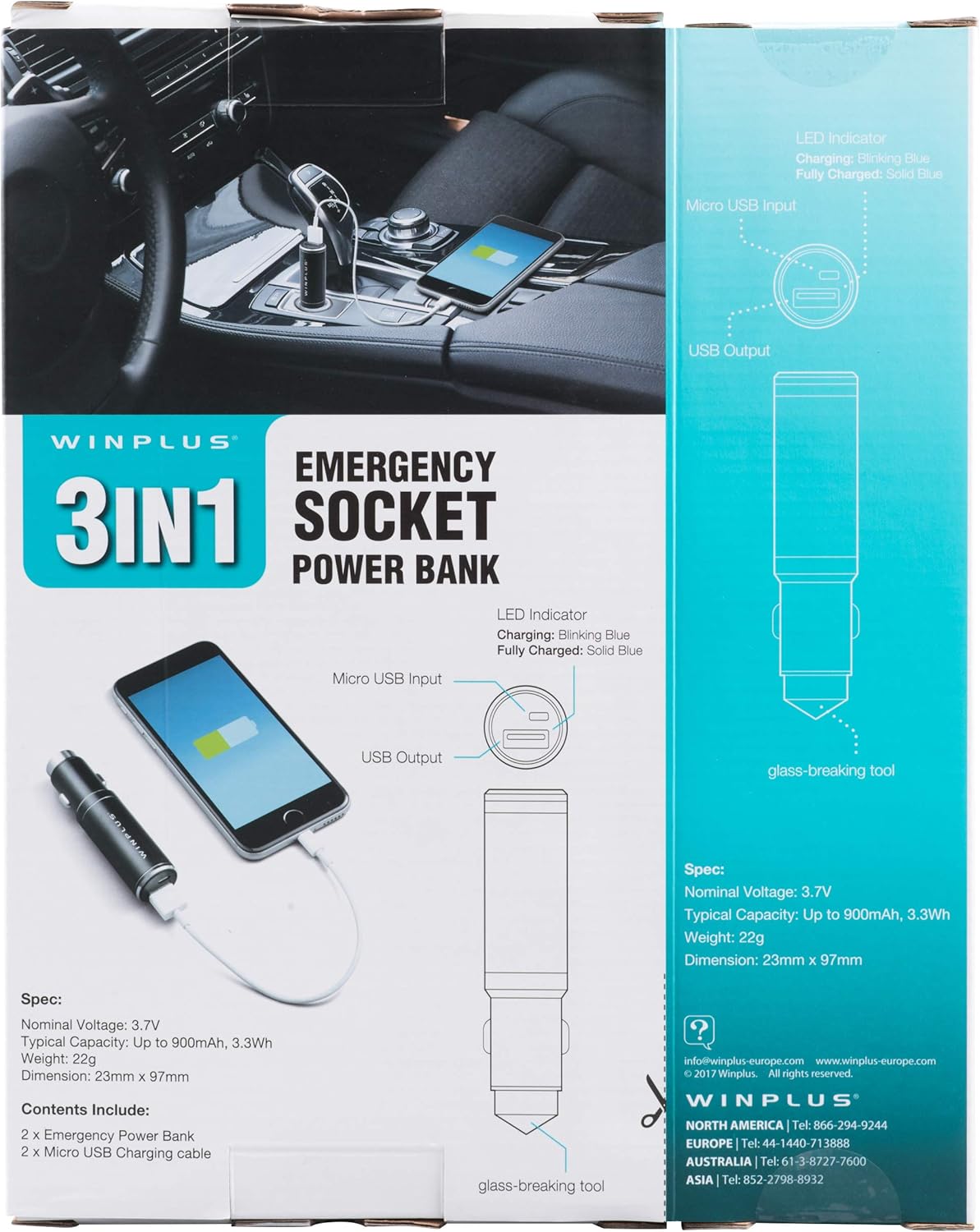
Figure 3: LED indicator status and glass-breaking tool location.
Configuración
Carga inicial do banco de enerxía:
- Locate the Micro USB Input port on the device.
- Connect the provided Micro USB charging cable to the Micro USB Input port.
- Connect the other end of the USB cable to a standard USB power source (e.g., a computer USB port, a wall adapter, or the car's 12V socket when used as a car charger).
- O indicador LED parpadeará en azul durante a carga.
- Once fully charged, the LED indicator will turn solid blue.
Note: It is recommended to fully charge the power bank before its first use.
Instrucións de funcionamento
Usando como banco de enerxía portátil:
- Ensure the power bank is charged (solid blue LED indicator).
- Connect your device's charging cable to the USB Output port on the power bank.
- Connect the other end of the cable to your mobile device (smartphone, tablet, etc.).
- O banco de enerxía comezará a cargar o teu dispositivo automaticamente.
Using as a USB Car Charger:
- Insert the Winplus 3-in-1 device into your vehicle's 12V accessory socket (cigarette lighter socket).
- Connect your device's charging cable to the USB Output port on the Winplus device.
- Conecte o outro extremo do cable ao seu dispositivo móbil.
- Your device will begin charging. The internal power bank will also charge simultaneously if it is not full.
Using the Emergency Glass-Breaking Tool:
The emergency glass-breaking tool is located at the tip of the device, opposite the USB ports. This tool is intended for emergency use only to break vehicle side windows in situations where occupants are trapped.
- In an emergency, firmly press the tip of the tool against a corner of a side window.
- Apply steady pressure until the spring-loaded mechanism activates and shatters the glass.
- Once the glass is broken, carefully clear any remaining shards before exiting the vehicle.
AVISO: Use this tool only in genuine emergencies. Misuse can cause serious injury. Keep out of reach of children.
Mantemento
- Manteña o dispositivo seco. A humidade pode danar os circuítos internos.
- Non expoña a temperaturas extremas (quentes ou frías).
- Limpa o dispositivo cun pano suave e seco. Non empregues produtos químicos agresivos nin produtos de limpeza abrasivos.
- Almacenar nun lugar fresco e seco cando non estea en uso.
- Evite deixar caer ou someter o dispositivo a fortes impactos.
Resolución de problemas
| Problema | Causa posible | Solución |
|---|---|---|
| O dispositivo non se está cargando. | Power bank is depleted. Cable is faulty. USB port is dirty or damaged. | Recarga o banco de enerxía. Proba cun cable de carga diferente. Clean the USB ports carefully or try another port. |
| O indicador LED non se acende. | Device is not connected to a power source. Device is fully charged (if solid blue). O dispositivo está defectuoso. | Ensure proper connection to a power source. Check if it's already solid blue. Póñase en contacto co servizo de atención ao cliente se os problemas persisten. |
| Carga lenta. | Cable is not suitable. Power source is low current. Device being charged has high power requirements. | Use a high-quality charging cable. Connect to a higher current USB adapter. This device provides 2.1A output, which is standard for fast charging most phones. |
Especificacións
- Modelo: AC55925-80
- Vol. Nominaltage: 3.6 V
- Capacidade típica: Up to 2500 mAh, 9 Wh
- Composición da pila da batería: Polímero de litio
- Saída USB: 5V/2.1A
- Entrada de micro USB: 5V/0.5A
- Dimensións: 23mm x 127mm (approximate)
- Peso do artigo: 510 g (para o paquete de 2)
- Tipo de conector: Micro USB (Input), USB Type-A (Output)
Información de seguridade
- Non desmonte, abra nin triture a batería.
- Non expoña a batería a calor ou lume. Evite o almacenamento á luz solar directa.
- Non cortocircuite unha batería. Non garde os paquetes de baterías ao azar nunha caixa ou caixón onde poidan producirse curtocircuítos entre si ou por outros obxectos metálicos.
- Non someta as baterías a golpes mecánicos.
- En caso de fuga dunha batería, non permita que o líquido entre en contacto coa pel ou os ollos. En caso de contacto, lave a zona afectada con abundante auga e consulte un médico.
- Non utilice ningún cargador que non sexa o especificamente proporcionado para o seu uso co equipo.
- Manteña as baterías fóra do alcance dos nenos.
- Busque atención médica inmediatamente se se tragou unha batería.
- Compre sempre a batería correcta para o equipo.
- Manteña as baterías limpas e secas.
- Non deixe unha batería con carga prolongada cando non estea en uso.
- Desfágase das baterías correctamente segundo a normativa local.
Garantía e Soporte
For warranty information or technical support, please contact Winplus North America Inc. directly.
- Fabricante: Winplus North America Inc
- Información de contacto: Refer to product packaging or the official Winplus websitio para obter os detalles de soporte máis actuais.
You can also visit the Winplus websitio para preguntas frecuentes e información adicional sobre o produto: www.winplus-europe.com


