1. Introdución
This manual provides comprehensive instructions for the setup, operation, and maintenance of your Galaxy Audio PA6BT Powered Hot Spot Monitor Speaker with Bluetooth. Please read this manual thoroughly before using the device to ensure proper functionality and to prevent damage.
The Galaxy Audio PA6BT is a 6-inch, 170-watt, 2-way powered monitor speaker designed for various audio applications, featuring integrated Bluetooth connectivity for wireless audio streaming.

Figura 1: Fronte angulada view of the Galaxy Audio PA6BT monitor, highlighting its compact design and the integrated control panel.
2. Instrucións de seguridade importantes
- Le estas instrucións.
- Conserve estas instrucións.
- Presta atención a todas as advertencias.
- Siga todas as instrucións.
- Non use este aparello preto da auga.
- Limpar só cun pano seco.
- Non bloquee ningunha abertura de ventilación. Instáleo segundo as instrucións do fabricante.
- Non instale preto de fontes de calor como radiadores, rexistros de calor, cociñas ou outros aparellos (incluíndo amplificadores) que producen calor.
- Non derogue o propósito de seguridade do enchufe polarizado ou con conexión a terra. Un enchufe polarizado ten dúas láminas, unha máis ancha que a outra. Un enchufe con conexión a terra ten dúas láminas e unha terceira punta de conexión a terra. A folla ancha ou a terceira punta son proporcionadas para a súa seguridade. Se o enchufe proporcionado non encaixa na súa toma de corrente, consulte a un electricista para a substitución da toma obsoleta.
- Protexa o cable de alimentación para evitar que se pise ou se pinche, especialmente nos enchufes, tomas de corrente e no punto de saída do aparello.
- Use só anexos/accesorios especificados polo fabricante.
- Use só co carro, soporte, trípode, soporte ou mesa especificados polo fabricante ou vendidos co aparello. Cando se use un carro, teña coidado ao mover a combinación de carro/aparato para evitar feridas por envorco.
- Desenchufe este aparello durante tormentas eléctricas ou cando non se use durante longos períodos de tempo.
- Encargue toda a reparación a persoal de servizo cualificado. O mantemento é necesario cando o aparello resultou danado dalgún xeito, como o cable de alimentación ou o enchufe está danado, se derrama líquido ou caen obxectos no aparello, o aparello estivo exposto á choiva ou á humidade, non funciona normalmente. , ou foi abandonado.
- AVISO: To reduce the risk of fire or electric shock, do not expose this apparatus to rain or moisture. Do not open the unit; there are no user-serviceable parts inside.
3. Características clave
- Potencia de saída: 170 Watts for robust sound delivery.
- Resposta en frecuencia: 80Hz - 18kHz for a wide audio spectrum.
- Sistema de altofalantes bidireccionais: Features a 6.5" Neodymium High Power Woofer and a 1.5" High Efficiency Tweeter.
- Canles dobres: Two independent input channels with individual volume controls.
- Entradas versátiles: Channel 1 offers XLR and 1/4" inputs. Channel 2 offers XLR, 1/4", and an additional 1/8" line input.
- Conectividade Bluetooth: Integrated Bluetooth technology with its own volume control for wireless audio streaming.
- XLR Pass-Through: Allows independent control of microphones without affecting the signal sent to a main PA system.
- -20dB Pad Switch: On each XLR input to accommodate high-level signals without distortion.
- EQ de 3 bandas: Adjustable Low, Mid, and High frequency controls for sound shaping.
- Compressor/Limiter: Built-in 18dB circuit with Compressor and Clip LEDs to smooth transient peaks and protect speakers.
- Opcións de montaxe: Designed for mounting on most mic stands, includes an MSA-1 stand adaptor.
4. Contido do paquete
Ao desembalar, comproba o contido do paquete para asegurarte de que estean presentes todos os elementos:
- Galaxy Audio PA6BT Powered Hot Spot Monitor Speaker
- MSA-1 Stand Adaptor
- Cable de alimentación IEC
- Manual de usuario (este documento)
5. Controis e conexións
5.1 Controis do panel frontal

Figura 2: Fronte view of the Galaxy Audio PA6BT monitor, showing the speaker grille, tweeter, and control panel with knobs and LEDs.
- LED PWR: Acende cando a unidade está acendida.
- LOW, MID, HI Knobs: 3-band equalizer controls to adjust bass, midrange, and treble frequencies.
- LED CLIP: Indicates when the input signal is too high, potentially causing distortion. Reduce input volume if this LED illuminates frequently.
- COMP LED: Indicates when the built-in compressor/limiter circuit is active, smoothing out transient peaks.
- CHAN 1 Knob: Volume control for Channel 1 input.
- CHAN 2 Knob: Volume control for Channel 2 input.
- BT VOL Knob: Volume control for the Bluetooth audio input.
5.2 Conexións do panel traseiro
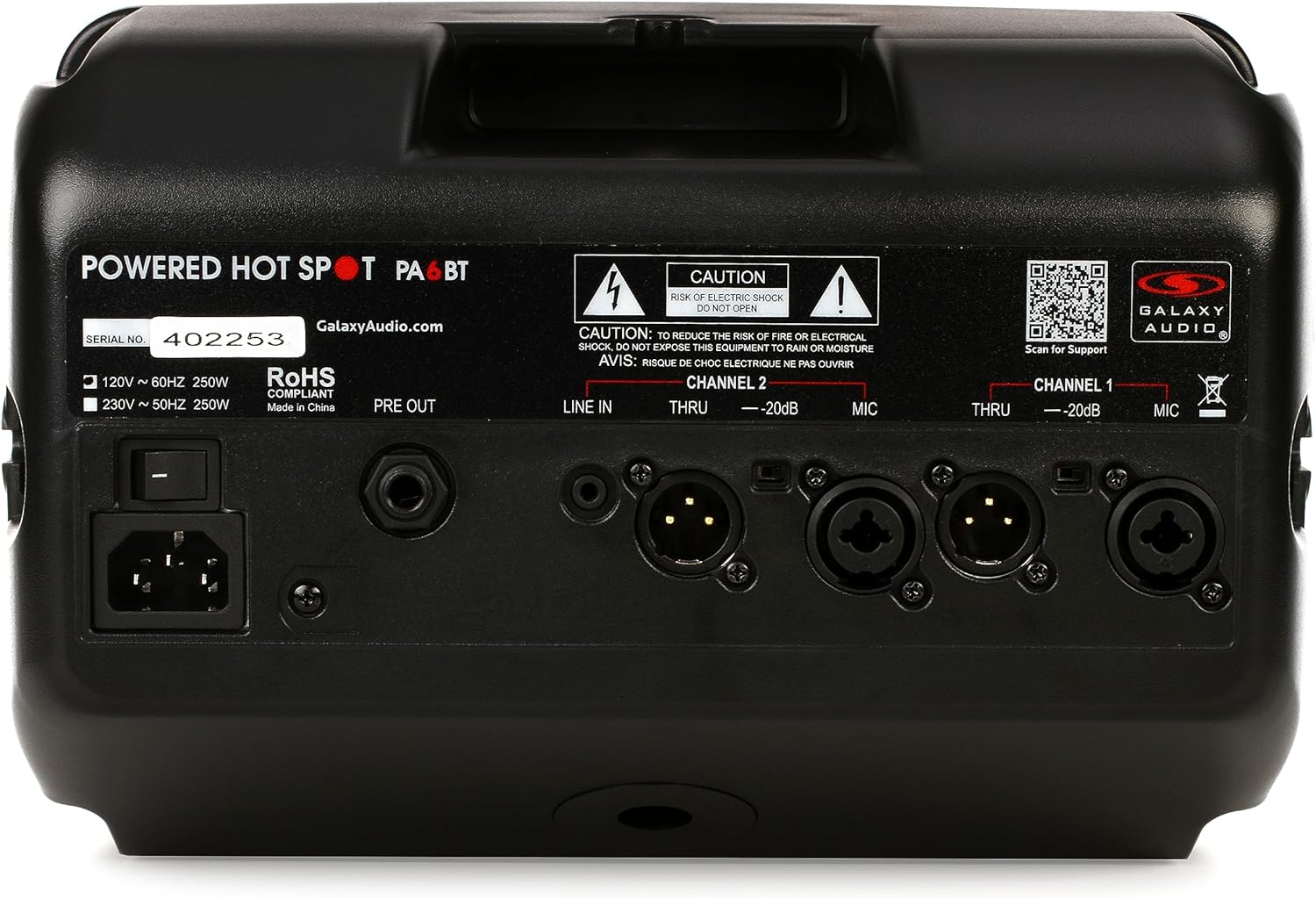
Figura 3: Traseira view of the Galaxy Audio PA6BT monitor, displaying the power input, serial number, and various audio input/output connections for Channel 1 and Channel 2.
- Interruptor de alimentación: Acende ou apaga a unidade.
- IEC Power Inlet: Connects the included IEC power cable to an AC power source.
- PRE OUT: Line-level output for sending the mixed signal to another powered speaker or a main PA system.
- Channel 2 Inputs:
- LINE IN (1/8"): Stereo or mono input for connecting devices like MP3 players, smartphones, or laptops.
- THRU (XLR): XLR pass-through for Channel 2, allowing the input signal to be sent to another device without processing.
- -20dB Pad (Switch): Reduces the input sensitivity by 20dB for high-level signals.
- MIC (XLR/1/4" Combo): Combo jack for connecting microphones (XLR) or line-level instruments (1/4").
- Channel 1 Inputs:
- THRU (XLR): XLR pass-through for Channel 1.
- -20dB Pad (Switch): Reduces the input sensitivity by 20dB for high-level signals.
- MIC (XLR/1/4" Combo): Combo jack for connecting microphones (XLR) or line-level instruments (1/4").
6. Guía de configuración
- Desempaquetar a unidade: Carefully remove the PA6BT from its packaging and inspect for any signs of damage.
- Colocación:
- For personal monitoring, mount the PA6BT onto a standard microphone stand using the included MSA-1 stand adaptor. Ensure the stand is stable.
- Alternatively, place the unit on a stable, flat surface such as a table or stage chan.
- Configuración de control inicial: Before connecting power, ensure all volume knobs (CHAN 1, CHAN 2, BT VOL) are turned completely counter-clockwise (minimum). Set the LOW, MID, and HI EQ knobs to their center (flat) positions.
- Conexión de alimentación: Connect the supplied IEC power cable to the IEC inlet on the rear panel of the PA6BT, then plug the other end into a suitable AC power outlet.
- Encendido: Flip the Power Switch on the rear panel to the "ON" position. The PWR LED on the front panel should illuminate.
7. Instrucións de funcionamento
7.1 Conexión de fontes de son
- Microphones/Instruments (XLR/1/4" Combo Jacks):
- Connect your microphone or instrument to either the Channel 1 or Channel 2 MIC input.
- If using a high-output source, engage the -20dB Pad switch for that channel to prevent input clipping.
- Slowly increase the corresponding CHAN 1 or CHAN 2 volume knob until the desired level is reached. Monitor the CLIP LED; if it flashes frequently, reduce the input volume or engage the -20dB pad.
- Line-Level Devices (1/8" LINE IN - Channel 2 only):
- Connect your smartphone, tablet, or other line-level audio device to the 1/8" LINE IN jack on Channel 2.
- Adjust the BT VOL knob to control the volume of this input.
7.2 Bluetooth Pairing and Operation
- Ensure the PA6BT is powered on.
- Activate Bluetooth on your audio device (e.g., smartphone, tablet).
- Busca available Bluetooth devices. The PA6BT should appear as "Galaxy Audio PA6BT".
- Select "Galaxy Audio PA6BT" to pair. A confirmation tone may sound from the speaker.
- Once paired, play audio from your device. Adjust the BT VOL knob on the PA6BT to control the playback volume.
7.3 Using the Equalizer (EQ)
The LOW, MID, and HI knobs allow you to tailor the sound to your preference or acoustic environment:
- BAIXO: Adjusts the bass frequencies. Turn clockwise to boost bass, counter-clockwise to cut.
- MID: Adjusts the midrange frequencies. Turn clockwise to boost mids, counter-clockwise to cut. This is often used to enhance vocal clarity.
- Ola: Adjusts the treble frequencies. Turn clockwise to boost highs, counter-clockwise to cut.
7.4 Compressor/Limiter
The PA6BT features a built-in 18dB compressor/limiter. This circuit automatically reduces the dynamic range of the audio signal, preventing sudden loud peaks from distorting the sound and protecting the speakers from damage. The COMP LED illuminates when the compressor/limiter is active.
7.5 XLR Pass-Through (THRU)
The XLR THRU outputs on both channels allow you to send the unprocessed input signal from that channel to another device, such as a main mixing console or another powered speaker. This is useful for creating a separate monitor mix without affecting the main house sound.
8. Mantemento
- Limpeza: Use a soft, dry cloth to clean the exterior of the unit. Do not use liquid cleaners or solvents, as they may damage the finish or internal components.
- Almacenamento: When not in use for extended periods, store the PA6BT in a cool, dry place, away from direct sunlight and extreme temperatures.
- Ventilación: Asegúrese de que as aberturas de ventilación non estean bloqueadas para evitar o sobrequecemento.
- Servizo: Refer all servicing to qualified service personnel. Do not attempt to open the unit or perform repairs yourself.
9 Solución de problemas
| Problema | Causa posible | Solución |
|---|---|---|
| No power (PWR LED off) | Cable de alimentación non conectado; interruptor de alimentación apagado; toma de corrente avariada. | Ensure power cable is securely connected. Turn power switch ON. Test power outlet with another device. |
| Sen saída de son | Volume knobs too low; Input source not connected or muted; Incorrect input selected; Faulty cable. | Increase CHAN 1, CHAN 2, or BT VOL. Check input source connection and volume. Ensure correct input is used. Test with a different cable. |
| Distorted sound / CLIP LED flashing | Input signal too high; EQ settings extreme. | Reduce the volume of the input source. Engage the -20dB Pad switch for the affected channel. Adjust EQ knobs to a more neutral position. |
| Bluetooth non se sincroniza | PA6BT not in pairing mode; Device too far; Interference; Previously paired with another device. | Ensure PA6BT is powered on. Move device closer. Turn off other Bluetooth devices. Forget PA6BT from your device's Bluetooth list and try pairing again. |
| Retroalimentación (son aullante) | Microphone too close to speaker; Microphone gain too high; Speaker pointed directly at microphone. | Reposition the microphone and speaker. Reduce microphone gain. Adjust EQ settings (especially MID/HI). |
10. Especificacións

Figure 4: Diagram showing the dimensions of the Galaxy Audio PA6BT monitor: 12 inches deep, 7 inches wide, and 12 inches high.
| Característica | Detalle |
|---|---|
| Modelo | PA6BT |
| Potencia de saída | 170 vatios |
| Resposta en frecuencia | 80 Hz - 18 kHz |
| Tipo de altofalante | 2-Way: 6.5" Neodymium Woofer, 1.5" Tweeter |
| Entradas | Channel 1: XLR/1/4" Combo; Channel 2: XLR/1/4" Combo, 1/8" Line In |
| Saídas | PRE OUT (Line Level), XLR THRU (Channel 1 & 2) |
| Conectividade sen fíos | Bluetooth |
| Igualación | 3 bandas (baixas, medias, altas) |
| Dynamic Processing | Built-in 18dB Compressor/Limiter |
| Dimensións (H x W x D) | 12" x 7" x 12" (aproximadamente) |
| Peso do elemento | 8.21 libras |
| Compoñentes incluídos | MSA-1 stand adaptor, IEC power cable |
| Fonte de enerxía | Eléctrico con cable |
| Cor | Negro |
11. Garantía e soporte
11.1 Garantía limitada
The Galaxy Audio PA6BT is covered by a limited warranty. For specific terms, conditions, and duration of the warranty, please refer to the warranty card included with your product or visit the official Galaxy Audio websitio. Garda o comprobante de compra para reclamacións de garantía.
11.2 Atención ao cliente
For technical assistance, troubleshooting beyond this manual, or service inquiries, please contact Galaxy Audio customer support. You can find contact information and additional resources on the official Galaxy Audio websitio: