Produto rematadoview
The Extech MG320 is a versatile instrument combining a portable 20GΩ/1000V insulation tester with a True RMS multimeter. It is designed for professionals needing to perform insulation resistance measurements and general electrical troubleshooting.
Key features include Polarization Index (PI) and Dielectric Absorption Ratio (DAR) modes, a programmable timer for test duration, and a comparator function for setting custom pass/fail criteria. The device offers 5 test voltage ranges and includes high voltage and overload indication for safety. It is rated CAT IV 600V for enhanced safety.
The MG320 allows for manual storage and recall of up to 99 readings, making it suitable for field use where data logging is required. It comes complete with test leads, an alligator clip, 6 AA batteries, and a soft carrying case.

Figura 1: Fronte view of the Extech MG320 Insulation Tester, showing the display, function dial, and input terminals.
Información de seguridade
Always adhere to local and national safety codes. Use personal protective equipment (PPE) as required. Ensure the device is in good working condition before use. Do not attempt to measure voltagou correntes que superan as clasificacións máximas especificadas.
- CAT IV 600V Safety Rating: This instrument is designed for measurements at the source of the low-voltage instalación, como contadores de electricidade e dispositivos de protección primaria contra sobreintensidade.
- Inspect test leads for damage before each use.
- Non poña en funcionamento o medidor se parece estar danado ou se a caixa está aberta.
- Always disconnect power to the circuit under test before making connections for resistance or continuity measurements.
- Teña en conta o alto voltage during insulation tests.
Configuración
Instalación de baterías
The Extech MG320 requires 6 AA batteries for operation. To install or replace batteries:
- Asegúrese de que o medidor estea APAGADO.
- Localice o compartimento da batería na parte traseira da unidade.
- Use un desaparafusador para abrir a tapa do compartimento da batería.
- Insert 6 AA batteries, observing correct polarity (+/-).
- Coloque a tapa do compartimento da batería e fíxaa co parafuso.
Conexión de puntas de proba
Connect the red test lead to the VΩ input terminal and the black test lead to the COM input terminal for most measurements. For insulation tests, connect the red lead to the V INSULATION terminal and the black lead to the EARTH terminal.
Instrucións de funcionamento
Medición de resistencia de illamento
The MG320 offers 5 test voltage ranges for insulation resistance. Always ensure the circuit under test is de-energized before performing insulation tests.
- Turn the rotary switch to one of the INSULATION TEST voltage ranges (50V, 100V, 250V, 500V, 1000V).
- Connect the test leads to the circuit or component to be tested.
- Preme o PROBA button to initiate the insulation test. The display will show the resistance value.
- Soltar o PROBA button to stop the test.
True RMS Multimeter Functions
The MG320 also functions as a True RMS multimeter for various electrical measurements.
- VoltagMedición (CA/CC): Turn the rotary switch to the V~ (AC) or V- (DC) position. Connect test leads in parallel with the circuit.
- Medición da resistencia (Ω): Turn the rotary switch to the Ω position. Ensure the circuit is de-energized. Connect test leads across the component.
- Proba de continuidade: Turn the rotary switch to the continuity position. A built-in buzzer will sound if continuity is detected.
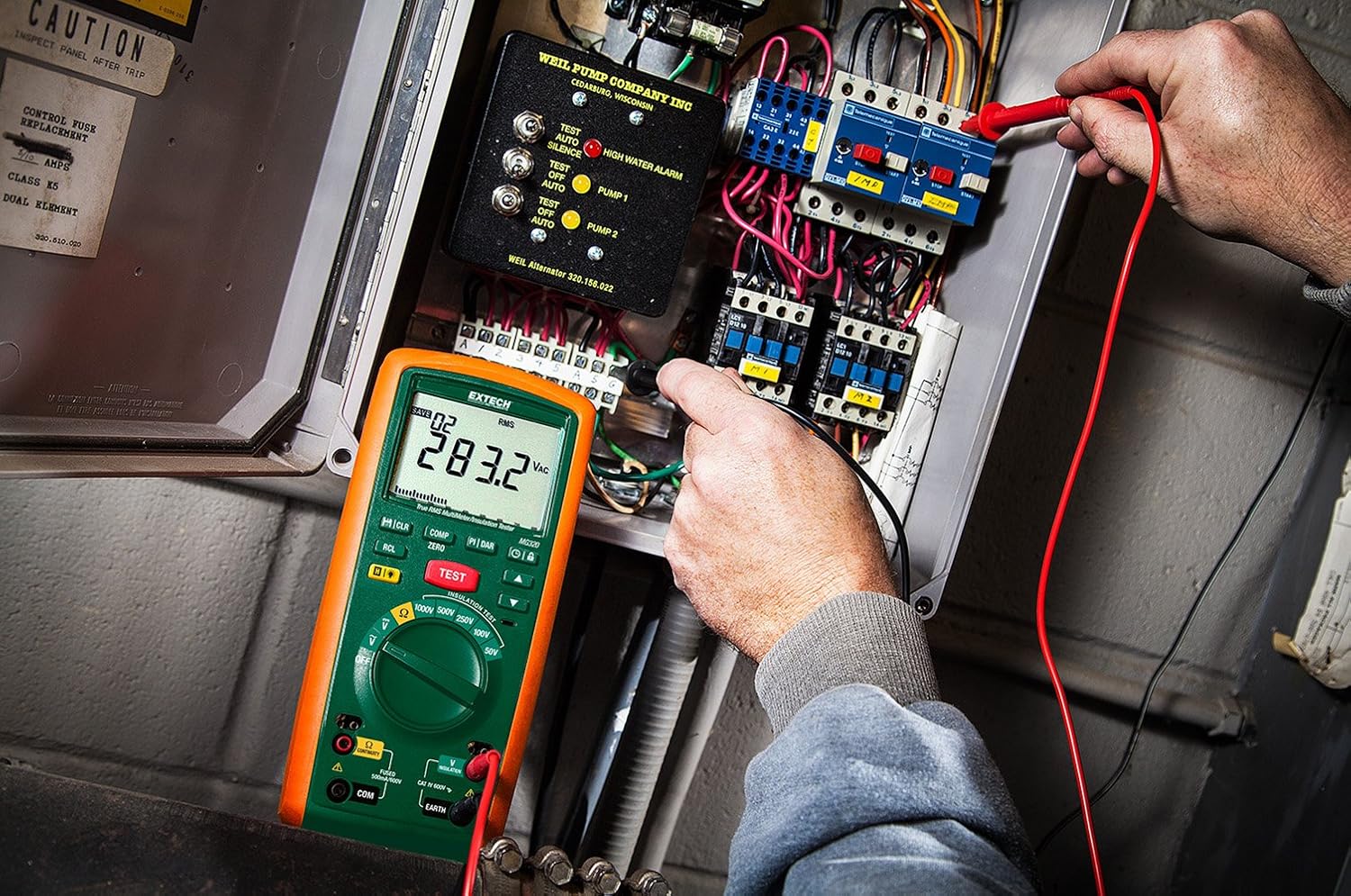
Figure 2: An electrician using the Extech MG320 to perform measurements within an electrical panel, demonstrating its application in industrial settings.

Figure 3: A technician conducting tests on industrial piping using the Extech MG320, highlighting its use in maintenance and troubleshooting.
Mantemento
Limpeza
Wipe the meter with a dry, clean cloth. Do not use abrasives or solvents. Keep the display clean for optimal readability.
Substitución da batería
Replace batteries when the low battery indicator appears on the display to ensure accurate measurements. Refer to the "Battery Installation" section under Setup for detailed instructions.
Almacenamento
Se o medidor non se usa durante un período prolongado, retire as pilas para evitar fugas e danos. Garde o dispositivo nun lugar fresco e seco, lonxe da luz solar directa e de temperaturas extremas.
Resolución de problemas
| Problema | Causa posible | Solución |
|---|---|---|
| O medidor non se acende. | Baterías gastadas ou instaladas incorrectamente. | Comprobe a polaridade das baterías; substitúa as baterías. |
| Lecturas inexactas. | Low battery, incorrect function selected, damaged test leads. | Replace batteries, verify function setting, inspect and replace test leads if damaged. |
| "OL" or Overload displayed. | A medición supera o rango do medidor. | Select a higher range or ensure the measurement is within the meter’s capabilities. |
Especificacións
| Especificación | Detalle |
|---|---|
| Marca | Extech |
| Modelo | MG320 |
| Rango de resistencia de illamento | Up to 20 GΩ |
| Test Voltages | 50 V, 100 V, 250 V, 500 V, 1000 V |
| Tipo de multímetro | RMS verdadeiro |
| Valoración de seguridade | CAT IV 600 V |
| Fonte de enerxía | 6 pilas AA (incluídas) |
| Peso do elemento | 1.2 libras (aprox. 0.54 kg) |
| Dimensións (L x W x H) | 4 x 9 x 2.5 polgadas (aprox. 10.16 x 22.86 x 6.35 cm) |
| Compoñentes incluídos | Test leads, alligator clip, 6 AA batteries, soft case |
Garantía e Soporte
For warranty information and technical support, please refer to the official Extech website or contact Extech customer service directly. Keep your purchase receipt as proof of purchase for warranty claims.
Extech Contact Information:
- Websitio: www.extech.com
- Soporte: Consulte o website for regional support contacts.


